# Welcome to Hats Protocol

Save time, automate onboarding, and manage permissions across the internet with programmable onchain roles

## Organizations work better with Hats

Hats turns organizations into a digital object, ready to be programmed. All of the properties of your organization and its individual roles and permissions can now be automated, just like any other software system.

At Hats Protocol, we are building public infrastructure for the next era of humanity. Here's an overview of what Hats is and how it works.

#### **Quick links:**

* [Website](https://hatsprotocol.xyz/)
* [Use cases & case studies](https://www.hatsprotocol.xyz/case-studies)
* [App](https://app.hatsprotocol.xyz/)
* [Foundational vision post](https://blog.hatsprotocol.xyz/organizational-graphs)
* [Blog](https://blog.hatsprotocol.xyz/)
* [Join the Hats Community & protoDAO](https://community.hatsprotocol.xyz/)

## What is Hats?

Hats is a full-stack solution for organizing onchain. Create your roles onchain to streamline permission management and introduce real accountability for your contributors.

[**Roles**](/using-hats/what-hats-do-i-need) — which we call “hats” — are rich objects that conform to the ERC-1155 standard and that bundle responsibilities, permissions, and incentives. They are represented as tokens, which are held by [**agents**](/using-hats/adding-wearers) (Ethereum accounts). Because of the flexibility of accounts in the EVM, they can easily be controlled by individuals, groups, DAOs, smart accounts, or AI agents, with any decision-making structure you can think of onchain.

<figure><img src="https://lh7-us.googleusercontent.com/XmvualHMUh27UvgJ3EVo2aHeag1aSn4tkmyZdmJ2q3iQjr-Ic_VsfGrIdWIJShTAVH6n9b41nMA9GSg5PK6uJJnIzVB53opG1tnClXK5mCxLCMtRdRCmEMDRyno2nUP9l_crFbKwCV6Ckk2oE0wWRxk" alt=""><figcaption></figcaption></figure>

The connections between the nodes of an organizational structure are the admin and accountability relationships between roles. [**Admins**](/using-hats/admins-creating-issuing-and-revising-hats) get certain in-protocol permissions, like being able to create new roles, select which agents will get each role, and modify the permissions delegated to a role so the agent can accomplish its responsibilities.

[**Accountability relationships**](/using-hats/eligibility-requirements-for-wearers) make it possible for any agent in the organization to hold the responsibility for evaluating and aligning another agent’s performance. They can revoke hats that are misused or no longer needed.&#x20;

In Hats Protocol, all of these interfaces are extensible by developers. Organizations can easily automate the granting and revoking of roles, admin relationships, and accountability using any criteria or logic. Hats ecosystem developers have already created over 15 automations that organizations can plug into their graphs without writing any code.

Of course, it is the [**permissions**](/hats-integrations/permissions-and-authorities) delegated to a hat that make it powerful. Specifically, we’ve seen that there are a few categories of permissions that are particularly important for organizational operations:

* Control of funds, operational budgets, and compensations streams&#x20;
* Ownership or voting power in domain-specific decisions
* Access to data, communication channels, and workspaces
* Ability to modify, publish, and execute code
* Identity that you can use to represent the organization in other contexts

<figure><img src="https://lh7-us.googleusercontent.com/4mAlQnmGQpwf4tN2s4lUvHZxP3FhYL0IY2F_9c6xsCQA3zq-aQWGWEO7UUAxtr_YZSeK4R8_XY0JAlWhQZvuJx7zVdo1ygRCtIim9HB0ThUdhLivIKPA-TT59MG8LnQWJoPuUVZE-nYQNSLMfjvCSvU" alt=""><figcaption><p>RareDAO is bringing its organizational graph onchain to create committees with accountability increase the efficiency of council transitions. <a href="https://www.hatsprotocol.xyz/case-studies">See this and other case studies here.</a></p></figcaption></figure>

Organizational efficiency is a function of pushing both decision-making and execution as close to the edges of the organization as possible. Hats enables this for onchain organizations, making it possible to get things done even with a widely distributed set of owners and stakeholders.

## How Does Hats Work?

Hats are programmable, revocable, and legible roles, which can be collectively controlled by the wearer of the "Top Hat", which could be an individual or a group, such as an organization. Hat-based roles can be flexibly imbued with responsibilities, authorities, accountabilities, context, and more.

Hats are represented onchain by tokens that conform to the ERC-1155 standard. They are connected together in a tree structure (aka a "Hats tree") to create flexible organizational structures that are controlled by an organization or its designees, which can then be visualized in any Hats front-end.

Hats tokens can be held by any address including an EOA, multisig, or contract. When an address has a balance of 1 of a given Hats token, it is considered a "wearer" of that "hat". Then, by way of various integrations and token-gates, that address is granted the [authorities](/using-hats/connecting-hats-w-permissions-and-authorities) that have been associated with that hat.

Each hat can have any number of wearers up to the hat’s max supply. Hats are granted and revoked by the organization, or agents/smart contracts that are designated by the org. Wearers can renounce a hat, but they cannot transfer it.

## Create Your Organizational Structure with Hats Protocol

The [Using the Hats App](/using-hats/essentials-for-hat-wearers) section of these docs is devoted to documentation for Hats usage and setup by hat wearers, governance facilitators, and operations managers.&#x20;

In these pages, we emphasize the usage of the first front-end built by Haberdasher Labs for this purpose, but recognize that there will be many apps that are able to interact with Hats Protocol in our open-source ecosystem.

{% content-ref url="/pages/Ouc2LTkqI8jkl8mozmDV" %}
[Getting Started with Hats](/getting-started-with-hats)
{% endcontent-ref %}

## Developer Documentation

If you're a developer looking for more technical documentation, including contract functions, SDK details, subgraph information, and integration help, please jump directly to the [For Developers](/for-developers/hats-protocol-for-developers) section of these docs:

{% content-ref url="/pages/anNlc0gZQxrGchF0HIiV" %}
[Hats Protocol, for Developers](/for-developers/hats-protocol-for-developers)
{% endcontent-ref %}


# Getting Started with Hats

Hold on to your hats and let's jump in!

![](https://hackmd.io/_uploads/SyR9M0QH3.jpg)

You can get started with Hats in one of two ways.&#x20;

**1. Create individual Hats for specific roles & permissions:** First, you could start small, creating a single hat that provides its wearers with all the [permissions](/hats-integrations/permissions-and-authorities) they need to contribute to the group (for example, you could create a Community Member Hat that is worn by all community members to give them the authorities they need to access and contribute to the community's workspaces).

**2. Create a Hats tree as the foundation of your organizational graph:** Or, you can begin with the end in mind, creating a fully-fleshed out Hats tree for your organization to provide the role clarity, access control, and accountability mechanisms it needs to thrive.

Wherever you begin, the docs found here will walk you through it, or watch this short video for a quick tutorial of the [Hats App](https://app.hatsprotocol.xyz):&#x20;

{% embed url="<https://www.loom.com/share/c857633cb5f84f33b5226428095239c3?sid=f6edfb04-7e4b-4a13-8666-b058eaeff7d4>" %}
Getting started with the Hats app
{% endembed %}

{% content-ref url="/pages/7Q11hzkjNoZiAnXJHDIC" %}
[Creating My First Hat](/using-hats/creating-my-first-hat)
{% endcontent-ref %}

{% content-ref url="/pages/1SwlusSBllvvTOD9PXEc" %}
[Admins: Creating, Issuing, and Revising Hats](/using-hats/admins-creating-issuing-and-revising-hats)
{% endcontent-ref %}

{% content-ref url="/pages/y6cYtqqFuY1eSqCMw185" %}
[What Hats Do I Need?](/using-hats/what-hats-do-i-need)
{% endcontent-ref %}

{% content-ref url="/pages/U69YuLhm0r26omK1APCf" %}
[Drafting, Exporting, and Deploying Tree Changes](/using-hats/drafting-exporting-and-deploying-tree-changes)
{% endcontent-ref %}

{% content-ref url="/pages/oUXpjvVn2lTekGToRsXR" %}
[Setting a Hat's Basic Properties](/using-hats/setting-a-hats-basic-properties)
{% endcontent-ref %}

{% content-ref url="/pages/BbW9A3oGNc1SHgCQnl9O" %}
[Adding Wearers](/using-hats/adding-wearers)
{% endcontent-ref %}

{% content-ref url="/pages/LywtFjKPRFPhbr9nFeCz" %}
[Connecting Hats w/ Permissions & Authorities](/using-hats/connecting-hats-w-permissions-and-authorities)
{% endcontent-ref %}

{% content-ref url="/pages/z9y52JZRxAFUKUZzBWVS" %}
[Revocation & Eligibility: Requirements for Wearers](/using-hats/eligibility-requirements-for-wearers)
{% endcontent-ref %}

{% content-ref url="/pages/Set6YVQxMfq2SEfb0hLl" %}
[Deactivating & Reactivating Hats](/using-hats/toggle-activating-and-deactivating-hats)
{% endcontent-ref %}

{% content-ref url="/pages/TovfSKSFMr5IOMIetEYl" %}
[Making Hats Claimable](/using-hats/making-hats-claimable)
{% endcontent-ref %}

{% content-ref url="/pages/ZgOHdjGIopUDBGEBd3P0" %}
[Linking Trees Together](/using-hats/linking-trees-together)
{% endcontent-ref %}

{% content-ref url="/pages/8Jvd3bOS5UxswSARGyxU" %}
[Permissions & Authorities](/hats-integrations/permissions-and-authorities)
{% endcontent-ref %}

{% content-ref url="/pages/y4efoW9GkbgVnRmh3kR0" %}
[Eligibility & Accountability Criteria](/hats-integrations/eligibility-and-accountability-criteria)
{% endcontent-ref %}

{% content-ref url="/pages/oU1W2cgwodixcVGA83gJ" %}
[Activation & Deactivation Criteria](/hats-integrations/activation-and-deactivation-criteria)
{% endcontent-ref %}

{% content-ref url="/pages/BnTT7FYa9uuyHK658siq" %}
[Hatter Modules](/hats-integrations/hatter-modules)
{% endcontent-ref %}


# Quick Start

Key shortcuts for those who know their way around Hats

## **Key Links**

* [Hats App](https://app.hatsprotocol.xyz)
* [Hats Protocol contract addresses](/using-hats/connecting-hats-w-permissions-and-authorities/connecting-hats-to-token-gates/hats-protocol-contract-addresses)
* [Finding a hat's token ID](/using-hats/connecting-hats-w-permissions-and-authorities/connecting-hats-to-token-gates/finding-a-hats-token-id)

## **Key Guides**

{% content-ref url="/pages/7Q11hzkjNoZiAnXJHDIC" %}
[Creating My First Hat](/using-hats/creating-my-first-hat)
{% endcontent-ref %}

{% content-ref url="/pages/y6cYtqqFuY1eSqCMw185" %}
[What Hats Do I Need?](/using-hats/what-hats-do-i-need)
{% endcontent-ref %}

{% content-ref url="/pages/LywtFjKPRFPhbr9nFeCz" %}
[Connecting Hats w/ Permissions & Authorities](/using-hats/connecting-hats-w-permissions-and-authorities)
{% endcontent-ref %}

{% content-ref url="/pages/z9y52JZRxAFUKUZzBWVS" %}
[Revocation & Eligibility: Requirements for Wearers](/using-hats/eligibility-requirements-for-wearers)
{% endcontent-ref %}

{% content-ref url="/pages/Set6YVQxMfq2SEfb0hLl" %}
[Deactivating & Reactivating Hats](/using-hats/toggle-activating-and-deactivating-hats)
{% endcontent-ref %}

{% content-ref url="/pages/BbW9A3oGNc1SHgCQnl9O" %}
[Adding Wearers](/using-hats/adding-wearers)
{% endcontent-ref %}


# Essentials For Hat Wearers

So you received your first hat. Now what?

### **Congratulations, you've received a hat!**

<figure><img src="/files/OlyPr2CBPRdhDUGggHzG" alt=""><figcaption></figcaption></figure>

We hope this hat gives you the context, authorities, and accountabilities you need to get things done.

## **What are hats?**

A hat is a "role in a box". More specifically, hats are programmable roles which can be imbued with responsibilities, [authorities](/using-hats/connecting-hats-w-permissions-and-authorities), and accountabilities. [Roles](/using-hats/what-hats-do-i-need) can be big and ongoing, or small and discrete.&#x20;

<figure><img src="/files/lCCEFxwsiwIBytNldlQO" alt=""><figcaption></figcaption></figure>

## **What hats do I have?**

To learn what kind of hat(s) you have, visit the [Hats App](https://app.hatsprotocol.xyz), connect your wallet, and click My Hats.

<figure><img src="/files/zEqEB3koUcc0Y2v2gOZc" alt=""><figcaption><p>The My Hats page is your portal to accessing all your hats. If you don't see the My Hats link, be sure to connect to the app with the correct wallet address.</p></figcaption></figure>

You'll see all the hats your wallet address is holding in your My Hats page. Hats are ERC1155-compatible tokens that can be held by any address including an EOA or a contract (e.g. a multisig). When an address has a balance of 1 of a given Hats token, it is considered a "wearer" of that "hat".

## **What can my hats do?**

Hats often come with special [authorities](/hats-integrations/permissions-and-authorities) which you can only access as long as you're wearing that hat. To see what authorities your hat grants you, click on the hat in your My Hats page. This will open up the full structure of hats (called a "Hats tree") within which your particular hat lives, along with a information panel for your hat.&#x20;

In this information panel you'll find lots of information about your hat, including a description for the hat, any responsibilities associated with the role, and any authorities you receive by wearing the hat. The links found in the authorities section will usually direct you to the right place to claim those authorities. If you do not see any way to claim the authorities associated with your hat, contact the group or person who sent you your hat.&#x20;

<figure><img src="https://lh7-us.googleusercontent.com/GAOO4yrmN2-vs9XVXCMGXD_F2dhpXFhn_6WA68-2mXLfN7vnCS-9sFjh_1QlCcC23212BZyNppc0mHRIFpHye-NLllq16g7IlLENqetTKMx_8Mys7e6VylLuhzjRP6qpb0qfr-z-aQ0LdfYT--sl7ok" alt=""><figcaption><p>Authorities granted by the <a href="https://app.hatsprotocol.xyz/trees/10/1?hatId=1.2.1.1">Hats Community Member hat</a> as seen in the Hats App</p></figcaption></figure>

## **What else can my hat do?**

Your hat is an admin for any hats in the direct lineage below it.

<figure><img src="/files/mF0gKHDkNiOjeHAo5ApO" alt=""><figcaption><p>Admin relationships</p></figcaption></figure>

As an admin, you can change a hat's name, image, description, max supply, authorities, and accountabilities, grant the hat to new wearers, and transfer the hat from one wearer to another -- but ONLY if the hat is [mutable](/using-hats/setting-a-hats-basic-properties#editable-mutability). When hats are immutable, your admin powers are diminished.

To see which hats your hat is an admin of, click on your hat in the My Hats page and take a look at the tree within which your hat exists.

You can find the hats you're wearing in this tree based on the little green hat icon seen in the hat cards. For example, in the image below, you would see that you are wearing the Product Workstream Facilitator hat 6.1.2.3 ([for more on hat IDs, see here](/for-developers/hats-protocol-for-developers/hat-ids)).&#x20;

<figure><img src="/files/E5e9rQROtoEQTQXYWn9A" alt=""><figcaption></figcaption></figure>

As a wearer of hat 6.1.2.3 in the tree above, you are an admin for any hats in the direct lineage below it, including 6.1.2.3.1, 6.1.2.3.2, and 6.1.2.3.3.

Similarly, the hats that are direct ancestors of your hat have admin authority over your hat—unless, of course, your hat is immutable.

## **Can I transfer my hat?**

No. Hats are nontransferrable by the wearer. Hats can only be transferred or revoked by its [admin hats](/using-hats/admins-creating-issuing-and-revising-hats) as well as the accountability addresses for your specific hat.&#x20;

Just like you can't transfer or sell your job online without your organization's approval, you can't transfer your hats unilaterally either.

<figure><img src="/files/TGrXMiFgxUkwUh85xR50" alt=""><figcaption></figcaption></figure>

## **How do I keep this hat?**

To keep your hat, you'll need to fulfill whatever responsibilities are associated with your hat, as well as remain eligible according to [the accountabilities embedded in your hat](/using-hats/eligibility-requirements-for-wearers). Accountabilities could include things like holding certain tokens or NFTs in your wallet, staking, winning an organizational election, or agreeing to specific conditions. If you don't follow these accountabilities, your hat could be manually or automatically revoked or deactivated.&#x20;

To see the accountabilities embedded in your hat, view your hat's information panel or contact your organization.

## **Can I create other hats?**

Yes! As a hat wearer you can also create new child hats -- these are new hats directly beneath yours that you can set up and manage however you wish.&#x20;

But take note! Any hats that are the admin of your hat will ALSO be the admin of the child hats you create. Additionally, if you are not the sole wearer of your hat (as hats can be worn by multiple addresses up to the [max supply](/using-hats/adding-wearers#max-wearers)), then any of the other wearers of your hat will also have admin powers over the child hat you created.&#x20;

If you'd rather ensure that you are the only admin over the hats you create, it's probably best [to create a new Hats tree](/using-hats/creating-my-first-hat) or create a new child hat that you then make immutable.

## **What else do I need to know?**

Those are the basics. If you have other questions or are unsure of what a term means, visit the [Glossary & FAQ](/using-hats/glossary-and-faq).&#x20;

For everything else, you'll find the information you need in the docs found here or via the group that sent you your hat. And if that's not enough, you can always [get in touch with us here](https://hatsprotocol.typeform.com/getintouch), we're here to help.


# Creating My First Hat

**Hats Protocol is flexible and powerful enough to serve as the backbone for your decentralized work**, comprising the roles, responsibilities, authorities, and accountabilities across a community or organization.&#x20;

While there are many ways you can deploy Hats to support your decentralized work, getting started is simple.

{% embed url="<https://www.loom.com/share/c857633cb5f84f33b5226428095239c3?sid=f6edfb04-7e4b-4a13-8666-b058eaeff7d4>" %}
First create a new Hats tree [using this link](https://app.hatsprotocol.xyz/trees/new), then follow the instructions in this video to build out your structure with additional Hats
{% endembed %}

**You can get started with Hats in two steps:**

1. Creating a new tree
2. Creating your first child hat

After you've created a new Hats tree and your first child hat, you will be ready to [add wearers](/using-hats/adding-wearers) to give all wearers of the hat the [authorities](/using-hats/connecting-hats-w-permissions-and-authorities) and accountabilities they need to get things done.

Following are instructions for creating a new Hats tree and your first child hat:

## 1. Creating a new tree

Hats are organized in a tree structure, called a "Hats tree". Each tree can hold all the hats for a given organization, or you could create a new tree for each team or project ([you can always link trees together later](/using-hats/linking-trees-together)).

In either case, the first step to creating a new Hats tree is to create the "Top Hat": the root of a Hats tree which serves as a super-admin for all of the other hats that will be added to the tree.

### **The Top Hat**

The broadest authority of your Hats tree is represented by the Top Hat. This is the first hat you will create; you can think of it as the super-admin of the entire Hats tree. *Top Hats should be worn by the highest-level governance surface of your organization.* That said, when you're just getting started it's usually OK to first mint the Top Hat to an address you control and then transfer the Top Hat to the organization's address later.

### **To create a new tree**

* Visit the [Hats app](https://app.hatsprotocol.xyz)
* Connect your wallet
* Select "Create a new tree" ([or visit this link](https://app.hatsprotocol.xyz/trees/new))
* Add an image
* Enter the name and description for your new Hats Tree (the name and description of a Top Hat effectively serves as the name and description for its full tree)
* Enter the address that will wear this Top Hat (see [Creating My First Hat](/using-hats/creating-my-first-hat#the-top-hat) above for recommendations on where to mint the Top Hat)
* Ensure you are creating this tree on the right network; you can change the network by selecting the network icon in the banner
* Select "Create" and confirm the transaction through your wallet

<figure><img src="/files/hSau0GrnVxXKo9gGbBqx" alt=""><figcaption><p>Creating a new Hats tree starts with creating that tree's Top Hat</p></figcaption></figure>

## **2. Creating your first child hat**

Once your new tree is created with the tree's Top Hat minted to an address you control, you can create your first child hat(s). To create a child hat:

* Select "Edit Tree"
* On the Top Hat's card, select "Create Hat \<child hat ID>"

<figure><img src="/files/hoflwfoNSS3DZ1tSxwWq" alt=""><figcaption></figcaption></figure>

* You'll be able to [set the hat's basic details](/using-hats/setting-a-hats-basic-properties), [add wearers](/using-hats/adding-wearers), create/add [eligibility](/using-hats/eligibility-requirements-for-wearers) and/or [toggle](/using-hats/toggle-activating-and-deactivating-hats) modules and more. As long as you keep the hat [mutable](/using-hats/setting-a-hats-basic-properties#editable-mutability) for now, you can always change these properties later as long as you're wearing a hat that is an admin of this new hat (such as the Top Hat, which is an admin for all other hats in the tree).&#x20;

<figure><img src="/files/n40IOoyYo8Me1G5jvqhW" alt=""><figcaption></figcaption></figure>

* You can continue to use Edit Mode to add as many hats and change any details for existing hats as you wish, making sure to click "Save" after each change.
* Finally, select "Deploy" to update your changes in the chain.

**Congratulations, you've created a new Hats tree and your first child hat!** You can now continue to create additional hats throughout the tree. See [What Hats Do I Need?](/using-hats/what-hats-do-i-need) for suggestions on which hats your group may need.

Each of the hats you create can then be [connected with authorities](/using-hats/connecting-hats-w-permissions-and-authorities) and [minted to one or more wearers](/using-hats/adding-wearers) to give them the authorities associated with those hats.&#x20;


# Admins: Creating, Issuing, and Revising Hats

## Overview

In Hats Protocol, admins are specific hats that can change a child hat's details, image, max supply, eligibility address, and toggle address — as long as that child hat is mutable (immutable hats cannot be changed once deployed). Admin hats can also mint both mutable and immutable hats to new wearers, and transfer mutable hats from one address to another.

Each hat is an admin of all other hats linked directly below it, as seen in the diagram below:&#x20;

<figure><img src="/files/uiKuj4cFmKkfw2ypGemU" alt=""><figcaption></figcaption></figure>

Any Ethereum account can be a hat wearer: EOAs, DAOs, Smart Accounts (e.g. a Safe Multi-sig) or any other smart contract.&#x20;

## Autonomous Admins

As described above, any smart contract can also be a hat wearer. This enables organizations to use dedicated smart contracts in order to perform some Hats Admins operations in an automated manner, according to a predefined logic. These particular kind of hat wearers are called Autonomous Admins. One example is using an automated admin in order to automatically enable eligible accounts to [claim](/using-hats/making-hats-claimable) certain roles instead of manually minting.

We typically recommend leaving space for an Autonomous Admin hat just below the Top Hat, from which the rest of the tree will emerge. At first this hat can be unworn, but as it is not yet possible to introduce new levels into your tree later without recreating your hats, creating this dedicated role will future-proof your tree for handling automation/operational needs. See the example below for our recommended placement of the Autonomous Admin hat.

<figure><img src="/files/rcrOvJOtWLFzTHbgJH5F" alt=""><figcaption><p>TreasureDAO Hats tree for the Arbitrum Representative Council (ARC), featuring an Autonomous Admin hat: https://app.hatsprotocol.xyz/trees/42161/6</p></figcaption></figure>

Check out [this](/using-hats/what-hats-do-i-need) guide for an overview of the different kinds of roles that a Hats Tree might include, and some general recommendations on how to structure them.


# What Hats Do I Need?

Hats are roles, and roles are rich objects that compose a lot of things together, including: responsibilities, authorities, and accountabilities.

What roles might you want to represent as hats? As you consider all the hats you may want to deploy, it may be helpful to consider the following kinds of roles we commonly see embodied onchain as hats.

## Different Kinds of Roles

Hats can represent roles at different levels of granularity. It can be helpful to start broad and get increasingly granular, listing each hat as you go.

### **The Top Hat**

The broadest authority of your Hats tree is represented by the Top Hat. This is the first hat you will create; you can think of it as the superadmin of the entire Hats tree. *Top Hats should be worn by the highest-level governance surface of your organization.* That said, when you're just getting started it's usually OK to first mint the Top Hat to an address you control and then transfer the Top Hat to the organization's address later.

### **Workstream, Team, and Group Roles**

Next, consider the roles held collectively by a group, such as Councils, Workstreams, Guilds, and other organizational units. Any address can wear a hat, so multisigs and pods can and often should be represented by hats as well.

### **Individual Roles**

What roles exist in your organization that will be held by individual people? Roles can be broad and held by many people, as in a Community Member Hat or Guild Member Hat, or narrow and specific, as in a Workstream Facilitator Hat or Recognized Delegate Hat. Roles may also be ongoing, or bound to a specific project or deliverable.

### **Discrete Authorities**

Consider any granular authorities that should be represented by a hat to enable capture-resistant delegation and revocation of specific credentials. See the [Hat-Gated Authorities](/hats-integrations/permissions-and-authorities) section below for examples of the types of authorities that can be enabled by Hats.

Your Hats tree is meant to evolve with your organization, so don't feel pressure to get it perfect from the start. For example, roles can continue to be added, removed, and changed over time (as long as they are [mutable](/using-hats/setting-a-hats-basic-properties#editable-mutability)). The wearers of a given hat may change over time as well, as a given hat can be worn first by a single individual and later transferred to a group (e.g., a multisig or pod), or vice versa.

## General Recommendations

Here are some general recommendations for an organization's tree structure:

* The [Top Hat](#the-top-hat) wearer is the entity that represents the organization's highest-level governance surface.
* Right below the Top Hat, create an "Autonomous Admin" role, from which the rest of the tree will flow. This role can be granted to smart contracts that will automate certain operations, e.g. making other roles in the tree [claimable by eligible accounts](/using-hats/making-hats-claimable), and more. Creating this dedicated role will future-proof your tree for handling automation/operational needs.
* [Workstreams, Teams, or Groups](#workstream-team-and-group-roles) wear Level 2 hats (just below the Autonomous Admin).
* [Individual Role](#individual-roles) Hats and [Discrete Authority](#discrete-authorities) Hats are located at the lower-levels of the tree.

{% hint style="info" %}
The Autonomous Admin role can also enable an individual EOA to temporarily set up and manage the Hats tree for a period of time, usually during a bootstrap period.
{% endhint %}

<figure><img src="/files/z6FhTYntEYfXdKU1ElwR" alt=""><figcaption></figcaption></figure>


# Drafting, Exporting, and Deploying Tree Changes

How to propose changes in Edit Mode, export those changes to share with others, and deploy those changes through a multisig or DAO contract

Once a Hats tree has been [created](https://docs.hatsprotocol.xyz/using-hats/pages/7Q11hzkjNoZiAnXJHDIC#1.-creating-a-new-tree), you can use the app's Edit Mode to draft, share and/or deploy changes to the tree.&#x20;

## Drafting

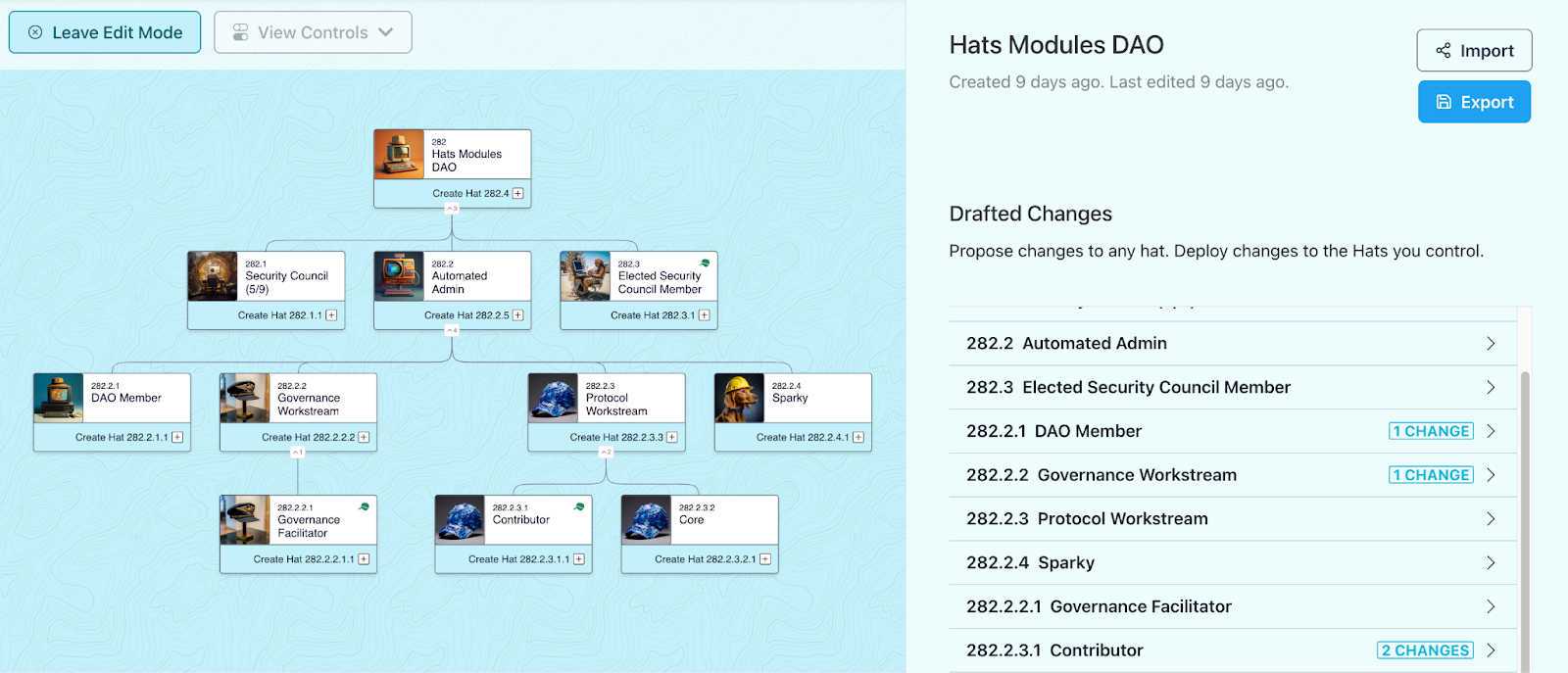
Use [Edit Mode](/using-hats/creating-my-first-hat) by clicking the "Edit Tree" button (see below) to create new hats, give them a [name and image](/using-hats/setting-a-hats-basic-properties), [add wearers](/using-hats/adding-wearers), [specify powers & responsibilities](/using-hats/connecting-hats-w-permissions-and-authorities/documenting-hat-powers-and-responsibilities), add modules to automate hat [eligibility and revocation](/using-hats/eligibility-requirements-for-wearers), enable [hat-claiming](/using-hats/making-hats-claimable) and more.&#x20;

<figure><img src="/files/Nl9W8Su2SAqU6A4FuFdo" alt=""><figcaption></figcaption></figure>

You can create as many new hats and changes to the Hats tree as you’d like before deploying all changes in one transaction.&#x20;

<figure><img src="https://lh7-us.googleusercontent.com/1fftIQh9W2kDYhOZSp1seaeN_PzP8Vi0o7fdm7hgaOS1esyxE5JjtZn3OFqzbq4KxvwYAp-rNbRNpZKRdBONL-Ad9nXCX52USWkXT5b6bJtGQ3jno4jddCAa0B_93IGKneaoFJG7tOw1JL14N26T2Ew" alt=""><figcaption><p>Use Edit Mode to draft, share, and deploy changes to your Hats tree</p></figcaption></figure>

In large trees, you can group hats together for a cleaner display by creating a parent hat with zero as its "max wearers" property.&#x20;

<figure><img src="/files/TU4F6wwHYb4847XGCd1h" alt=""><figcaption></figcaption></figure>

## Deploying

After making changes in edit mode, you have the option to deploy the changes for which you have [admin authorities](/using-hats/admins-creating-issuing-and-revising-hats)\*. If you are wearing the Top Hat, this means you'll be able to deploy all the changes immediately.

To deploy all other changes, you can:

1. Export and share your proposed edits with others, and&#x20;
2. Provide the transaction calldata necessary to deploy those changes onchain

Both of these options are described below.

*\*Each hat is an admin of all other hats linked directly below it. Therefore, wearers of certain hats will be able to deploy changes to other mutable hats for which their hat is an admin. This includes minting both mutable and immutable hats to new wearers, and transfer mutable hats from one address to another. For more information about Admins in a Hats tree, click* [*here*](/using-hats/admins-creating-issuing-and-revising-hats)*.*

## Sharing

You can export the changes made in Edit Mode in order to share them with others. This is especially useful for sharing any changes for which you do not have the admin authority to deploy. &#x20;

There are two options:

1. Exporting a JSON file to save and share your changes with others.
2. Exporting transaction Call Data in order to use in an onchain proposal.

### Exporting & Importing a JSON to Share & View Changes

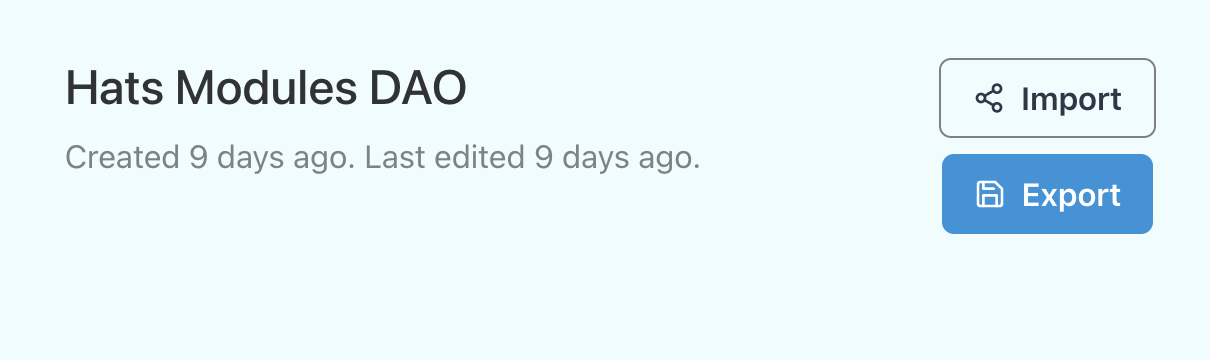
To share your suggested changes with others, click the “Export” button found in Edit Mode, as seen in the screenshot below. Others can then import this JSON file into the same tree to see all the changes you’ve created.&#x20;

<figure><img src="https://lh7-us.googleusercontent.com/HTP0014QPYzyHMq6-JkW4e571VT-dpMx9dBIwqYhIVVgIDE_EzZBqcDnQqQteARn0qR0Z781ExFN46DpLn8yIvy_huRfulj5WgyFFk4JicvRJLhBAzO6SDBm93JEudzt7ZefqfuiE3HtRqIm19VsmF0" alt=""><figcaption><p>Export and import changes to a tree using the buttons seen above</p></figcaption></figure>

### Exporting Call Data to Deploy Changes Onchain

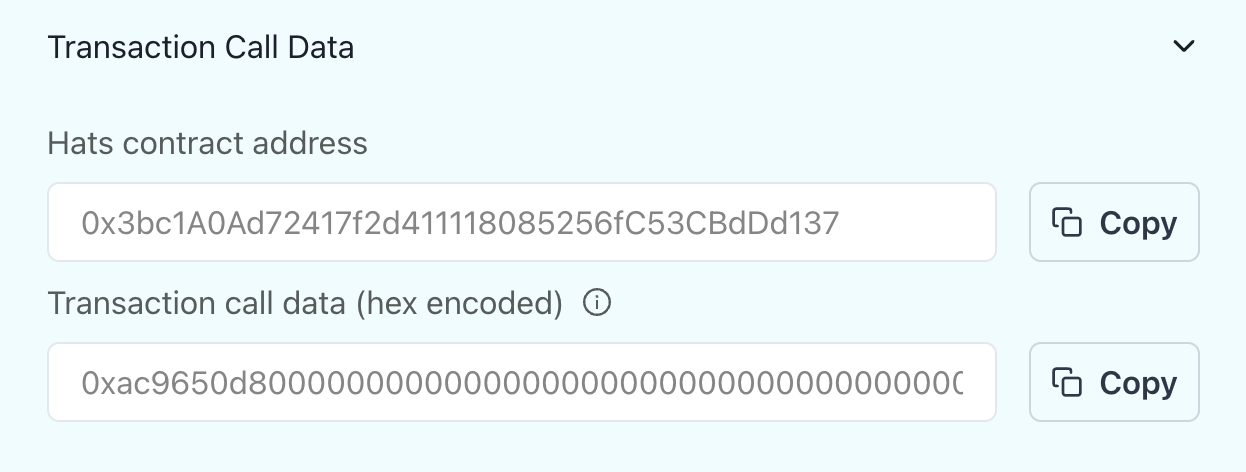
To deploy changes via a DAO or multisig-controlled hat (e.g. a DAO contract wearing the top-hat), copy the transaction call data using the information found in edit mode as seen in the screenshot below.&#x20;

<figure><img src="https://lh7-us.googleusercontent.com/rqSJsl2uUqEfMtsobOUPDN7BC6VXdfJj6aEW1bq4dYK-WwoDCEWT8n2cPS7mcslg9OKB8Mfs8EAuj1Tedipq5zEaIpOVnAd7MmLLxyCuT7G4Hk5t1d9W6ar6o3yZCzCE2jxXcUykexKRDFHoy_OUJbs" alt=""><figcaption><p>Use transaction call data to deploy changes through a multisig or DAO contract</p></figcaption></figure>

You can then use your organization's governance interface to create a proposal, in which the target address is the [Hats contract address](/using-hats/connecting-hats-w-permissions-and-authorities/connecting-hats-to-token-gates/hats-protocol-contract-addresses) and with the transaction Call Data as copied from the app.&#x20;

We recommend including the associated JSON file in your proposal as well, so that others can review your changes directly within the Hats app by importing the JSON into the same tree and confirm the validity of the transaction.


# Setting a Hat's Basic Properties

For each hat you create, the first type of properties you'll be able to edit are under the "Hat Basics" section:

<figure><img src="/files/EBlKgdZFzebw2yERdie0" alt=""><figcaption></figcaption></figure>

### Image

Like any other NFT, hats have images. You can set a specific image for each hat. If no image is set for a hat, it will adopt the image of its nearest admin, as seen in the hats with IDs 2.3.1, 2.4.1, and 2.5.1 below.

<figure><img src="/files/T0NXK1Tkg6yqp4PXlL9v" alt=""><figcaption><p>A subset of the <a href="/users/Ajcq1GvbYJMa6t1IqqyyBN3Bewo2">Cabin</a> Hats tree</p></figcaption></figure>

### Name & Description

Free-text fields.&#x20;

Once set, the hat's name will be shown on its associated card in the tree graph. Additionally, once choosing the hat, its name and description are located at the top of the hat's sidebar.

<figure><img src="/files/B0FHrvvhVsUflAOb4eBp" alt=""><figcaption></figcaption></figure>

### Editable (Mutability)

Mutability determines whether the hat's properties (including name, description, max supply, mutability, image, eligibility and toggle modules) can be changed by its admins. Additionally, mutable hats can be transferred by their admins to a different wearer. Immutable hats cannot be transferred.

Immutable hats cannot be made mutable later, so we generally recommend starting with mutable hats, with the option to make them immutable later once your organization's structure solidifies and there is a need to limit the powers of a hat's admins.

**Why make a hat immutable?** In some cases, a hat's properties should be immutable to give everybody (particularly the wearer(s)) maximal confidence in what they are signing up for. Immutability also curbs the powers of a hat's admins, as immutable hats cannot be changed or transferred by admins.

**Top Hat exception:** The only exception to the above mutability rules is for Top Hats, which despite being immutable are allowed to change their own `details` and `imageURI` (but not other properties). Note that this only includes non-linked Top Hats; a Top Hat that has been linked (aka grafted) onto another hat tree is no longer considered a Top Hat, and therefore is subject to the same mutability rules as other hats.

### Top-Hat Special Properties

The top-hat of a tree has two special properties - "Guilds" and "Snapshot Spaces".&#x20;

These are used in order to associate Guilds and/or Snapshot Spaces to the tree, allowing to display   authorities that are granted to wearers of hats within the tree.

<figure><img src="/files/9xMwebomdgsaOn1VaEDM" alt=""><figcaption></figcaption></figure>

For example, once setting the associated Snapshot Space, the relevant authorities will be displayed on hats which grant their wearers voting power in the Space:

<figure><img src="/files/TCNeUDZ3nxDCG7VrKIif" alt=""><figcaption></figcaption></figure>


# Adding Wearers

Hats tokens can be held by any address including an EOA, multisig, or contract. When an address has a balance of 1 of a given Hats token, it is considered a "wearer" of that "hat". Then, by way of various token-gates, that address is granted the [authorities](/using-hats/connecting-hats-w-permissions-and-authorities) that have been associated with that hat.

Each hat can have any number of wearers up to the hat’s max wearers. Hats are granted and revoked by the organization, or agents/smart contracts that are designated by the org. Wearers can renounce a hat, but they cannot transfer it.

### How to add new wearers for a given hat

* Select "Edit Tree"
* Locate and select the hat
* Open the "Wearers" section

<figure><img src="/files/nNrU5RGpRjSCvX5QxTCx" alt=""><figcaption></figcaption></figure>

Then, add an address or ENS that is controlled by the intended wearer *(note: ensure the address is on the same chain as your Hats tree)*.

To add multiple wearers with one transaction, enter multiple addresses/ENS or upload a .csv containing a list of wearer addresses.

Once the changes are deployed, all the wearers of that hat will be shown in the sidebar under "Hat Wearers".

<figure><img src="/files/QfP8FMOuHn3oJjGJd8yE" alt=""><figcaption></figcaption></figure>

Once wearers are added, they can view the hats they're wearing by selecting "My Hats", see the associated responsibilities and authorities they hold, renounce a hat they are wearing, create new child hats underneath hats they are wearing, and make changes to any mutable hats they are an admin of.

### Max Wearers

The maximum number of addresses that can wear a given hat at once. Max wearers could be set to 1 to ensure only one address is holding that role at a given time, or it could be set as high as 4.29 billion (2^32).&#x20;


# Connecting Hats w/ Permissions & Authorities

Hats makes it easy for organizations to manage permissions and access for their human and AI agents across the open internet. The number of permissions and authorities that can be granted and accessed by a hat is constantly growing, including:

* **Accounts and resources:** control of Ethereum accounts, multisig signing authority, and compensation
* **Communication channels:** access and posting rights for shared communications channels and accounts
* **Governance and voting:** onchain permissions for any smart contract, proposal creation, and voting power
* **Workspaces:** read, review & write permissions in workspaces, files & docs

<figure><img src="/files/C5fULRWohp3OHUGwEmsY" alt=""><figcaption><p>Powers and resources that can be accessed by a hat</p></figcaption></figure>

These powers can be granted and revoked by designated individual or group admins, as well as based on a wide range of automated [eligibility and accountability criteria](/hats-integrations/eligibility-and-accountability-criteria).

{% content-ref url="/pages/XVsSggEoJNoYRVLNoLyo" %}
[Types of Hat-Powered Authorities](/using-hats/connecting-hats-w-permissions-and-authorities/types-of-hat-powered-authorities)
{% endcontent-ref %}

{% content-ref url="/pages/NPCTA2TTyKjmESjW1cYY" %}
[Connecting Hats to Token Gates](/using-hats/connecting-hats-w-permissions-and-authorities/connecting-hats-to-token-gates)
{% endcontent-ref %}


# Types of Hat-Powered Authorities

Authorities can include hard powers, such as explicit onchain or offchain permissions provided through token gates (see below), as well as soft powers provided through social agreements and other accountability mechanisms, such as the authority to facilitate a meeting, work on projects in a given domain, or hold admin rights for a specific app that can't yet be token-gated.

You'll attach these authorities to your hats via token-gates after your hats are created onchain.

Authorities can be linked to hats in a number of ways, including via:

* **Token-gating platforms** including [Guild](https://guild.xyz/), [Collab.Land](https://www.collab.land/), and [Lit Protocol](https://litprotocol.com/), which provide token-gating for the following apps:
  * [**Guild**](https://guild.xyz/guildverse)**:** [Coordinape](https://docs.coordinape.com/info/integrations/guild), [Discord](https://guild.xyz/brain/discord), [Github](https://guild.xyz/brain/github) (private repos only), [Google Workspace](https://guild.xyz/brain/google-workspace) (Docs, Sheets, Slides), [Party.Space](https://guild.xyz/brain/party.space), [POAP](https://guild.xyz/brain/poap),  [Rally](https://guild.xyz/brain/rally), [Telegram](https://guild.xyz/brain/telegram), and [Wonderverse](https://guild.xyz/brain/wonderverse)
  * [**Collab.Land:**](https://www.collab.land/) [Discord](https://collab-land.gitbook.io/collab-land/bots/discord) and [Telegram](https://collab-land.gitbook.io/collab-land/bots/telegram)
  * [**Lit Protocol**](https://litprotocol.com/)**:** [Gather Town](https://www.youtube.com/watch?v=kDpKhMUNuqE\&ab_channel=CryptoArcade), [Google Drive](https://litgateway.com/apps/google-drive), [Headline](https://viaheadline.xyz/), [IPFS](https://litgateway.com/files), [Nowhere](https://www.urnowhere.com/), [Orbis Club](https://orbis.club/), [Shopify](https://apps.shopify.com/lit-token-access), [WalletChat](https://lit.walletchat.fun/), [Wordpress](https://litgateway.com/apps/wordpress), and [Zoom](https://litgateway.com/apps/zoom)
* **Apps that integrate token-gating** to provide access to specific channels and read/write permissions, including [Charmverse](https://www.charmverse.io/), [Wonderverse](https://www.wonderverse.xyz/), and (soon) [Commonwealth](https://commonwealth.im/)
* **Tools that read ERC1155s for modifying parameters**, such as using [Snapshot Strategies](https://snapshot.org/) to allow only certain hats to vote in Snapshot proposals and/or give certain hats greater voting weight in Snapshot proposals
* [**HatsSignerGate**](https://github.com/Hats-Protocol/hats-zodiac)**, a Zodiac module that provides Safe multisig signing authority for a given set of hats**
* **Social agreements or other accountability mechanisms**, including seasonal elections, staking requirements, and/or reputation systems. Authorities that can't be explicitly granted to a hat via token-gating can still be granted to a hat wearer by using the hat as a signal of social agreement that the wearer has that authority.

See the subpages within the [Hat-Gated Authorities](/hats-integrations/permissions-and-authorities) section for detailed guides for connecting specific authorities to hats:&#x20;

{% content-ref url="/pages/8Jvd3bOS5UxswSARGyxU" %}
[Permissions & Authorities](/hats-integrations/permissions-and-authorities)
{% endcontent-ref %}


# Connecting Hats to Token Gates

Hats are ERC1155 tokens, so they can be plugged into token gates to grant the wearers of that hat specific authorities, as long as 1) the wearer’s address is still eligible to wear the hat, and 2) the hat is still active.

You can think of it this way: token gates have two parts, the token and the gate. Hats provides the token, which gets plugged into the necessary gates, to give the hat wearer access to the proper authorities.

<figure><img src="/files/jZsF2F0AAvlAWyMurIPd" alt=""><figcaption></figcaption></figure>

To connect a hat to a token-gate, locate the token-gating permissions for the platform or application you wish to use. In many cases, the process requires that you create a specific role in the platform that has special permissions associated with that role, and then add a specific requirement necessary for a user to hold that role (e.g., holding a particular Hats token). *See the* [*Hat-Gated Authorities*](/hats-integrations/permissions-and-authorities) *section of these docs for guides for connecting hats to specific authorities and platforms.*

### Example - Guild.xyz

At Guild.xyz, for example, which provides token-gating for Discord, Telegram, Github, and Google Workspace, you will create a role within your Guild, provide that Guild role with specific "rewards" (aka permissions), and then add a requirement that an address must have possession of a particular NFT to hold that Guild role.

<div><img src="https://hackmd.io/_uploads/BkTwIJXBn.png" alt="" width="375"> <img src="https://hackmd.io/_uploads/By7qBkXHn.png" alt="" width="375"></div>

To connect a hat to a token-gate, you will need to add an NFT (ERC1155) requirement. Then, you'll need to enter two details:

1. [The Hats Protocol contract address](/using-hats/connecting-hats-w-permissions-and-authorities/connecting-hats-to-token-gates/hats-protocol-contract-addresses), and
2. [The Hats token ID](/using-hats/connecting-hats-w-permissions-and-authorities/connecting-hats-to-token-gates/finding-a-hats-token-id) (sometimes called a Custom ID) for the appropriate hat. This token ID will be the same for all wearers of a single hat.

See below for these details.

{% content-ref url="/pages/uebSSCvVzZMz6wPYjMTV" %}
[Hats Protocol Contract Addresses](/using-hats/connecting-hats-w-permissions-and-authorities/connecting-hats-to-token-gates/hats-protocol-contract-addresses)
{% endcontent-ref %}

{% content-ref url="/pages/1zy1c6snF1ytgP8qxjNJ" %}
[Finding a Hat's Token ID](/using-hats/connecting-hats-w-permissions-and-authorities/connecting-hats-to-token-gates/finding-a-hats-token-id)
{% endcontent-ref %}

Finally, associate your Hats tree with the Guild/s:

* Select "Edit Tree"
* Locate and select the tree's top-hat
* Select the "Hat Basics" section
* Set the Guild name/s in the "Guilds" field

<figure><img src="/files/P4lb16twchoLo3QvBOOr" alt=""><figcaption></figcaption></figure>

Now, Guild authorities will be automatically displayed on the relevant hats.

<figure><img src="/files/RCy0tgaomX3VHb0u58Fk" alt=""><figcaption></figcaption></figure>


# Hats Protocol Contract Addresses

Hats Protocol has the same contract address for each chain is it deployed to (ENS: v1.hatsprotocol.eth): `0x3bc1A0Ad72417f2d411118085256fC53CBdDd137`

Visit the page linked below to access a complete list of the chains Hats Protocol is currently deployed to along with their associated contracts.

{% content-ref url="/pages/Yk0JR8rO2y75WneJ0KKN" %}
[Hats Protocol Supported Chains](/using-hats/hats-protocol-supported-chains)
{% endcontent-ref %}


# Finding a Hat's Token ID

To find a hat's token ID, locate and select that hat in the [Hats app](https://app.hatsprotocol.xyz) and click the copy icon to the right of the hat's "pretty ID" (found in the green box below).&#x20;

<figure><img src="/files/1sUXfig73VkExhkzxDUU" alt=""><figcaption></figcaption></figure>

In decimal format, the hat's token ID will look something like this: `26960769425706497914046077453500346168786499100899720886694455541760`.

In hexadecimal format, the same hat's token ID will look something like this: `0x0000000100020001000100000000000000000000000000000000000000000000`.

The Hats app converts the hexadecimal version to the "pretty id" format `1.2.1.1`:

* `0x00000001` converts to `1`
* `0x0002` converts to `2`
* `0x0001` converts to `1`

*For more technical details on how the Hats addressable ID system works, see the* [*Hat IDs*](/for-developers/hats-protocol-for-developers/hat-ids) *page within the "For Developers" section of these docs.*


# Documenting Hat Powers & Responsibilities

As you [connect explicit authorities to hats](/using-hats/connecting-hats-w-permissions-and-authorities/connecting-hats-to-token-gates), you can document those powers onchain. This includes both hard powers like authorities provided by token gates, as well as soft powers provided through social agreements.

Additionally, you can document the responsibilities attached to these powers, providing the relevant context to the hat wearers and the organization as a whole.

### Adding Responsibilities

* Select "Edit Tree"
* Locate and select the hat
* Open the "Responsibilities" section

<div align="left" data-full-width="false"><figure><img src="/files/IMwVqKIksuTTZjggvKKv" alt=""><figcaption></figcaption></figure></div>

* Select "Add a Responsibility"&#x20;

<figure><img src="/files/IEZfzUdeGGqPtlTJsWeH" alt=""><figcaption></figcaption></figure>

* Fill the responsibility details

### Adding Powers

* Select "Edit Tree"
* Locate and select the hat
* Open the "Powers" section

<figure><img src="/files/zFpsfaSunenVenbA4IyS" alt=""><figcaption></figcaption></figure>

* Select "Add a Permission"&#x20;

<figure><img src="/files/k6yDCUX1Z9WZiiLyZYdp" alt=""><figcaption></figcaption></figure>

* Fill the authority details


# Revocation & Eligibility: Requirements for Wearers

The [permissions and authorities](/hats-integrations/permissions-and-authorities) that can be accessed via a hat can be granted and revoked by designated individual or group admins, as well as based on a wide range of automated eligibility and accountability criteria using Hats Modules.&#x20;

[Hats Modules](https://hats.mirror.xyz/xAk_yb7dDL1OLBx8nq47Ni7V1SuiC6L6B-49u7vz520) are programmable extensions for roles. Modules can be connected to hats to expand their functionality, such as enabling automatic granting and revocation of hats (and their associated permissions) based on specific conditions.&#x20;

A hat’s eligibility module is an address that determines which addresses are eligible to wear that hat, and can revoke the hat if the wearer is no longer eligible. Eligibility modules can be humanistic (as in an EOA or multisig) or mechanistic (as in a contract with custom logic) to automatically and instantly revoke the hat based on pre-defined triggers.

<figure><img src="/files/uyvk3D8uMfmNjNzqPCtP" alt="" width="300"><figcaption></figcaption></figure>

## **Eligibility Criteria Examples**

Any combination of permissions and authorities can be granted or revoked automatically based on a customizable set of criteria, including:

* **Tokens, NFTs, and attestations**, including ERC20 token balance, ERC721 NFTs, ERC1155 NFT tokenIDs, and EAS attestations
* **Elections and allowlists**, including election results from JokeRace, Snapshot, or Tally, automatic term limits, and manually-created allowlists
* **Achievements and reputation**, like badges, onchain points, Colinks, or Gitcoin passport score
* **Prerequisite actions**, like staking, signing an agreement, holding other roles, or being a subscriber
* **And more:** combine multiple criteria with and/or logic, introduce AI agents, or create granular onchain or offchain triggers

<figure><img src="/files/C3ClkjbF9QDPMunJnLjh" alt=""><figcaption><p>Ways to automate hat granting and revocation</p></figcaption></figure>

Anyone can create their own eligibility or accountability criteria, or tap into the Hats ecosystem of [Hats Modules](https://hats.mirror.xyz/xAk_yb7dDL1OLBx8nq47Ni7V1SuiC6L6B-49u7vz520)—programmable extensions for roles—built permissionlessly by community developers and distributed via the [Hats Modules Registry](https://docs.hatsprotocol.xyz/for-developers/hats-modules/building-hats-modules/modules-registry), which is curated by [Hats protoDAO](https://hats.mirror.xyz/novgFmPfRzlHsJ2StKvQV48lh0CKHMLxeCBgMerrqEs) via the [Modules Registry Curator hat](https://app.hatsprotocol.xyz/trees/10/1?hatId=1.2.4.4). Likewise, any app can tap into the same infrastructure to offer the fast-growing suite of Hats Modules options to their end-users.

## How to Set the Eligibility for a given Hat

* Select "Edit Tree"
* Locate and select the hat
* Open the "Revocation & Eligibility" section

<figure><img src="/files/SuSCmANp4IHXaMThr7GI" alt=""><figcaption></figcaption></figure>

You can choose between two types of modules:

#### Humanistic: EOA, Multisig Address, or DAO Contract Address&#x20;

* Choose "Manually" in order to set a humanistic type of eligibility (e.g. EAO or a Multisig)&#x20;
* Enter the address that will determine manually eligibility for that hat
* Optionally, add any relevant context by adding requirements as pairs of labels and external links

#### Mechanistic: Hats Modules

* Choose "Automatically" in order to set a mechanistic type of eligibility (e.g. ownership of a token), enabling the automatic granting and revocation of hats (and their associated permissions) based on specific conditions&#x20;

<figure><img src="/files/qLS5WoSMeuxw8F7XZ3af" alt=""><figcaption></figcaption></figure>

## Hats Modules: Programmable Extensions for Roles & Permissions

Hats Modules are programmable extensions for roles. Modules can be connected to hats to expand their functionality, such as enabling automatic granting and revocation of hats (and their associated permissions) based on specific conditions. For more details on Hats Modules, including what they can unlock and how builders can create new modules, [see this blog post](https://hats.mirror.xyz/xAk_yb7dDL1OLBx8nq47Ni7V1SuiC6L6B-49u7vz520).

To deploy an eligibility module for a given hat, first open the "Revocation and Eligibility" panel for a hat within Edit Mode and select "Automatically" as detailed above. Then:

* Choose "Create new Module"

<figure><img src="/files/nj84hYT8P5NbzJQkPVRp" alt=""><figcaption></figcaption></figure>

* Choose one of the available modules ([see module descriptions here](https://docs.hatsprotocol.xyz/hats-integrations/eligibility-modules)). As an example, we'll use the ERC20 Eligibility module below, which defines eligibility by ownership of a minimum balance of a chosen amount of an ERC20 token

<figure><img src="/files/RUYrmAH9yTQuJK2D3QAD" alt=""><figcaption></figcaption></figure>

* Choose the module-specific parameters
* Choose "Deploy & Return" to deploy the module and return to the hat edit form.&#x20;

You'll be able to continue making any edits to the hat(s) and deploy them once ready.

Go [here](/hats-integrations/eligibility-and-accountability-criteria) to check the complete list of available Eligibility modules, including a step-by-step creation guide for each. Additionally, it includes a guide on how to make hats claimable by eligible wearers.

## Unsure of Where to Start?

If you're not sure what a particular hat's eligibility or toggle modules should be at this point, consider: "who or what should this role be accountable to?"

For instance, it could make good sense to set the eligibility and toggle modules for a "Product Workstream Facilitator Hat" to the Product Workstream's multisig address. And, it could make sense to set the eligibility and toggle modules for the Product Workstream Hat to the organization's contract address.

For any hats you're still not sure about, we recommend setting their eligibility and toggle modules to the organization's contract address, at least to start. If the hats in question are mutable, their admins can always change their eligibility and toggle modules later.

## Digging Deeper

For more technical details on how Hats eligibility modules work, see the [Eligibility Modules](/for-developers/hats-protocol-for-developers/eligibility-modules) page within the "For Developers" section of these docs.


# Deactivating & Reactivating Hats

The [permissions and authorities](/hats-integrations/permissions-and-authorities) that can be accessed via a hat can be granted and revoked by designated individual or group admins, as well as based on a wide range of automated eligibility and accountability criteria using Hats Modules.&#x20;

[Hats Modules](https://hats.mirror.xyz/xAk_yb7dDL1OLBx8nq47Ni7V1SuiC6L6B-49u7vz520) are programmable extensions for roles. Modules can be connected to hats to expand their functionality, such as enabling automatic granting and revocation of hats (and their associated permissions) based on specific conditions.&#x20;

A hat’s toggle module is an address that determines whether the hat is active or inactive for all wearers. Toggle modules can be humanistic (as in an EOA or multisig) or mechanistic (as in a contract with custom logic) to automatically and instantly deactivate/activate the hat based on pre-defined triggers.

<figure><img src="/files/FI6dWFyzZqhlrME5syK9" alt="" width="563"><figcaption></figcaption></figure>

## **Toggle Examples**

Toggle triggers you may use to determine whether or not a hat is active include:

* **Seasonal or time-specific toggle** that automatically deactivates a hat at the end of a given season or period of time
* **Hat-based toggle** that enables the wearer/s of one hat to decide on the activation/reactivation of another.
* **Circuit-breaker toggle** to safeguard the DAO's assets and deactivate a set of hats and their associated authorities if certain conditions are met
* Any custom logic you can imagine that can be represented onchain

## How to Set the Toggle for a given Hat

* Select "Edit Tree"
* Locate and select the hat
* Open the "Deactivation & Reactivation" section

<figure><img src="/files/AOx2MMf0XrwbxHogJr2n" alt=""><figcaption></figcaption></figure>

You can choose between two types of modules:

#### Humanistic: EOA, Multisig Address, or DAO Contract Address

* Choose "Manually" in order to set a humanistic type of toggle (e.g. EAO or a Multisig)&#x20;
* Enter the address of the hat's toggle
* Optionally, add any relevant context by adding requirements as pairs of labels and external links

#### Mechanistic: Hats Modules

* Choose "Automatically" in order to set a mechanistic type of toggle (e.g. time-based automatic deactivation/activation)&#x20;

<figure><img src="/files/mQKMrufQSc3dQUH0tIql" alt=""><figcaption></figcaption></figure>

## Hats Modules: Programmable Extensions for Roles & Permissions

Hats Modules are programmable extensions for roles. Modules can be connected to hats to expand their functionality, such as enabling automatic deactivation and reactivation of hats (and their associated permissions) based on specific conditions. For more details on Hats Modules, including what they can unlock and how builders can create new modules, [see this blog post](https://hats.mirror.xyz/xAk_yb7dDL1OLBx8nq47Ni7V1SuiC6L6B-49u7vz520).

To deploy a toggle module for a given hat, first open the "Deactivation & Reactivation" panel for a hat within Edit Mode and select "Automatically" as detailed above. Then:

* Choose "Create new Module"

<figure><img src="/files/g1O7jDnOCwwlGa8RJHsn" alt=""><figcaption></figcaption></figure>

* Choose one of the available modules. As an example, we'll use the Pass-through Toggle module which enables the wearers of one hat to decide on the deactivation/reactivation of another hat.

<figure><img src="/files/JfrSWps3D9LgoVAh2aWp" alt=""><figcaption></figcaption></figure>

* Choose the module-specific parameters
* Choose "Deploy & Return" to deploy the module and return to the hat edit form.&#x20;

You'll be able to continue making any edits to the hat(s) and deploy them once ready.

Go [here](/hats-integrations/activation-and-deactivation-criteria) to check the complete list of available Toggle modules, including a step-by-step creation guide for each.&#x20;

## Digging Deeper

For more technical details on how Hats toggle modules work, see the [Toggle Modules](/for-developers/hats-protocol-for-developers/toggle-modules) page within the "For Developers" section of these docs.


# Making Hats Claimable

The following guide will walk you through the steps required to make a hat claimable:

* Go to the tree that includes the hat you wish to make claimable
* Select "Edit Tree"
* Locate and select the hat
* Open the "Revocation & Eligibility" section

<figure><img src="/files/lx2Km0r3xjmF6Vx0qpP7" alt=""><figcaption></figcaption></figure>

* Choose "Automatically" and then choose "Create new Module". This will open the module creation form

If you have not yet made any other hats claimable, you'll be prompted to create and choose the admin hat that will wear the new hatter contract that will enable hat claiming, as seen below.

<figure><img src="/files/7c7MojhrDi7G1mXYIZgl" alt=""><figcaption></figcaption></figure>

If a hatter contract instance has been already created, simply register the hat with the existing hatter contract. A single hatter contract can make all hats claimable for which it is an admin, so we recommend selecting an admin hat that has admin authority over as many other hats as possible.

Now choose "Deploy & Return" to deploy the module and return to the hat edit form. The edit form will be automatically updated with the necessary changes, including minting the admin hat to the new hatter contract instance. Then, you'll be able to keep editing the tree and deploy when ready.


# Linking Trees Together

Two or more Hats trees can be connected together through linking

This powerful feature lets you graft two separate Hats trees together, by linking the Top Hat from one tree to a hat from another tree. Hats trees that have been linked can then be unlinked later.

**Example use cases for linking Hats trees include:**

* Onchain organizational mergers (e.g. one DAO joining another DAO)
* Emergent subgroups (e.g., subDAOs can create their own Hats tree and then petition to link to the main DAO anization upon maturity, and unlink again to go independent)
* Enabling experimentation with Hats within subgroups before scaling to the whole organization (e.g. enable a subgroup to build out its own Hats tree and try out new Hats features with different authorities and responsibilities before merging into organization's main tree)
* "Refactor" your organization (e.g. fork your Hats tree to try different Hats configurations before merging with the main tree)

## Overview

At a high-level the process of tree linking looks like this:&#x20;

Initially, two separate Hats trees exist, each with their own respective Top Hats, as seen in the diagram below.

<figure><img src="/files/gOog9iKJKHg6ogi9EAuh" alt=""><figcaption></figcaption></figure>

Hats Tree 2 requests to link to a specific hat in Hats Tree 1. Effectively the Top Hat from Tree 2 asks a specific hat from Tree 1, *"hat, ser - will you be my admin hat?"*

<figure><img src="/files/SMNWBxudKso3FClXDN3z" alt=""><figcaption></figcaption></figure>

If approved, Tree 2 links, or "grafts", to Tree 1. The approving hat becomes the admin of the Top Hat from Tree 2.&#x20;

The Top Hat from Tree 2, along with its associated branch, can be unlinked from Tree 1 at any point in the future, thereby returning back to the initial state of having two separate Hats trees.

<figure><img src="/files/8iU0sQfGnaK8MmgMEXV4" alt=""><figcaption></figcaption></figure>

When a link between these two trees is created, as seen in the diagram above, the level 2 hat from Tree 1 becomes the admin for the Top Hat of tree 2, and therefore the Top Hat of Tree 2 effectively becomes a level 3 hat in Tree 1. The previous Top Hat from the now nonexistent Tree 2 will then hold the same properties as as any other hat in Tree 1, with one distinction: the Top Hat and its child hats can be unlinked from Tree 1 at any point in the future, thereby returning back to the initial state of having two separate Hats trees.

## Digging Deeper

For more technical details on tree linking, see the [Linking Hats Trees](/for-developers/hats-protocol-for-developers/linking-hats-trees) page within the "For Developers" section of these docs.

## How to Link Trees Together

*Coming soon. Contact us at support \[at] hatsprotocol \[dot] xyz if you're looking to link two trees together and need some guidance.*


# Hats Protocol Supported Chains

A complete list of the chains Hats Protocol is currently deployed to

Hats Protocol has the same contract address for each chain is it deployed to (ENS: v1.hatsprotocol.eth): `0x3bc1A0Ad72417f2d411118085256fC53CBdDd137`

See below for links to the specific contracts for each chain Hats Protocol is currently on:

* [**Ethereum (mainnet)**](https://etherscan.io/address/0x3bc1A0Ad72417f2d411118085256fC53CBdDd137)
* [**Arbitrum**](https://arbiscan.io/address/0x3bc1A0Ad72417f2d411118085256fC53CBdDd137)
* [**Gnosis Chain**](https://gnosisscan.io/address/0x3bc1A0Ad72417f2d411118085256fC53CBdDd137)
* [**Optimism**](https://optimistic.etherscan.io/address/0x3bc1A0Ad72417f2d411118085256fC53CBdDd137)
* [**Polygon**](https://polygonscan.com/address/0x3bc1A0Ad72417f2d411118085256fC53CBdDd137)
* [**Scroll**](https://scrollscan.com/address/0x3bc1a0ad72417f2d411118085256fc53cbddd137)
* [**Celo**](https://celoscan.io/address/0x3bc1A0Ad72417f2d411118085256fC53CBdDd137)
* [**Base**](https://basescan.org/address/0x3bc1A0Ad72417f2d411118085256fC53CBdDd137)
* [**Sepolia (testnet)**](https://sepolia.etherscan.io/address/0x3bc1A0Ad72417f2d411118085256fC53CBdDd137)
* [**Holesky (testnet)**](https://holesky.etherscan.io/address/0x3bc1A0Ad72417f2d411118085256fC53CBdDd137)
* [**Goerli (testnet)**](https://goerli.etherscan.io/address/0x3bc1A0Ad72417f2d411118085256fC53CBdDd137)

If you would like to use Hats on a chain not listed above, please reach out to us at support \[at] hatsprotocol \[dot] xyz.


# Glossary & FAQ

Created by the Hats community

*NOTE: This is an unofficial Hats glossary & FAQ created by the Hats community.*

## **Questions?**

[You can use this form to submit Hats-related terms and questions that you'd like more clarity on. ](https://docs.google.com/forms/d/e/1FAIpQLSc9v4xvkFNflih6tiasB3-NO5zQqE8OMbHYPz5HwLqCfPrqTA/viewform)This can be anything from the general to the specific, the technical to the non-technical, the bland to the spicy 🌶️ . No submissions are off limits.&#x20;

All questions are optional. Responses are anonymous by default. Submissions are captured on this [sheet](https://docs.google.com/spreadsheets/d/1jJMgLHejxah4sWWpseIWWKNA6RloFCC8rlEGai3fnTg/edit?resourcekey#gid=2071491320). Once captured, Hats community members collaborate to define terms and answer questions. Once consensus is reached, the information is added to the [Hats Protocol Docs ](https://docs.hatsprotocol.xyz/)Glossary and FAQ sections.

## Glossary

{% embed url="<https://docs.google.com/spreadsheets/d/1Us0xClfM1IGBRhKt0cn5XNaqNbouxQ1pzsHN7cB8dyM/edit?usp=sharing>" %}

## FAQ

*This FAQ will be continuously updated as questions are received* [*through this submission form*](https://docs.google.com/forms/d/e/1FAIpQLSc9v4xvkFNflih6tiasB3-NO5zQqE8OMbHYPz5HwLqCfPrqTA/viewform)*.*

**What is the difference between Hats vs Hats Protocol vs Hats App?**

* Hats: the meme 🧢
* [Hats Protocol](https://github.com/Hats-Protocol/hats-protocol): the open-source roles protocol upon which many different apps and integrations will be developed
* [Hats App](https://app.hatsprotocol.xyz/): a front-end app developed to make it easy for anyone to use the protocol

**How are Hats different from membership NFTs?**

Hats are like membership NFTs in that they are nontransferable, revocable, and grant access to a group of some kind. But they are also highly programmable, automatable, boosted by a wide range of eligibility modules and integrations that are being created, and nested with deterministic IDs to enable flexible governance structures for almost any need you can imagine.

**Can I "claim" my hat or does it have to be granted by someone else?**

Both are possible! Hats can be [granted (aka "minted")](/using-hats/adding-wearers) to new wearers by wearers of any existing [admin hat](/using-hats/admins-creating-issuing-and-revising-hats), OR hats can be claimed by eligible wearers [provided the hat has been made claimable](/hats-integrations/hatter-modules/making-hats-claimable).&#x20;

**Can I renounce a hat if I no longer want to be part of the DAO?**

Yes! Any hat can be renounced by any wearer at any time. To renounce a hat you are wearing: select the hat in the Hats app, find your address under "Hat Wearers", select the three dots next to your address, and select "Renounce".

<figure><img src="/files/jFGqPl8qCkgggbI4xzKZ" alt=""><figcaption></figcaption></figure>

**What will happen with my Hats if I change my wallet address for whatever reason?**

Your hats will stay with the wallet address they were originally minted to. However, you can request to transfer your hats to a new address, as any admin can transfer a hat from one address to another using the "Transfer" function seen in the image above.

**How are responsibilities different than authorities?**&#x20;

* Responsibilities are the things a given hat wearer is expected to do as part of their role (e.g., a responsibility of the product workstream facilitator is to set the agenda for each product workstream meeting)
* Authorities are the permissions granted to the hat wearer (e.g., read/write access to specific communication channels or workspaces).


# Permissions & Authorities

Guides for connecting permissions to a given hat

Hats makes it easy for organizations to manage permissions and access for their human and AI agents across the open internet.

The number of permissions and authorities that can be granted and accessed by a given hat is constantly growing, including:

* **Accounts and resources:** control of Ethereum accounts, multisig signing authority, and compensation
* **Communication channels:** access and posting rights for shared communications channels and accounts
* **Governance and voting:** onchain permissions for any smart contract, proposal creation, and voting power
* **Workspaces:** read, review & write permissions in workspaces, files & docs

<figure><img src="/files/C5fULRWohp3OHUGwEmsY" alt=""><figcaption><p>Powers and resources that can be accessed by a hat</p></figcaption></figure>

These powers can be granted and revoked by designated individual or group admins, as well as based on a wide range of automated [eligibility and accountability criteria](/hats-integrations/eligibility-and-accountability-criteria).

## Hats Protocol Contract Addresses and Token IDs

To connect specific hats to token gates, you will need the Hats Protocol contract address as well as the specific token IDs for the relevant hats you want to associated with that token gate.&#x20;

{% content-ref url="/pages/uebSSCvVzZMz6wPYjMTV" %}
[Hats Protocol Contract Addresses](/using-hats/connecting-hats-w-permissions-and-authorities/connecting-hats-to-token-gates/hats-protocol-contract-addresses)
{% endcontent-ref %}

{% content-ref url="/pages/1zy1c6snF1ytgP8qxjNJ" %}
[Finding a Hat's Token ID](/using-hats/connecting-hats-w-permissions-and-authorities/connecting-hats-to-token-gates/finding-a-hats-token-id)
{% endcontent-ref %}

## Guides for Connecting Authorities to Hats

See the subpages within this section for detailed guides for connecting specific authorities to hats:

{% content-ref url="/pages/c1AJuSxrFk84c3G7xVX0" %}
[Coordinape](/hats-integrations/permissions-and-authorities/coordinape)
{% endcontent-ref %}

{% content-ref url="/pages/USY7YWU2VyJ1cYyFeTRI" %}
[Council Voting Vault](/hats-integrations/permissions-and-authorities/council-voting-vault)
{% endcontent-ref %}

{% content-ref url="/pages/ySDBYO2TbJwlcRPMW7sM" %}
[Charmverse](/hats-integrations/permissions-and-authorities/charmverse)
{% endcontent-ref %}

{% content-ref url="/pages/u4eyfDW3nyGavEwkIvGU" %}
[Discord](/hats-integrations/permissions-and-authorities/discord)
{% endcontent-ref %}

{% content-ref url="/pages/lpr9R0iqqmXUSnr0mEF3" %}
[Google Workspace](/hats-integrations/permissions-and-authorities/google-workspace)
{% endcontent-ref %}

{% content-ref url="/pages/eqhASNynpuQF6y6gvl8L" %}
[Hats Account](/hats-integrations/permissions-and-authorities/hats-account)
{% endcontent-ref %}

{% content-ref url="/pages/08g7GVj58Q5nXd7yMyqU" %}
[Safe Multisig Signing Authority](/hats-integrations/permissions-and-authorities/safe-multisig-signing-authority)
{% endcontent-ref %}

{% content-ref url="/pages/pIqbkVwYlrDz7uU2JQEw" %}
[Telegram](/hats-integrations/permissions-and-authorities/telegram)
{% endcontent-ref %}

{% content-ref url="/pages/Jis2AMSLPu3NsAUkCyPk" %}
[Snapshot: Voting, Weight & Proposal Creation](/hats-integrations/permissions-and-authorities/snapshot-voting-weight-and-proposal-creation)
{% endcontent-ref %}

{% content-ref url="/pages/C51ZFxaathWNf1MCWtGa" %}
[Wonderverse](/hats-integrations/permissions-and-authorities/wonderverse)
{% endcontent-ref %}


# Coordinape

How to hat-gate access to a Coordinape circle

To hat-gate access for a Coordinape circle, you will need to complete the following steps:

1. **Create a** [**Guild**](/hats-integrations/permissions-and-authorities/discord/guild.xyz-greater-than-discord) **role** associated with Coordinape circle access (or use an existing Guild role; note that only one Guild role can be used to provide access to the Coordinape circle)
2. **Create a** [**Coordinape**](https://app.coordinape.com) **circle** (or use an existing coordinape circle)
3. Select the **Admin** settings of that Coordinape circle
4. Under Integrations, **enter the URL of your Guild.xyz guild** and **select the appropriate Guild role\***
5. Select **Save Settings**
6. Under **Members** select **Add Members,** and then select **Guild.xyz.** Copy the link provided: **this is the invite link you should use** to provide hat-gated access into your Coordinape circle.

<figure><img src="/files/qpMI90Bnw9bZYzmdyoOp" alt=""><figcaption><p>Found in your Coordinape circle Admin settings under Integrations</p></figcaption></figure>

For additional details, see the [Coordinape guide](https://docs.coordinape.com/info/integrations/guild) for token-gating access with Guild.


# Council Voting Vault

How to only allow specified hats (or hats of a certain type) to vote in a Council voting vault

As the [Council Kit](https://blog.element.fi/launching-council-kit/) has gained adoption, we have heard the following needs from Council users:

1. **How can we create a more flexible system that allows members to vote in the way that best suits their needs?** Manually allow-listing members' addresses in a Council voting vault limits their optionality for how they may vote (e.g., if a DAO's contract address is listed as a Council member, they are unable to vote in any manner other than a full DAO vote).
2. **How can we make membership in a Council more legible and mutually-confirmed?** Denoting membership in a Council only by the inclusion of addresses in the voting vault lacks legibility and could be done without a member's consent.
3. **How can we streamline the process of granting and revoking access to workspaces, communication channels, and forums for new and existing members of a Council?** Current methods require manual addition to each individual platform, which can be time-consuming and prone to error.

**To solve these issues, we built a** [**Hats-powered Council Voting Vault**](https://github.com/Hats-Protocol/highcouncil-hats-vault/blob/main/src/HatsHighCouncilVotingVault.sol)**.**

With a Hats-powered Council voting vault, members of a collective, including cross-chain collectives, have the ability to choose to vote using their DAO contract, delegate their vote to a specific multisig (e.g., their stewardship council), delegate their vote to an individual representative, **or even vote cross-chain** by issuing the voting rep hat to the DAO's cross-chain avatar contract on the Council network.

[The Hats-powered Council voting vault](https://github.com/Hats-Protocol/highcouncil-hats-vault/blob/main/src/HatsHighCouncilVotingVault.sol) can be configured to check if a voter is a valid voter on behalf of or as a Member DAO by verifying that they have a Hats token ID matching a particular pattern. [Since Hats token IDs are addressable](/for-developers/hats-protocol-for-developers/hat-ids), we can know what that pattern will be ahead of time based on the structure of the Hats tree, so we only have to configure the voting vault once, and no changes to it will be required as new Member DAOs (up to 65k) are added.

Additionally, using Hats, active DAO members are clearly legible and confirmed onchain, as any Hats token can be renounced by its wearer.

*This integration is currently in beta. Contact us at support \[at] hatsprotocol \[dot] xyz if you want to explore this integration, or* [*check out the Hats Council Voting Vault repo here*](https://github.com/Hats-Protocol/highcouncil-hats-vault/blob/main/src/HatsHighCouncilVotingVault.sol)*.*


# Charmverse

How to hat-gate access to specific Charmverse roles, pages, and read/comment/write/admin permissions

[Charmverse](https://charmverse.io) is a Web3 platform that provides Notion-like workspaces, databases, a forum, bounty system, and proposal system, all of which can be accessible only to wearers of specific hats using Charmverse's highly-customizable roles and permissions system.

There are three steps to connecting Charmverse permissions with specific hats.

1. Create a Charmverse role associated with your desired hat(s)
2. Set page-level permissions for that Charmverse role
3. Hat-gate access to that Charmverse role

Each step is explained in detail below.

## Step 1. Create a Charmverse role associated with your desired hat(s)

To set up your hat-gated authorities within Charmverse, first navigate to your Charmverse space, open "Settings", and select "Roles & Permissions".

<figure><img src="/files/wG5ZI5d3zAKx4zTY1kcA" alt=""><figcaption></figcaption></figure>

Next, select "Add a role" as seen in the lower-right of the screenshot above.

Create a Charmverse role you want to associate with a given hat or set of hats (you can associate multiple hats with a single Charmverse role). Enter a name for the role, do **not** add any members to the role, and select "Create role".

<figure><img src="/files/Wqfq12xTkrP2Pa4y7J5H" alt=""><figcaption></figcaption></figure>

Once the Charmverse role has been created, open the role with the dropdown arrow, select "Permissions", and set your desired permissions associated with this role.

<figure><img src="/files/82WKufLx2vicUW7dsMLR" alt=""><figcaption></figcaption></figure>

## Step 2. Set page-level permissions for that Charmverse role

Next, navigate to any Charmverse pages within your space that you specifically want to set permissions for. Each page within Charmverse can set its own permissions along the dimensions of view, view & comment, editor, and full access. **Note: subpages will inherit permissions from their parents.**

Once on a page, navigate to the "Share" button in the upper-right, and click in the box that says "Add people, roles or email"

<figure><img src="/files/vrzxS0vv9Cjd25jXR9Jz" alt="" width="375"><figcaption></figcaption></figure>

In the box that appears (shown below), set the permissions for this page, and add the role(s) you created into the "Roles" box. Then click "Invite".&#x20;

<figure><img src="/files/oLMIjDk4WsYdev9fbyxK" alt="" width="375"><figcaption></figcaption></figure>

Repeat this process for all the Charmverse pages you want to make accessible to holder of the role(s) you created (remember, subpages will inherit permissions from their parents).

## 3. Hat-gate access to that Charmverse role

To require an address to be wearing a given hat in order to claim a Charmverse role, and the permissions held by that role, return to your Charmverse space's "Settings", select "Invites", select "Add", and click "Add a Token Gate"

<figure><img src="/files/L0PPav9xBupNje0m74wb" alt=""><figcaption></figcaption></figure>

Selecet "Communities":

<figure><img src="/files/O0Pv8DrYg5WDjio3jXe0" alt="" width="563"><figcaption></figcaption></figure>

Select the blockchain network your hats are on and enter the Hats token ID associated with a hat you want to associate with this role (see [Finding a Hat's Token ID](/using-hats/connecting-hats-w-permissions-and-authorities/connecting-hats-to-token-gates/finding-a-hats-token-id) *for details on how to find specific hat token IDs)*.

<figure><img src="/files/MCRVr07xxJie1n8fnaq0" alt="" width="563"><figcaption></figcaption></figure>

Then click "Next", review your condition and select "Confirm".

Finally, locate this new "Token Gated Link" within the Invites page, and assign the role you created to this token ID.&#x20;

<figure><img src="/files/93tz1JXDl1QprIhAvW5R" alt=""><figcaption></figcaption></figure>

Repeat this process for any other hats you want to associate with this same Charmverse role, or other roles you have created.

You can now select "Copy Link" associated with this Token Gated Link, which can be shared with wearers of the appropriate hat(s) to claim their Charmverse role and access the associated Charmverse permissions.


# Discord

How to provide access to specific Discord roles and channels using Hats

## Two Options for Hat-Gating Discord

The two token-gating platforms most commonly used for connecting Discord authorities to specific hats are 1) Collab.Land and 2) Guild.xyz. In either case, the basic steps are the same:

* Connect your Discord server to Collab.Land or Guild.xyz
* Add a requirement that an address must hold a specific Hats token ID in order to receive a given Discord role
* Give that Discord role access to specific permissions and channels within Discord

Following are detailed descriptions of how to use each gating option:

* [**Collab.Land**](/hats-integrations/permissions-and-authorities/discord/collab.land-greater-than-discord)
* [**Guild.xyz**](/hats-integrations/permissions-and-authorities/discord/guild.xyz-greater-than-discord)


# Collab.Land --> Discord

How to hat-gate Discord roles and channels with Collab.Land

## **Giving Hats Access to Specific Discord Roles and Channels with  Collab.Land**

Following is a detailed description for how to use Collab.Land to hat-gate Discord roles and channels:

#### 1. Connect your Discord server to Collab.Land

Follow the [instructions found here](https://collab-land.gitbook.io/collab-land/bots/discord).

#### 2. Add a requirement that an address must hold a specific Hats token ID in order to claim a given Discord role

To create a Discord role associated with a specific hat, first navigate to your Discord server's settings. Then:

* Select "Roles"
* Select "Create Role"
* Create a new Discord role associated with a specific hat. We recommend using the same name and image as the hat, as seen in the [Hats app](https://app.hatsprotocol.xyz).

Then, back in Collab.Land:

* Navigate to the Token Granted Roles ("TGRs") page associated with your Discord server within Collab.Land
* Select "Select Role"
* Select the Discord role associated with this hat&#x20;

<figure><img src="/files/XY7fRIG0hPOtV1AJGtbo" alt=""><figcaption></figcaption></figure>

You will then be asked to provide TGRs (token-gating requirements) for this role. Enter the following information:

* Enter the chain your Hats tree is on
* Select the "ERC1155" token type
* Add the Hats Protocol contract address
* Enter the custom token ID associated with the hat you are associating with this Discord role
* Choose a minimum balance of 1

*See* [Permissions & Authorities](/hats-integrations/permissions-and-authorities#hats-protocol-contract-addresses-and-token-ids) *for details on how to find the Hats Protocol contract address and specific hat token IDs*.

![](/files/oCdnjaT3JF6sC1OQ0nDY)

#### 3. Give that Discord role access to specific permissions and channels within Discord

Open Discord and select the server associated with this role.&#x20;

From here, there are two means of setting the Discord authorities associated with this role.

First, open the Server Settings, and select Roles. From here you can manage the display, permissions, and other details of the Discord role associated with this hat.

<div align="left"><figure><img src="/files/NCXn6Yc2qMHvU8pdMR3E" alt="" width="375"><figcaption></figcaption></figure></div>

Second, select the specific Discord channels you want this role to have access to. Make sure these channels are set to "Private".&#x20;

Then, within each private channel you want to give this role access to, select "Add members or roles" and select the role associated with the hat.

![](/files/IsRwZasVo3rtlIjOygIu)![](/files/FfI3k0C24HhLZAztW78L)&#x20;

That's it, you're done! All Hat wearers have to do to claim the Discord authorities associated with their hat is to visit the #collabland-join channel that is now available in your Discord server, and connect their wallet using the Collab.Land bot.


# Guild.xyz --> Discord

How to Hat-gate Discord roles using Guild.xyz

## **Giving Hats Access to Specific Discord Roles and Channels with  Guild.xyz**

Following is a detailed description for how to use Guild.xyz to Hat-gate Discord roles and channels

#### **1. Connect your Discord server to Guild**

If you're new to Guild, [follow steps 1-5 found here](https://help.guild.xyz/en/articles/6947581-how-to-gate-a-discord-server).

If you already have a Guild set up, find your Guild, select "Add reward", and choose "Discord".

![](/files/3csUe5LPu1gpz9yP6W1R)![](/files/jo1XBjgR13CrPa1Na4L6)

Then, in your Discord server settings, add the Guild.xyz bot as an integration by navigating to the "Integrations" page under the "Apps" section. This will create a #verify channel in your Discord server where people can verify with Guild to gain access to the Discord roles associated with their Hat.

#### **2.Create a new role in Guild:**&#x20;

*If you already have a Guild role associated with this Hat, you can skip this step.*

Navigate to your Guild and select "Add Role". We recommend creating a Guild role with the same name and image as the Hat you want to associated it with.

<figure><img src="/files/ZsXYkyuQCPFEaN5KaDIT" alt=""><figcaption></figcaption></figure>

**3. Add a requirement that an address must hold a specific Hat token ID in order to claim that Guild role:**&#x20;

*If you have already associated that Guild role with the Hat token ID, you can skip this step.*

Within that Guild role, select "Add Requirement"

<div align="left"><figure><img src="/files/roXcSroVz36fnfl0eT8l" alt="" width="375"><figcaption></figcaption></figure></div>

Then select "NFT"

![](/files/gUgpXfSxg3WIHLVjpUtq)

Next, input the chain your hat is on, add the Hats Protocol contract address, and enter the custom token ID associated with the hat. *See* [Permissions & Authorities](/hats-integrations/permissions-and-authorities#hats-protocol-contract-addresses-and-token-ids) *for details on how to find the Hats Protocol contract address and specific hat token IDs*.

![](/files/omltsPD6euvym9waI5x5)

Finally, select "Add requirement".&#x20;

This Guild role is now gated by the hat!

#### **4. Give that Guild role access to the Discord role you want to be associated with the hat:**

Within the Guild role, select "Add Reward", select "Add reward" within the Discord box, and connect the Guild role to a new Discord role or an already existing Discord role.&#x20;

<div align="left"><figure><img src="/files/m5X24raJiLMuXT6XHEnU" alt="" width="375"><figcaption></figcaption></figure></div>

Save the Guild role. The hat now provides access to the designated Discord role via Guild!

#### 5. Give that Discord role access to specific permissions and channels within Discord

Open Discord and select the server associated with this role.&#x20;

From here, there are two means of setting the Discord authorities associated with this role.

First, open the Server Settings, and select Roles. From here you can manage the display, permissions, and other details of the Discord role associated with this hat.

<div align="left"><figure><img src="/files/NCXn6Yc2qMHvU8pdMR3E" alt="" width="375"><figcaption></figcaption></figure></div>

Second, select the specific Discord channels you want this role to have access to. Make sure these channels are set to "Private".&#x20;

Then, within each private channel you want to give this role access to, select "Add members or roles" and select the role associated with the hat.

![](/files/IsRwZasVo3rtlIjOygIu)![](/files/FfI3k0C24HhLZAztW78L)&#x20;

That's it, you're done! All hat wearers have to do to claim the Discord authorities associated with their hat is to visit the #verify channel in your Discord server.

## Link your Hats tree to Guild to automatically display Guild authorities

This step will enable the Hats app to automatically detect and display Guild.xyz related authorities in your Hats tree:

{% hint style="info" %}
Skip this step if your tree's top-hat already includes the relevant Guild(s).
{% endhint %}

* Select "Edit Tree"
* Locate and select the tree's top-hat
* In the "Hat Basics" section, add the relevant Guilds. A Guild's name can be found in its URL. For example, if the Guild page is <https://guild.xyz/hats-protocol>, then its name is 'hats-protocol'.

<figure><img src="/files/M6U1y2bZsWw6JyDrgI1S" alt=""><figcaption></figcaption></figure>

Guild.xyz authorities will now be displayed on the relevant hats:

<figure><img src="/files/QW08TcJDa5OQ1XQdOYj2" alt="" width="563"><figcaption></figcaption></figure>


# Farcaster Casting Rights

Delegate casting rights for a shared Farcaster account

Hats Farcaster Delegator enables non-custodial shared Farcaster accounts. Organizations and groups can use it to share a Farcaster account and delegate casting rights to individuals by minting them a hat.&#x20;

The best place to use Hats Farcaster Delegator today is in [Herocast](https://herocast.xyz), the open-source Farcaster client for power users and teams, with whom we’ve worked closely. Use Herocast to create a shared Farcaster account or delegate casting rights for an existing Farcaster account in minutes: <https://app.herocast.xyz/hats>

<figure><img src="/files/ZNA3advlz0CxwBe6VDmy" alt=""><figcaption><p>Use Herocast to create a shared Farcaster account or delegate casting rights for an existing Farcaster account in minutes: https://app.herocast.xyz/hats</p></figcaption></figure>

**Example:** The Charmverse Farcaster account is now controlled by 3 different addresses wearing the [Charmverse Caster hat](https://app.hatsprotocol.xyz/trees/10/86?hatId=86.1.1.1). This hat can be minted to new addresses, immediately giving them the ability to post to the Charmverse Farcaster account. Later, if the Charmverse Farcaster Caster hat were to be revoked from one of the casters, that individual would immediately lose their ability to cast on behalf of Charmverse.


# Fileverse

Role-based access control for documents, files, and whiteboards

Hats are coming to the Fileverse collaboration suite and smart contracts. Their integration of Hats is designed to make it easy for any person, team or community, whether they are onchain and online, to collaborate without relying on intermediaries like Google Suite or Notion. The integration means that Fileverse users will have full access to the automation power of Hats Modules to manage their community’s access to their files and documents.

**Example:** Filverse created a simple [Hats tree](https://app.hatsprotocol.xyz/trees/100/100?hatId=100.1) to give stakers of the $SPORK token (the governance token of the EthDenver DAO) special voting power in a [game of onchain love](https://ethdenver.fileverse.io/) for EthDenver speakers.


# Google Workspace

How to hat-gate read, write, or comment access on specific Google docs, sheets, or slides

To hat-gate read, comment, or write access to specific Google documents, sheets, or slides, you will need to complete the following steps:

1. **Create a** [**Guild**](/hats-integrations/permissions-and-authorities/discord/guild.xyz-greater-than-discord) **role** associated with access to the Google Workspace document or use an existing Guild role
2. **Associate that Guild role with one or more Hats**
3. **Give that Guild role access** to the relevant Google document(s)

### **1. Create a new role in Guild or use an existing Guild role**&#x20;

*If you have not yet set up a Guild,* [*follow these instructions*](https://help.guild.xyz/en/articles/6947591-how-to-gate-a-google-file)*.*

Navigate to your existing Guild and select "Add Role". We recommend creating a Guild role with the same name and image as the Hat you want to associated it with.

If you have already created a Guild role that you want to associate with this authority, continue to step 2.

<figure><img src="/files/DR4KxGdtmW2OczTJn87D" alt=""><figcaption></figcaption></figure>

### **2. Add a requirement that an address must hold a specific Hat token ID in order to claim that Guild role:**&#x20;

*If you have already associated that Guild role with the Hat token ID, you can skip this step.*

Within that Guild role, select "Add Requirement"

<div align="left"><figure><img src="/files/roXcSroVz36fnfl0eT8l" alt="" width="375"><figcaption></figcaption></figure></div>

Then select "NFT"

![](/files/gUgpXfSxg3WIHLVjpUtq)

Next, input the chain your hat is on, add the Hats Protocol contract address, select "Custom ID" under Requirement type, and enter the custom token ID associated with the hat. *See* [Permissions & Authorities](/hats-integrations/permissions-and-authorities#hats-protocol-contract-addresses-and-token-ids) *for details on how to find the Hats Protocol contract address and specific hat token IDs*.

![](/files/omltsPD6euvym9waI5x5)

Finally, select "Add requirement".&#x20;

This Guild role is now gated by the hat!

### **3. Give that Guild role access to the relevant Google document(s)**

Within the Guild role, select "Add Reward", select "Google Workspace", and follow the instructions to provide Guild with editor access to the appropriate Google document.&#x20;

Return to Guild, and wait a few seconds for the box below to appear. Once it does, select **Gate File** and then select the desired **access type.** Save by clicking **Gate file** again, and finally click **Save** once more to save the changes to the Guild role.

<figure><img src="/files/Yi8hIpU7miIH4p7LQc5y" alt=""><figcaption></figcaption></figure>

That's it, you've now given specific hats special access to a Google Workspace document!&#x20;

### 4. Update your Hats tree to automatically include Guild authorities

This step will enable the Hats app to automatically detect and display Guild.xyz related authorities in your Hats tree:

{% hint style="info" %}
Skip this step if your tree's top-hat already includes the relevant Guild(s).
{% endhint %}

* Select "Edit Tree"
* Locate and select the tree's top-hat
* In the "Hat Basics" section, add the relevant Guilds. A Guild's name can be found in its URL. For example, if the Guild page is <https://guild.xyz/hats-protocol>, then its name is 'hats-protocol'.

<figure><img src="/files/M6U1y2bZsWw6JyDrgI1S" alt=""><figcaption></figcaption></figure>

Guild.xyz authorities will now be displayed on the relevant hats:

<figure><img src="/files/QW08TcJDa5OQ1XQdOYj2" alt="" width="563"><figcaption></figcaption></figure>


# Hats Account

How to give every hat a wallet

<figure><img src="/files/hglQgFyNoNfrFYF2VWSI" alt=""><figcaption></figcaption></figure>

## Overview

Hats Account gives every Hats Protocol hat a smart contract account, following the [ERC-6551](https://eips.ethereum.org/EIPS/eip-6551) standard. A Hats Account instance is only controlled by the current wearers of its hat.

By Using Hats Account, DAOs are able to delegate certain authorities to predefined roles rather than directly to individuals/groups. Then, individuals/groups that hold these roles can access these authorities, while staying accountable to the DAO.

A Hats Account can perform any operations that EOAs or other smart contract accounts can, for example:

* Send/receive ETH, ERC20, ERC721 and/or ERC1155 tokens
* Become a member of a DAO and make and/or vote on proposals, e.g. in a Moloch DAO
* Be assigned permissions in address-based onchain access control schemes, e.g. via [Zodiac](https://zodiac.wiki/index.php/Introduction:_Zodiac_Standard) or [OpenZeppelin](https://docs.openzeppelin.com/contracts/5.x/access-control) access control contracts.
* Call functions on any other contracts

## **Using Hats Account**

A Hats Account instance address is deterministically determined by the hat it is tied to. This fact allows using the account even before it was deployed, e.g. setting up permissions or sending tokens to it.&#x20;

To deploy the account:

1. Select the hat you want to deploy the account for
2. Select the Hats Account authority card

<figure><img src="/files/PKv7UwMDIyNZQgdiGtLS" alt="" width="563"><figcaption></figcaption></figure>

3. Select "Deploy" in order to create the Hats Account instance, or "Got to HatsWallet" in order to view its address on a blockchain explorer.&#x20;


# Role-Based Compensation

Stream tokens and rewards to hat wearers

Hats enables organizations to stream or send tokens and rewards to an account that only the hat-wearer has access to, using a combination of a Hats Signer Gate-enabled Safe with financial protocols like Superfluid, Sablier, or Splits. Organizations can even grant assets, including governance power, to a specific role without needing to know who has that role at any given moment. Thanks to the eligibility and accountability criteria that can be programmed into a hat, those assets are then only accessible by those holding the role only as long as they remain eligible.

<figure><img src="https://lh7-us.googleusercontent.com/V_bZ749T27w_gobouZoX8v2qr-pI-r6MaaJYYvbOwjcHfsUrXaTl4Ccyyxq3NgIJQGUtSZrPTGYOXQr9PD0d9r5OUXhAXZ07T3OZC41FE3Ebcq4Zn8ztmAq5bhWV2i1EZSwQx44Ta5X61KgZuQ8wIYA" alt=""><figcaption><p>A subset of the <a href="https://app.hatsprotocol.xyz/trees/100/92">RaidGuild Hats tree</a></p></figcaption></figure>

**Case Study:** RaidGuild is one of the original dev shops in the web3 space, with nearly 200 client projects (called “raids”) under its belt. As its membership expanded beyond [Dunbar's number](https://www.bbc.com/future/article/20191001-dunbars-number-why-we-can-only-maintain-150-relationships), the DAO required a clearer and more accountable way of operating. Hats Account enabled RaidGuild to set up payments to people in key roles via Superfluid streams. Without sufficient accountability mechanisms in place, the DAO had historically been hesitant to do this even though those roles were under-resourced. [See the full case study here.](https://docs.hatsprotocol.xyz/hats-integrations/permissions-and-authorities/www.hatsprotocol.xyz/wearer/raidguild-case-study)

**How you can use it:** Spin up a hat-connected 1/1 Safe multisig using the [Hats Signer Gate Factory](https://docs.hatsprotocol.xyz/hats-integrations/hat-gated-authorities/safe-multisig-signing-authority#id-2a.-deploy-a-new-hats-signer-gate-contract-using-the-hats-signer-gate-factory). Then, stream tokens to the multisig address via Superfluid of Sablier, or include it in an 0xSplit contract, and voila, you’ve created a role-based compensation system!


# Safe Multisig Signing Authority

How to hat-gate signing authority on a Safe multisig

{% hint style="info" %}
This guide refers to v1 of Hats Signer Gate, which is being deprecated in favor of Hats Signer Gate v2. Existing instances of HSG v1 will continue to be supported. This note will be removed once these docs have been updated to reflect v2.
{% endhint %}

[Hats Signer Gate](https://github.com/Hats-Protocol/hats-zodiac#hats-signer-gate) is a contract that grants Safe multisig signing rights to addresses wearing a given hat, enabling on-chain organizations (such as DAOs) to delegate revocable constrained signing authority and responsibility to individuals.

**Case Study:** Treasure is building the “decentralized game console” on Arbitrum to power next-gen gaming onchain. As a highly active participant in the Arbitrum ecosystem, TreasureDAO is the second largest delegate by voting power in the Arbitrum DAO. Hats, in partnership with Gnosis Guild, enables TreasureDAO to give more voice to its community through the formation of an Arbitrum Council (ARC) consisting of its community members. ARC members, called ARC Liaisons, are now able to represent TreasureDAO in Arbitrum governance and vote with the delegated $ARB in a safe and secure way. [See the full case study here.](https://docs.hatsprotocol.xyz/hats-integrations/permissions-and-authorities/www.hatsprotocol.xyz/wearer/treasure-case-study)

*NOTE: We take security seriously and our contracts* [*have been audited*](/for-developers/hats-security-audits)*. When used properly, Hats Signer Gate enables secure transfer of safe signing authority from one address to another. However, with improper configurations, Hats Signer Gate can behave differently than designed and could result in lost funds. If you are interested in using Hats Signer Gate, contact us at support \[at] hatsprotocol \[dot] xyz for implementation support. Otherwise, be sure to heed the* [*conditions for safe use*](#conditions) *below and use at your own risk.*

## Technical Overview of Hats Signer Gate

There are two components to the Hats Signer Gate contract:

### **Zodiac Module**

[HatsSignerGate.sol](https://github.com/Hats-Protocol/hats-zodiac/blob/main/src/HatsSignerGate.sol) is a **Zodiac module** that...

1. Grants multisig signing rights to addresses based on whether they are wearing the appropriate hat(s).
2. Removes signers who are no long valid (i.e. no longer wearing the signer hat)
3. Manages the multisig threshold within the [owner](https://github.com/Hats-Protocol/hats-zodiac#contract-ownership)-specified range as new signers are added or removed.

**NOTE:** For security reasons, you cannot use Hats Signer Gate with other Zodiac modules

### **Zodiac Guard**

Since hat-wearing is dynamic, as hats can be programmatically revoked from wearers, this contract also services as a **Zodiac guard** to ensure that:

A) **Only valid signers can execute transactions**, i.e. only signatures made by accounts currently wearing a valid signer hat count towards the threshold.

B) **Signers cannot execute transactions that remove the constraint in (A)**. Specifically, this contract guards against signers...

1. Removing the contract as a guard on the multisig
2. Removing the contract as a module on the multisig — or removing/changing/adding any other modules,
3. Changing the multisig threshold
4. Changing the multisig owners

> Warning: Protections against (3) and (4) above only hold if the Safe does not have any authority over the signer hat(s). If it does — e.g. it wears an admin hat of the signer hat(s) or is an eligibility or toggle module on the signer hat(s) — then in some cases the signers may be able to change the multisig threshold or owners.
>
> Proceed with caution if granting such authority to a Safe attached to HatsSignerGate.

For more details on Hats Signer Gate including security audit results, [see here](https://github.com/Hats-Protocol/hats-zodiac/blob/main/README.md).

## Using Hats Signer Gate

There are five steps required to properly implement Hats Signer Gate:

1. Create the hats that will have multisig signing authority and note their token IDs. *See* [*Finding a Hat's Token ID*](/using-hats/connecting-hats-w-permissions-and-authorities/connecting-hats-to-token-gates/finding-a-hats-token-id) *for details on how to find specific hat token IDs*.
2. Deploy a new Hats Signer Gate contract (deployed via the [Hats Signer Gate Factory](https://github.com/Hats-Protocol/hats-zodiac/releases/tag/v1.2-beta))
3. Set up the Hats Signer Gate Zodiac module
4. Set up the Hats Signer Gate Zodiac guard
5. Mint Hats to wearers and have them claim signing authority

**Note:** If you create a new Safe in the process of deploying Hats Signer Gate in Step 2a, you can skip Steps 3 and 4! Your Zodiac module and Zodiac guard will have been automatically added to a new Safe and ready to go.

### 1. Create the Hats that will have multisig signing authority

Before continuing onto subsequent steps, it is first necessary to create the hats that you want to A) have signing authority on the multisig, and B) be the owners of the Hats Signer Gate contract (see below). You will need to enter the token IDs for each of these hats when first deploying your instance of the Hats Signer Gate contract.

You can easily create new Hats using the [Hats app](https://app.hatsprotocol.xyz) (but you do not need to mint them to any wearers yet). For a detailed guide for creating new Hats, see the [Getting Started](/for-developers/v1-sdk/core/getting-started) page within these docs.

Once the owner and signer Hats are created, note their hat token IDs. *See* [Connecting Hats w/ Permissions & Authorities](/using-hats/connecting-hats-w-permissions-and-authorities#finding-a-hats-token-id) *for details on how to find specific hat token IDs*.

### 2a. Deploy a new Hats Signer Gate contract using the Hats Signer Gate Factory

In the Hats App, enter edit mode and select the Authorities section:

<figure><img src="/files/tBLZsNECgU0gmxKd3aeY" alt="" width="563"><figcaption></figcaption></figure>

Select "Add a Safe":

<figure><img src="/files/gecTWxvjtwCrcGEeUfPs" alt=""><figcaption></figcaption></figure>

**Note:** make sure that you're connected to the chain in which your Hats are on.

If you already have a multisig set up that you'd like to use, select either:

* **Deploy Hats Signer Gate:** for cases where only one distinct hat will be a signer on the multisig, or
* **Deploy Multi Hats Signer Gate:** to enable multiple distinct hats to be signers on the multisig

If you would like to set up a new multisig to use with Hats Signer Gate, select either:

* **Deploy Hats Signer Gate and Safe**, or
* **Deploy Multi Hats Signer Gate and Safe**

**Note worth repeating:** If you create a new Safe in the process of deploying Hats Signer Gate in Step 2a, you can skip Steps 3 and 4! Your Zodiac module and Zodiac guard will have been automatically added to a new Safe and ready to go.

Complete the deployment process:

<figure><img src="/files/MfvC7RK83eL8OzOtPlJv" alt=""><figcaption></figcaption></figure>

Following are additional explanations regarding the HSGs parameters:

1. **Owner Hat ID:** The wearer of the Owner Hat can make the following changes to Hats Signer Gate:
   1. "Transfer" ownership to a new hat&#x20;
   2. Set the acceptable multisig threshold range by changing Min Threshold and Target Threshold
   3. Add other Zodiac modules to the multisig
   4. In Multi-Hats Signer Gate, add other hats as valid signer hats
2. **Signer Hat IDs:** The ID or multiple IDs of the hats that will have signing authority on the multisig.&#x20;
3. **Min Threshold:** The fewest number of signers that can execute a transaction, even as signers are getting added to the safe. A minimum threshold is necessary to set, as signers may claim their signing authority at different times.&#x20;
4. **Target Threshold:** Once enough signers get added to the multisig by claiming signing authority, they will reach the target threshold, at which point this becomes the fewest number of signers that can execute a transaction.

For example, with a min threshold of 2 and a target threshold of 3...

* The first signer (1/1) to claim signing authority cannot execute transactions
* Once the second signer claims signing authority, the safe will be a 2/2
* Once the third signer claims signing authority, the safe will be a 3/3
* With a fourth signer, the safe will have reached its target threshold and become a 3/4
* The safe will then be a 3/N safe up to N = max signers

5. **Max Signers:** The maximum number of addresses that can claim signing authority on the Safe.

Once deployed, you'll get links to the Safe and the new HSG or MHSG contract:

<figure><img src="/files/6uX9FzXesN081qctj9Ob" alt="" width="375"><figcaption></figcaption></figure>

### 2b. Connect your new multisig to the Safe app

*NOTE: Step 2b is only necessary if you created a new Safe multisig in the previous transaction*.

To connect your new multisig to the Safe app:

* Visit [**app.safe.global**](https://app.safe.global)
* Select **Add Existing Account**
* **Enter a name** for your new multisig
* **Enter the Safe address** you saved above
* Click **Next**

The Safe owner you see listed on the following page is the new Hats Signer Gate contract you deployed. This signer will be replaced as soon as an authorized hat wearer claims signing authority for the first time.

*If you created a new Safe in the process of deploying Hats Signer Gate, you can skip Steps 3 and 4!* Your Zodiac module and Zodiac guard have automatically been added to the new Safe and are ready to go. Proceed to Step 5.

### 3. Set up the Hats Signer Gate Zodiac module

**If you are using an existing Safe, continue through Steps 3 and 4:**

To set up the Hats Signer Gate Zodiac module for your Safe:

* Open your Safe multisig in a new tab
* Under **Apps**, select **Zodiac**

<figure><img src="/files/6BB7TeKWlW8N3JuuY2T7" alt=""><figcaption></figcaption></figure>

* Select **Open Safe App**
* Select **Custom Module**
* In the **Module Address** field, enter the address of your new Hats Signer Gate contract that you saved above
* Select **Add Module**
* Submit your transaction

![](/files/4k1ftNb96wTiBLPiNom3)![](/files/21HJxV1ln4vzPYsDyLMR)

### 4. Set up the Hats Signer Gate Zodiac guard

Adding the HatSignerGate guard to your Safe multisig is a very important step that cannot be overlooked *(unless you created a new Safe in the process of deploying Hats Signer Gate in Step 2a, in which case you can skip step 4 as your Zodiac guard will have been automatically added to your new Safe and is ready to go)*.&#x20;

To complete this step:&#x20;

* Within the Safe app, select "New transaction" and then "Contract interaction"

<figure><img src="/files/2MLv2KKBEgUttInil7DO" alt="" width="375"><figcaption></figcaption></figure>

* Enter the address of your Safe multisig in the address field
* Select "use implementation ABI"

<figure><img src="/files/HmQq4DRU5Py6U0klXUli" alt="" width="375"><figcaption></figcaption></figure>

* From the Contract Method Selector dropdown, select "setGuard"
* Enter the address of the Signer Gate contract you created in Step 2
* Select "Add transaction"

<figure><img src="/files/1vFVnvGzEzMskgPDUgTd" alt="" width="375"><figcaption></figcaption></figure>

* Select "Create batch" and "Send batch"
* Sign and execute the transaction

### 5. Mint hats to wearers and have them claim signing authority

Nearly done! The final step is to mint the appropriate hats (corresponding to the hat token IDs you gave signing authority to) to the addresses you want to claim signing authority.&#x20;

Once these hats are minted, all wearers need to do to claim signing authority is to:&#x20;

* Select the hat
* In the Authorities section, locate the HSG Signer authority card

<figure><img src="/files/83WzX5YywhMqAa9IIEzg" alt="" width="563"><figcaption></figcaption></figure>

* Select "Claim signer rights"

## FAQs

#### **How do you revoke signing authority?**

At any point hereafter, as soon as an address has lost its mutisig signer hat, anyone can call the removeSigner function in the Hats Signer Gate contract you deployed above by entering the address that should be removed from the multisig and processing the transaction.

**Will signers be able to sign and execute transactions if they've lost their multisig signer hat but are still on the Safe?**

No — this is the function of the Guard. The moment an address is no longer wearing its multisig signer hat, it will immediately be unable to sign or execute transactions.

## Conditions for Safe Use of Hats Signer Gate <a href="#conditions" id="conditions"></a>

The following conditions apply to all versions of Hats Signer Gate and Multi Hats Signer Gate. These conditions must be met to safely use Hats Signer Gate and avoid accidental bricking of your safe.

**Context:** It is possible to accidentally brick the Hats Signer Gate-connected safe if your organization loses its ability to transfer the signer hats to new wearers. If that happens, and if too many signers ghost, then the remaining signers won't be able to reach the required signer threshold and funds would get stuck.

In this case, the safe is recoverable if the wearer of the Owner Hat is able to reduce the minimum threshold, or is able to set additional hats as signers in the case of Multi Hats Signer Gate. However, these contingencies require that the wearer of the Owner Hat is not also the safe.

Under certain conditions, it's also possible for the existing signers to accidentally or maliciously brick the safe. Specifically, if the safe is an admin of the signer hat(s), it is possible for the safe to do the following:

* Transfer away too many of its current signer hats, in the case where signer hats are mutable, resulting in a bricked safe.
* Maliciously changing or removing the eligibility or toggle modules and setting the signer hats to immutable to prevent other admins from changing the hats back. This would result in the existing signers having total control of the safe.
* In the case where signer hat(s) are immutable, if the safe serves as the eligibility module for the signer hat(s), then the safe could be bricked if there are enough signers that ghost.

**These mistakes are easily avoided using the following guidelines for the Owner Hat and signer hat(s):**

DOs

* DO ensure there is always a functional eligibility module (aka accountability address) for the signer hat(s) that is not controlled by the safe
* DO ensure there is always a functional toggle module (aka accountability address) for the signer hat(s) that is not controlled by the safe

DON'Ts

* DON'T have the safe wear a hat that is an admin of the Owner Hat
* DON'T have the safe wear a hat that is an admin of any mutable signer hat(s)
  * *If signer hats are in the admin path of the safe, they must have a functional eligibility module (aka accountability address) that is not controlled by the safe, AND the signer hats must be immutable such that the safe cannot use its admin powers to remove or change the eligibility and toggle modules for the signer hat(s).*
* DON'T set the safe as the eligibility module (aka accountability address) of the Owner Hat NOR the signer hat(s)
* DON'T set the safe as the toggle module (aka activation address) of the Owner Hat NOR the signer hat(s)


# Telegram

How to provide access to specific Telegram channels using Hats

## Two Options for Hat-Gating Telegram

The two token-gating platforms most commonly used for connecting Telegram channels to specific hats are 1) Collab.Land and 2) Guild.xyz. We recommend using Collab.Land, as unlike Guild, Collab.Land allows a single hat to gain access to multiple distinct Telegram channels.

Following are detailed descriptions of how to use each gating option:

* [**Collab.Land**](/hats-integrations/permissions-and-authorities/telegram/collab.land-greater-than-telegram)
* [**Guild.xyz**](/hats-integrations/permissions-and-authorities/telegram/guild.xyz-greater-than-telegram)


# Collab.Land --> Telegram

How to hat-gate Telegram channel access with Collab.Land

## **Giving Hats Access to Telegram via Collab.Land**

#### 1. Connect your Telegram channel to Collab.Land

[Follow steps 1-3 found here.](https://collabland.freshdesk.com/support/solutions/articles/70000637073-telegram-bot-walkthrough)

#### 2. Add a requirement that an address must hold a specific hat token ID in order to access the Telegram channel

Once you get to Step 4 [in the instruction link above](https://collabland.freshdesk.com/support/solutions/articles/70000637073-telegram-bot-walkthrough) to add Token Gating Access to your Telegram Channel via Collab.Land, add a TGA with the following details:

* Enter the chain your Hats are on
* Select the "ERC1155" token type
* Add the Hats Protocol contract address
* Enter the custom token ID associated with the hat
* Choose a minimum balance of 1

*See* [Permissions & Authorities](/hats-integrations/permissions-and-authorities#hats-protocol-contract-addresses-and-token-ids) *for details on how to find the Hats Protocol contract address and specific hat token IDs*.

![](/files/ztQ7bPeBoT95vPqexvBB)

#### 3. Use the Collab.Land invite link for your Telegram Channel moving forward

In the "Bot Config / Invite Link", copy the invite link found there and use this to link to add hat wearers to the Telegram channel (the invite link provided directly by Telegram will no longer work).

That's it, you're done! All hat wearers have to do to access the Telegram channels associated with their hat is to visit the invite link you provide them and connect their wallet to the Collab.Land bot that will appear.


# Guild.xyz --> Telegram

How to hat-gate Telegram channel access with Guild.xyz

**Giving Hats Access to Telegram via Guild.xyz**

#### **1. Connect your Telegram channel to Guild**

If you're new to Guild, [follow steps 1-7 found here](https://help.guild.xyz/en/articles/6947585-how-to-gate-a-telegram-group).

If you already have a Guild set up, find your Guild, select "Add reward", and choose "Telegram". Then [follow steps 4-7 found here](https://help.guild.xyz/en/articles/6947585-how-to-gate-a-telegram-group).

![](/files/3csUe5LPu1gpz9yP6W1R)![](/files/jo1XBjgR13CrPa1Na4L6)

#### **2.Create a new role in Guild:**&#x20;

*If you already have a Guild role associated with this hat, you can skip this step.*

Navigate to your Guild and select "Add Role". We recommend creating a Guild role with the same name and image as the hat you want to associated it with.

<figure><img src="/files/DR4KxGdtmW2OczTJn87D" alt=""><figcaption></figcaption></figure>

#### **3. Add a requirement that an address must hold a specific hat token ID in order to claim that Guild role:**&#x20;

*If you have already associated that Guild role with the hat's token ID, you can skip this step.*&#x20;

Otherwise, within that Guild role, select "Add Requirement"

<div align="left"><figure><img src="/files/roXcSroVz36fnfl0eT8l" alt="" width="375"><figcaption></figcaption></figure></div>

Then select "NFT"

![](/files/gUgpXfSxg3WIHLVjpUtq)

Next, input the chain your hats are on, add the Hats Protocol contract address, select "Custom ID" under Requirement type, and enter the custom token ID associated with the hat. *See* [Permissions & Authorities](/hats-integrations/permissions-and-authorities#hats-protocol-contract-addresses-and-token-ids) *for details on how to find the Hats Protocol contract address and specific hat token IDs*.

![](/files/omltsPD6euvym9waI5x5)

Finally, select "Add requirement".&#x20;

This Guild role is now gated by the hat!

#### **4. Give that Guild role access to the Telegram channel you want to be associated with the hat:**

Within the Guild role, select "Add Reward", select "Add reward" within the Telegram box, and connect the Guild role to the Telegram channel by adding the Guild bot to your Telegram channel and following the instructions to enter the Telegram group ID provided by the bot.&#x20;

<div align="left"><figure><img src="/files/m5X24raJiLMuXT6XHEnU" alt="" width="375"><figcaption></figcaption></figure></div>

Save the Guild role. The hat now provides access to the designated Telegram channel via Guild!

*NOTE: Each Guild role can only grant access to one Telegram Channel. If you want to give a hat access to multiple Telegram channels, you will have to create multiple Guild roles associated with that hat.*

That's it, you're done! All hat wearers have to do to claim the authorities associated with their hat is to visit your Guild page and claim the applicable Guild role(s).

## Link your Hats tree to Guild to automatically display Guild authorities

This step will enable the Hats app to automatically detect and display Guild.xyz related authorities in your Hats tree:

{% hint style="info" %}
Skip this step if your tree's top-hat already includes the relevant Guild(s).
{% endhint %}

* Select "Edit Tree"
* Locate and select the tree's top-hat
* In the "Hat Basics" section, add the relevant Guilds. A Guild's name can be found in its URL. For example, if the Guild page is <https://guild.xyz/hats-protocol>, then its name is 'hats-protocol'.

<figure><img src="/files/M6U1y2bZsWw6JyDrgI1S" alt=""><figcaption></figcaption></figure>

Guild.xyz authorities will now be displayed on the relevant hats:

<figure><img src="/files/QW08TcJDa5OQ1XQdOYj2" alt="" width="563"><figcaption></figcaption></figure>


# Snapshot: Voting, Weight & Proposal Creation

How to give specific hats voting access & voting weight in Snapshot polls

## **The Basic Steps**

[Snapshot](https://docs.hatsprotocol.xyz/hats-integrations/permissions-and-authorities/www.snapshot.org) is an off-chain voting platform that allows communities to participate in the decentralized governance. But even though Snapshot votes happen off-chain, Snapshot can still read what hats an address is wearing to determine eligibility to create proposals, vote on proposals, and/or assign a specific voting weight.

#### There are three primary ways to attach Snapshot authorities to Hats:

1. Only allowing certain hats to create a new proposal
2. Only allowing certain hats to vote on a proposal
3. Assigning different voting weights to different hats

Following is a guide to implement each of these authorities.

* **Note: Distinct sets of strategies require distinct Snapshot spaces.** If you want to enforce different space settings for proposal creation, voting access, and voting weight (e.g., giving a specific hat voting access to vote on some proposals but not others), you will need to set up a different Snapshot space for each collection of settings. Fortunately, Snapshot makes it possible for organizations to create multiple spaces and link them together. [See here for more details on how to set up multiple spaces and link them together.](https://docs.snapshot.org/user-guides/spaces/sub-spaces)

### 1. Only allowing certain hats to make a new proposal

As an admin of your Snapshot space:

* Enter the Settings
* Select Proposal

Then under Validation, select Basic.&#x20;

<figure><img src="/files/hrKnYmf3a0rWzUGpCFe0" alt=""><figcaption></figcaption></figure>

In the window that appears:

* Set "Minimum score" to 1
* Select "Use custom strategies"
* Select "erc1155-balance-of-ids" for the strategy
* Select the network your hats are on

![](/files/kT4vwRT2Wrc0rKkpbMe3)

Then enter the following under Params:

```json
{ 
"ids": [ "Hat-ID-1", "Hat-ID-2", "Hat-ID-3"],
 "address": "0x3bc1A0Ad72417f2d411118085256fC53CBdDd137" 
}
```

Replace Hat-ID-1, Hat-ID-2, and Hat-ID-3 with the specific hat token IDs that you want to give permission to post a new Snapshot proposal in this space (be sure to keep the quotations around each ID). You can add as many different hat token IDs as you want, using the convention above. *See*[Connecting Hats w/ Permissions & Authorities](/using-hats/connecting-hats-w-permissions-and-authorities#finding-a-hats-token-id) *for details on how to find specific hat token IDs.*

### 2 & 3: Only allowing certain hats to vote on a proposal + assigning different voting weights to different hats

*These use cases are combined because they are implemented simultaneously.*

As the admin of the Snapshot space:

* Enter the Settings
* Select Strategies

Here you can set up to 8 strategies for your Snapshot space. For the purposes of hat-gating voting access and voting weight, you will only need to set up one strategy (unless your hats are on different networks, in case you'll need one strategy per network).

<figure><img src="/files/gEoHT6BPpyYP8foofrbx" alt=""><figcaption></figcaption></figure>

To set up a strategy:

* Click the "+ Add" button
* Select "erc1155-weighted-by-id" for the Strategy type
* Select the network your hats are on
* Enter the following into the box:

```json
{ 
"ids": ["Hat-ID-1", "Hat-ID-2"], 
"symbol": "Hats", 
"weight": [X, Y], 
"address": "0x3bc1A0Ad72417f2d411118085256fC53CBdDd137" 
}
```

Replace Hat-ID-1 and Hat-ID-2 with the specific hat token IDs that you want to give permission to vote on Snapshot proposals in this space (be sure to keep the quotations around each ID). You can add as many different Hat IDs as you want, using the convention above. *See*[Connecting Hats w/ Permissions & Authorities](/using-hats/connecting-hats-w-permissions-and-authorities#finding-a-hats-token-id) *for details on how to find specific hat token IDs.*

And where X = the voting weight you want to assign to Hat-ID-1, Y = the voting weight for Hat-ID-3, and so on.&#x20;

**NOTE: Voting weight from Snapshot strategies is cumulative!** So if someone is wearing two different hats that are each allowed to vote on a proposal, one of which comes with a voting weight of 1 and the other with a voting weight of 2, they will actually be able to vote on the proposal with a voting weight of&#x20;

## Link your Hats tree to Snapshot to automatically display Snapshot authorities

This step will enable the Hats app to automatically detect and display Snapshot related authorities in your Hats tree:

{% hint style="info" %}
Skip this step if your tree's top-hat already includes the relevant Snapshot space(s).
{% endhint %}

* Select "Edit Tree"
* Locate and select the tree's top-hat
* In the "Hat Basics" section, add the relevant Snapshot spaces. A space ID can be found in its URL. For example, if the Snapshot space page is <https://snapshot.org/#/hatsprotocol.eth>, then its ID is 'hatsprotocol.eth'.

<figure><img src="/files/AQ0XJ9vRi0Vu71U1wjou" alt=""><figcaption></figcaption></figure>

Snapshot authorities will now be displayed on the relevant hats:

<figure><img src="/files/uLXSlpISxHKN43ZO8BUa" alt=""><figcaption></figcaption></figure>


# Wonderverse

How to hat-gate access to Wonderverse orgs and pods

**To hat-gate access to Wonderverse Orgs or Pods, complete the following steps:**

First, enter the **Org Settings** of your Wonderverse Org OR enter the **Pod Settings** for your Wonderverse Pod. The following instructions will be the same for each:

1. Creating a role
2. Adding a token gate
3. Inviting members

### 1. Creating a role

Select **Roles** in the lefthand navigation

Enter the name and authorities associated with this role and select **Create Role** (we recommend you create a role with the same name as the hat you intend to associate it with)

Scroll down and select **Add Token Gate**

<figure><img src="/files/TGt3MFxM1ZP5uFW6cx3K" alt=""><figcaption></figcaption></figure>

### 2. Adding a token gate

**Create a new token gate** associated with this role.

Enter the information relevant to the hat(s) you want to connect this authority to, including:

* Select the chain your hats are on
* Select "ERC1155" under "Token Type"
* Enter the Hats Protocol contract address ([found here](/hats-integrations/permissions-and-authorities)) under "Token"
* Enter "1" under "Min. amount to hold"
* Enter the Hats token ID associated with the hat you'd like to give this authority to
* Name the token gate (we recommend giving it the same name as the associated hat)

&#x20;*See*[Permissions & Authorities](/hats-integrations/permissions-and-authorities#hats-protocol-contract-addresses-and-token-ids) *for details on how to find the Hats Protocol contract address and specific hat token IDs*.

Select **Create Token Gate**

<figure><img src="/files/EjLysLhuZwykeQWthBJt" alt=""><figcaption></figcaption></figure>

### **3. Inviting others to collect this Wonderverse role via the token gate**&#x20;

To invite people to join your Wonderverse using the token gate you created, select **Members** in the lefthand navigation, select **Invite**, and **select the role you created above** using the dropdown menu. **Copy the link found here**: this is the link you will use to invite addresses to join Wonderverse  and receive the specified role and associated authorities.

<figure><img src="/files/CafyxlXB5EsArM0M3upl" alt=""><figcaption></figcaption></figure>

That's it. You have now successfully hat-gated access to your Wonderverse Org or Pod, using the granular Wonderverse permissions set for that specific hat!


# Eligibility & Accountability Criteria

Requirements for Wearers

The [permissions and authorities](/hats-integrations/permissions-and-authorities) that can be accessed via a hat can be granted and revoked by designated individual or group admins, as well as based on a wide range of automated eligibility and accountability criteria using Hats Modules.&#x20;

[Hats Modules](https://hats.mirror.xyz/xAk_yb7dDL1OLBx8nq47Ni7V1SuiC6L6B-49u7vz520) are programmable extensions for roles. Modules can be connected to hats to expand their functionality, such as enabling automatic granting and revocation of hats (and their associated permissions) based on specific conditions.&#x20;

Any combination of permissions and authorities can be granted or revoked automatically based on a customizable set of criteria, including:

* **Tokens, NFTs, and attestations**, including ERC20 token balance, ERC721 NFTs, ERC1155 NFT tokenIDs, and EAS attestations
* **Elections and allowlists**, including election results from JokeRace, Snapshot, or Tally, automatic term limits, and manually-created allowlists
* **Achievements and reputation**, like badges, onchain points, Colinks, or Gitcoin passport score
* **Prerequisite actions**, like staking, signing an agreement, holding other roles, or being a subscriber
* **And more:** combine multiple criteria with and/or logic, introduce AI agents, or create granular onchain or offchain triggers

<figure><img src="/files/C3ClkjbF9QDPMunJnLjh" alt=""><figcaption><p>Ways to automate hat granting and revocation</p></figcaption></figure>

Anyone can create their own eligibility or accountability criteria, or tap into the Hats ecosystem of [Hats Modules](https://hats.mirror.xyz/xAk_yb7dDL1OLBx8nq47Ni7V1SuiC6L6B-49u7vz520)—programmable extensions for roles—built permissionlessly by community developers and distributed via the [Hats Modules Registry](https://docs.hatsprotocol.xyz/for-developers/hats-modules/building-hats-modules/modules-registry), which is curated by [Hats protoDAO](https://hats.mirror.xyz/novgFmPfRzlHsJ2StKvQV48lh0CKHMLxeCBgMerrqEs) via the [Modules Registry Curator hat](https://app.hatsprotocol.xyz/trees/10/1?hatId=1.2.4.4). Likewise, any app can tap into the same infrastructure to offer the fast-growing suite of Hats Modules options to their end-users.

### Eligibility Modules

A hat’s eligibility module is an address that determines which addresses are eligible to wear that hat, and can revoke the hat the instant the wearer is no longer eligible.

<figure><img src="/files/uyvk3D8uMfmNjNzqPCtP" alt="" width="300"><figcaption></figcaption></figure>

For more details on Hats Modules, including what they can unlock and how builders can create new modules, [see this blog post](https://hats.mirror.xyz/xAk_yb7dDL1OLBx8nq47Ni7V1SuiC6L6B-49u7vz520). You can also [visit this docs page](/using-hats/eligibility-requirements-for-wearers) for a general guide about Eligibility Modules.

See the subpages within this section for detailed guides for specific eligibility modules you can currently use with Hats:

{% content-ref url="/pages/loCEfMF8oieEgdIdRKDJ" %}
[ERC20 Eligibility](/hats-integrations/eligibility-and-accountability-criteria/erc20-eligibility)
{% endcontent-ref %}

{% content-ref url="/pages/wZkvPChwuft4RXNqtGUH" %}
[ERC721 Eligibility](/hats-integrations/eligibility-and-accountability-criteria/erc721-eligibility)
{% endcontent-ref %}

{% content-ref url="/pages/yeNHJ53VaNbh4WF0Xl22" %}
[ERC1155 Eligibility](/hats-integrations/eligibility-and-accountability-criteria/erc1155-eligibility)
{% endcontent-ref %}

{% content-ref url="/pages/PicVjaamJiDJ4kXhmhTY" %}
[Staking Eligibility](/hats-integrations/eligibility-and-accountability-criteria/staking-eligibility)
{% endcontent-ref %}

{% content-ref url="/pages/cPYBB97B5NyPj28M5VnI" %}
[JokeRace Eligibility](/hats-integrations/eligibility-and-accountability-criteria/jokerace-eligibility)
{% endcontent-ref %}

{% content-ref url="/pages/GGmebyHy0xXsK1MNcw0Z" %}
[Pass-Through (Hat-Based) Eligibility](/hats-integrations/eligibility-and-accountability-criteria/pass-through-hat-based-eligibility)
{% endcontent-ref %}

{% content-ref url="/pages/XbKVp2tgEHWApY61tIIS" %}
[Hat-Wearing Eligibility](/hats-integrations/eligibility-and-accountability-criteria/hat-wearing-eligibility)
{% endcontent-ref %}

{% content-ref url="/pages/fbmUHDsX0ljF2iRoS8u8" %}
[Allow-List Eligibility](/hats-integrations/eligibility-and-accountability-criteria/allow-list-eligibility)
{% endcontent-ref %}

{% content-ref url="/pages/oHqNEaoPfaOMlReCa4QZ" %}
[Hats Election Eligibility](/hats-integrations/eligibility-and-accountability-criteria/hats-election-eligibility)
{% endcontent-ref %}

{% content-ref url="/pages/uVlABPi2cOvDlu4W6HeZ" %}
[CoLinks Eligibility](/hats-integrations/eligibility-and-accountability-criteria/colinks-eligibility)
{% endcontent-ref %}

Eligibility modules can also be combined with claimable hats to enable addresses to claim and wear a given hat *only if* they fulfill specific eligibility criteria. For more information, check out the guide [here](/hats-integrations/hatter-modules/making-hats-claimable).

## **Modules Coming Soon**

* Onchain signature of an agreement
* Gitcoin Passport score
* Attestations
* Combine multiple criteria!
* Request a new module [here](https://hatsprotocol.deform.cc/getintouch/) or [create your own!](https://docs.hatsprotocol.xyz/for-developers/hats-modules)

## Digging Deeper

For more technical details on how Hats eligibility modules work, see the [Eligibility Modules](/for-developers/hats-protocol-for-developers/eligibility-modules) page within the "For Developers" section of these docs.

## Building Modules

Modules customize, automate, and extend the behavior of Hats Protocol, and can also serve as adapters or integration points with other protocols and applications.

In a sense, modules are the lifeblood of Hats Protocol. The design space is wide open, ready to be filled with all the possible building blocks of human organization and coordination.

There are two primary ways for developers to work with Hats Modules. Whether you're [building new modules](/for-developers/hats-modules/building-hats-modules) or using the [Modules SDK](/for-developers/hats-modules/modules-sdk) to interact with or build applications for existing modules, we have a number of developer tools to make your job easier. See the page below to get started.

{% content-ref url="/pages/PAkzlDDCdw62dH722OGh" %}
[Hats Modules](/for-developers/hats-modules)
{% endcontent-ref %}


# Agreement Eligibility

## Overview

The agreement eligibility module requires someone to sign an agreement as a condition for claiming a given hat. This can be used for legal contracts, commitments of responsibility, or codes of conduct.&#x20;

When an individual signs the agreement, they also receive a hat that grants them access to the community. If a new agreement is published, community members must sign the new agreement in order to keep wearing the hat.

Adding an agreement module to a hat automatically creates a unique claim page for that hat, where users can view the agreement, sign it, claim the hat, and access the hat’s powers (like admission to a Discord server or multisig signing authority) all from a dedicated UI.&#x20;

<figure><img src="https://lh7-us.googleusercontent.com/4Q_N8zTAYZ5LB8zSpVdUNZQz9ZrmnP2jErMtpdQL6pmrZkyOR6u1rxXXsvghzgTL7Ao1rm5ORstOYVVnbn2hq29A4_jXX8jBI_-3M3zsfJKnqKRszDa-SX4rA3dmJYb8rY9T-iEtWPO_tBKC0SEE4ug" alt=""><figcaption><p>Claim-with-agreement page for the <a href="https://claim.hatsprotocol.xyz/10/78.1.5">All In For Sport Community Member hat</a></p></figcaption></figure>

**Case Study:** Hats protoDAO has automated the onboarding of over 200 community members into its communication channels and workspaces via the Hats Community Member hat, with minimal operational oversight. To claim the Community Member hat, individuals have to first sign a transaction confirming they agree to the Hats Community Agreements and Code of Conduct. Once claimed, the Community Member hat gives wearers access to the Community Telegram group, Charmverse workspace, and provides them with voting power in Snapshot and JokeRace. [See the full case study here.](https://docs.hatsprotocol.xyz/hats-integrations/eligibility-and-accountability-criteria/www.hatsprotocol.xyz/wearer/hats-protodao)

## **Adding the module to a hat**

* Go to the tree that includes the hat you wish to create the module for
* Select "Edit Tree"
* Locate and select the hat
* Open the "Revocation & Eligibility" section
* Choose "Agreement Eligibility" in the module type

<figure><img src="/files/OehTPKijlf5xmjAI4qtv" alt="" width="563"><figcaption></figcaption></figure>

* Fill in the module-specific parameters
* Choose "Deploy & Return" to deploy the module and return to the hat edit form. The module address will be automatically updated on the hat's eligibility property in the form. Once you deploy these changes, the hat's eligibility will be updated.

## Viewing the hat's eligibility criteria

Once the module is attached to the hat, you can view the hat's updated eligibility criteria:

* Select the hat
* In the eligibility section, you can view:
  * The module's public actions
  * The module's general description
  * The module's live parameters
    * Current agreement
    * Grace period ending (relevant when the agreement was updated)
  * Useful links
    * The module's source code on GitHub

<figure><img src="/files/pfAbj5x8y8e3LWo47oqd" alt="" width="563"><figcaption></figcaption></figure>


# Allow-List Eligibility

## **Overview**

A Hats Protocol eligibility module that uses an allowlist to determine eligibility.

This module sets up a simple allowlist to determine eligibility for a hat. For a given account (i.e. potential hat wearer), the allowlist stores values for that account's eligibility and standing for the hat. The wearer(s) of the `OWNER_HAT` can add or remove accounts from the allowlist. The wearer(s) of the `ARBITRATOR_HAT` can set the standing of accounts.

The module's code is open source and is available [here](https://github.com/Hats-Protocol/allowlist-eligibility/tree/main).

## **Adding the module to a hat**

* Go to the tree that includes the hat you wish to create the module for
* Select "Edit Tree"
* Locate and select the hat
* Open the "Revocation & Eligibility" section

<figure><img src="/files/lx2Km0r3xjmF6Vx0qpP7" alt=""><figcaption></figcaption></figure>

* Choose "Automatically" and then choose "Create new Module". This will open the module creation form
* Choose "Allowlist Eligibility" in the module type

<figure><img src="/files/1dp50hbqJblyKCph6kzk" alt=""><figcaption></figcaption></figure>

* Fill in the module-specific parameters
* Choose "Deploy & Return" to deploy the module and return to the hat edit form. The module address will be automatically updated on the hat's eligibility property in the form. Once you deploy these changes, the hat's eligibility will be updated.

## Viewing the hat's eligibility criteria

Once the module is attached to the hat, you can view the hat's updated eligibility criteria:

* Select the hat
* In the eligibility section, you can view:
  * The module's public actions
  * The module's general description
  * The module's live parameters
    * Owner Hat ID
    * Arbitrator Hat ID
  * Useful links
    * The module's source code on GitHub

<figure><img src="/files/OB89eCU7SJ0sB3tC59dO" alt="" width="563"><figcaption></figcaption></figure>

## Module's roles

The module has two special roles, which are set at the module's creation. Each role is granted to a hat, providing its wearers certain authorities in the module:

* Owner - can add and remove accounts from the allowlist.
* Arbitrator - can set the standing status of accounts.

### Owner&#x20;

To view or perform the Owner's authorities:

* Select the owner hat
* In the Authorities section, locate the Allowlist Owner authority card

<figure><img src="/files/EB2KNBYTBLaeJSBbtopx" alt="" width="563"><figcaption></figcaption></figure>

### Arbitrator&#x20;

To view or perform the Arbitrator's authorities:

* Select the arbitrator hat
* In the Authorities section, locate the Allowlist Arbitrator authority card

<figure><img src="/files/zu7WrHHUgEqSbwZcAZjC" alt="" width="563"><figcaption></figcaption></figure>


# CoLinks Eligibility

## **Overview**

A Hats Protocol Eligibility Module which determines eligibility based on the supply of CoLinks links targeting a given account. An account (i.e. potential hat wearer) is eligible if the current supply of their links meets a configurable threshold.

The module's code is open source and is available [here](https://github.com/Hats-Protocol/colinks-eligibility).

{% hint style="info" %}
Note: The [CoLinks](https://optimistic.etherscan.io/address/0x7154cA7E4C756E06151aefA2D765404950FA0EE1#code) contract is currently available on Optimism, and thus the module creation is available only on the Optimism network.
{% endhint %}

## **Adding the module to a hat**

* Go to the tree that includes the hat you wish to create the module for
* Select "Edit Tree"
* Locate and select the hat
* Open the "Revocation & Eligibility" section
* Choose "CoLinks Supply Eligibility" in the module type

<figure><img src="/files/LsVnMJyztRltnNSoZqVy" alt="" width="563"><figcaption></figcaption></figure>

* Fill in the module-specific parameters
* Choose "Deploy & Return" to deploy the module and return to the hat edit form. The module address will be automatically updated on the hat's eligibility property in the form. Once you deploy these changes, the hat's eligibility will be updated.

## Viewing the hat's eligibility criteria

Once the module is attached to the hat, you can view the hat's updated eligibility criteria:

* Select the hat
* In the eligibility section, you can view:
  * The module's general description
  * The module's live parameters
    * Link supply threshold
    * CoLinks contract address
  * Useful links
    * The module's source code on GitHub
    * CoLink's interface

<figure><img src="/files/zYlMv8aCpfPMQOBRHNL0" alt="" width="563"><figcaption></figcaption></figure>


# ERC20 Eligibility

Tying hat eligibility to specific ERC20 holdings

## **Overview**

A Hats Protocol eligibility module that checks if an address owns a minimum balance of an ERC20 token to determine eligibility.

The module's code is open source and is available [here](https://github.com/pumpedlunch/HatsEligibilityModules/blob/master/src/ERC20EligibilityModule.sol).

## **Adding the module to a hat**

* Go to the tree that includes the hat you wish to create the module for
* Select "Edit Tree"
* Locate and select the hat
* Open the "Revocation & Eligibility" section

<figure><img src="/files/lx2Km0r3xjmF6Vx0qpP7" alt=""><figcaption></figcaption></figure>

* Choose "Automatically" and then choose "Create new Module". This will open the module creation form
* Choose "ERC20 Eligibility" in the module type

<figure><img src="/files/4d0FUjD3OPEqyxsUf4Rp" alt=""><figcaption></figcaption></figure>

* Fill in the module-specific parameters
* Choose "Deploy & Return" to deploy the module and return to the hat edit form. The module address will be automatically updated on the hat's eligibility property in the form. Once you deploy these changes, the hat's eligibility will be updated.

## Viewing the hat's eligibility criteria

Once the module is attached to the hat, you can view the hat's updated eligibility criteria:

* Select the hat
* In the eligibility section, you can view:
  * The module's general description
  * The module's live parameters
    * The ERC-20 token address
    * The minimum balance required for eligibility&#x20;
  * Useful links
    * The module's source code on GitHub

<figure><img src="/files/xxsuDw1W0I5UkYHmiXpu" alt="" width="563"><figcaption></figcaption></figure>


# ERC721 Eligibility

Tying hat eligibility to specific ERC721 NFT holdings

## **Overview**

A Hats Protocol eligibility module that checks if an address owns a minimum balance of an ERC721 token to determine eligibility.

The module's code is open source and is available [here](https://github.com/pumpedlunch/HatsEligibilityModules/blob/master/src/ERC721EligibilityModule.sol).

## **Adding the module to a hat**

* Go to the tree that includes the hat you wish to create the module for
* Select "Edit Tree"
* Locate and select the hat
* Open the "Revocation & Eligibility" section

<figure><img src="/files/lx2Km0r3xjmF6Vx0qpP7" alt=""><figcaption></figcaption></figure>

* Choose "Automatically" and then choose "Create new Module". This will open the module creation form
* Choose "ERC721 Eligibility" in the module type

<figure><img src="/files/PxgotoyokHR54LxWlRFK" alt=""><figcaption></figcaption></figure>

* Fill in the module-specific parameters
* Choose "Deploy & Return" to deploy the module and return to the hat edit form. The module address will be automatically updated on the hat's eligibility property in the form. Once you deploy these changes, the hat's eligibility will be updated.

## Viewing the hat's eligibility criteria

Once the module is attached to the hat, you can view the hat's updated eligibility criteria:

* Select the hat
* In the eligibility section, you can view:

  * The module's general description
  * The module's live parameters
    * The ERC-721 token address
    * The minimum balance required for eligibility&#x20;
  * Useful links
    * The module's source code on GitHub

  <figure><img src="/files/WaBLhHoKrGS21SJn2zMl" alt="" width="563"><figcaption></figcaption></figure>


# ERC1155 Eligibility

Tying hat eligibility to specific ERC1155 NFT holdings

## **Overview**

A Hats eligibility module that makes addresses eligible to wear a given hat only if they have a specified minimum balance for at least one of specific ERC1155 token(s), as identified by contract address and token ID(s). This eligibility module can be configurable to support both single-token criteria as well as multiple-token criteria, where the balance requirement is configurable for each token.

The module's code is open source and is available [here](https://github.com/pumpedlunch/HatsEligibilityModules/blob/master/src/MultiERC1155EligibilityModule.sol).

## **Adding the module to a hat**

* Go to the tree that includes the hat you wish to create the module for
* Select "Edit Tree"
* Locate and select the hat
* Open the "Revocation & Eligibility" section

<figure><img src="/files/lx2Km0r3xjmF6Vx0qpP7" alt=""><figcaption></figcaption></figure>

* Choose "Automatically" and then choose "Create new Module". This will open the module creation form
* Choose "ERC1155 Eligibility" in the module type

<figure><img src="/files/LT2zaPk6k5VEf13eoHej" alt=""><figcaption></figcaption></figure>

* Fill in the module-specific parameters
* Choose "Deploy & Return" to deploy the module and return to the hat edit form. The module address will be automatically updated on the hat's eligibility property in the form. Once you deploy these changes, the hat's eligibility will be updated.

## Viewing the hat's eligibility criteria

Once the module is attached to the hat, you can view the hat's updated eligibility criteria:

* Select the hat
* In the eligibility section, you can view:
  * The module's general description
  * The module's live parameters
    * Token address
    * Token IDs
    * Corresponding minimum balances
  * Useful links
    * The module's source code on GitHub

<figure><img src="/files/D86b6OWdXyfwxwDsxncg" alt="" width="563"><figcaption></figcaption></figure>


# Hat-Wearing Eligibility

## **Overview**

A Hats Protocol eligibility module that conditions eligibility for one hat based on wearing another hat.

One use of a hat is to serve as an encapsulation of a set of logic and conditions that serve as baseline eligibility criteria for other hats. This eligibility module builds on that idea by allowing a hat to be used as an eligibility criterion for another hat.

The module's code is open source and is available [here](https://github.com/Hats-Protocol/hat-wearing-eligibility/tree/main).&#x20;

## **Adding the module to a hat**

* Go to the tree that includes the hat you wish to create the module for
* Select "Edit Tree"
* Locate and select the hat
* Open the "Revocation & Eligibility" section

<figure><img src="/files/lx2Km0r3xjmF6Vx0qpP7" alt=""><figcaption></figcaption></figure>

* Choose "Automatically" and then choose "Create new Module". This will open the module creation form
* Choose "Hat Wearing Eligibility" in the module type

<figure><img src="/files/3ka3ky4Lsh3nGTKrabLN" alt=""><figcaption></figcaption></figure>

* Fill in the module-specific parameters
* Choose "Deploy & Return" to deploy the module and return to the hat edit form. The module address will be automatically updated on the hat's eligibility property in the form. Once you deploy these changes, the hat's eligibility will be updated.

## Viewing the hat's eligibility criteria

Once the module is attached to the hat, you can view the hat's updated eligibility criteria:

* Select the hat
* In the eligibility section, you can view:
  * The module's general description
  * The hat that it is required to be a wearer of for eligibility&#x20;
  * A link to the the module's source code on GitHub

<figure><img src="/files/pfrOIw7wGAmMZZIkERMh" alt=""><figcaption></figcaption></figure>


# Hats Election Eligibility

## **Overview**

A Hats Protocol Eligibility Module which sets eligibility for a hat based on the results of an election for a given term (conducted elsewhere). Terms are defined as the timestamp after the term ends. This contract allows for the next term to be set while the current term has not yet ended, which allows for an election for the next term to be conducted while the current term is still active.

The module's code is open source and is available [here](https://github.com/Hats-Protocol/hats-elections-eligibility).

## **Adding the module to a hat**

* Go to the tree that includes the hat you wish to create the module for
* Select "Edit Tree"
* Locate and select the hat
* Open the "Revocation & Eligibility" section
* Choose "Hats Election Eligibility" in the module type

<figure><img src="/files/4lnBzvwkXRk9lbX81V46" alt=""><figcaption></figcaption></figure>

* Fill in the module-specific parameters
* Choose "Deploy & Return" to deploy the module and return to the hat edit form. The module address will be automatically updated on the hat's eligibility property in the form. Once you deploy these changes, the hat's eligibility will be updated.

## Viewing the hat's eligibility criteria

Once the module is attached to the hat, you can view the hat's updated eligibility criteria:

* Select the hat
* In the eligibility section, you can view:
  * The module's public actions
  * The module's general description
  * The module's live parameters
    * Admin Hat ID
    * Ballot Box Hat ID
    * Ending time of the current term
    * Ending time of the next term, if scheduled
  * Useful links
    * The module's source code on GitHub

<figure><img src="/files/DExyt92TgvPwAbNsqHgN" alt="" width="563"><figcaption></figcaption></figure>

## Module's roles

The module has two special roles, which are set at the module's creation. Each role is granted to a hat/s, providing its wearers certain authorities in the module:

* Admin - can set up new terms.
* Ballot Box - can submit the election's results.

### Admin&#x20;

To view or perform the Admin's authorities:

* Select the admin hat
* In the Authorities section, locate the Elections Admin authority card

<figure><img src="/files/CBQvYkwcsvMcoKaqqpqF" alt="" width="563"><figcaption></figcaption></figure>

### Ballot Box

To view or perform the Ballot Box's authorities:

* Select the admin hat
* In the Authorities section, locate the Elections Ballot Box authority card

<figure><img src="/files/KmtZaenjJBLi7gMQ1rXC" alt="" width="563"><figcaption></figcaption></figure>


# JokeRace Eligibility

Tying hat eligibility to the results of a JokeRace Contest

## **Overview**

[JokeRace](https://jokerace.xyz/) enables communities to make, execute, and reward decisions onchain. Hats can read the  results from a JokeRace contest and ensure that only the submitters of the top-voted proposals can wear a given hat and hold the powers associated with that hat. This removes the need for a trusted group of executors to accurately implement the results of a contest or election.&#x20;

Built into a Hats-powered election is a term limit function. Once the specified term ends, the hat and its associated powers are automatically revoked and a new election can be triggered.

The module's code is open source and is available [here](https://github.com/Hats-Protocol/jokerace-eligibility).

See below for [instructions](#adding-the-module-to-a-hat) on how to implement this eligibility module.

## Example

Using this module enables the wearers of the "Elected Role" hat to be the winners of a chosen JokeRace election:

<figure><img src="/files/2LPqTQESWWzn9CwKr33W" alt="" width="332"><figcaption><p><a href="https://app.hatsprotocol.xyz/trees/5/54">https://app.hatsprotocol.xyz/trees/5/54</a></p></figcaption></figure>

Any JokeRace election can be used for any hat, even elections that were held in the past or ones scheduled in the future. Following is the election for the "Elected Role" hat:

<figure><img src="/files/zJzgY0OW3EMMAD4iI4br" alt="" width="375"><figcaption><p><a href="https://jokerace.xyz/contest/goerli/0xd00F6a711522a84C73aED9997Fcf207B41E97311">https://jokerace.xyz/contest/goerli/0xd00F6a711522a84C73aED9997Fcf207B41E97311</a></p></figcaption></figure>

The top 5 most voted candidates in the election are the ones eligible for the role, for a term period of 1 year, as defined in the module.

## **Adding the module to a hat**

* Go to the tree that includes the hat you wish to create the module for
* Select "Edit Tree"
* Locate and select the hat
* Open the "Revocation & Eligibility" section

<figure><img src="/files/lx2Km0r3xjmF6Vx0qpP7" alt=""><figcaption></figcaption></figure>

* Choose "Automatically" and then choose "Create new Module". This will open the module creation form
* Choose "JokeRace Eligibility" in the module type

<figure><img src="/files/EA16fPINt2tZmwkKjBzm" alt=""><figcaption></figcaption></figure>

* Fill in the module-specific parameters
* Choose "Deploy & Return" to deploy the module and return to the hat edit form. The module address will be automatically updated on the hat's eligibility property in the form. Once you deploy these changes, the hat's eligibility will be updated.

## Viewing the hat's eligibility criteria

Once the module is attached to the hat, you can view the hat's updated eligibility criteria:

* Select the hat
* In the eligibility section, you can view:
  * The module's public actions
  * The module's general description
  * The module's live parameters
    * Admin Hat ID
    * Jokerace contest address
    * Ending time of the current term
    * Number of wearers that are elected to this role
  * Useful links
    * The module's source code on GitHub

<figure><img src="/files/srjp7ke28bWTGTBdsFCJ" alt="" width="563"><figcaption></figcaption></figure>

## Module's roles

The module has one special roles, which is set at the module's creation. The role is granted to a hat/s, providing its wearers certain authorities in the module:

* Admin - can set up new terms.

### Admin&#x20;

To view or perform the Admin's authorities:

* Select the admin hat
* In the Authorities section, locate the Jokerace Admin authority card

<figure><img src="/files/vNBFMrBHGlQNUA49X4kP" alt="" width="563"><figcaption></figcaption></figure>


# Pass-Through (Hat-Based) Eligibility

## **Overview**

A Hats Protocol module that enables an authorized hat to serve as the eligibility and/or toggle module for other hat(s).

In Hats Protocol v1, eligibility and toggle modules are set as addresses. This creates a lot of flexibility, since addresses can be EOAs, multisigs, DAOs, or even other smart contracts. But hats themselves cannot be set explicitly as eligibility or toggle modules because hats are identified by uint256 hat IDs, not addresses.

Passthrough Module is a contract that can be set as the eligibility and/or toggle module for a target hat, and allows the wearer(s) of another hat to call the eligibility and/or toggle functions of the target hat. This allows hats themselves to be used as eligibility and toggle modules.

This contract is a "humanistic" module, not a "mechanistic" module. It does not inherit from `IHatsEligibility.sol` or `IHatsToggle.sol`, so Hats Protocol cannot pull any data from it. It serves only as a passthrough, enabling the wearer(s) of the authorized hat to push eligibility and toggle data about the target hat to Hats Protocol.

The module's code is open source and is available [here](https://github.com/Hats-Protocol/passthrough-modules).

## **Adding the module to a hat**

* Go to the tree that includes the hat you wish to create the module for
* Select "Edit Tree"
* Locate and select the hat
* Open the "Revocation & Eligibility" section

<figure><img src="/files/lx2Km0r3xjmF6Vx0qpP7" alt=""><figcaption></figcaption></figure>

* Choose "Automatically" and then choose "Create new Module". This will open the module creation form
* Choose "Passthrough Eligibility and/or Toggle" in the module type

<figure><img src="/files/D6g4cBqTumoQ9tKCMyVG" alt=""><figcaption></figcaption></figure>

* Fill in the module-specific parameters
* Choose "Deploy & Return" to deploy the module and return to the hat edit form. The module address will be automatically updated on the hat's eligibility property in the form. Once you deploy these changes, the hat's eligibility will be updated.

## Viewing the hat's eligibility criteria

Once the module is attached to the hat, you can view the hat's updated eligibility criteria:

* Select the hat
* In the eligibility section, you can view:
  * The module's general description
  * The module's live parameters
    * Eligibility Hat ID
  * Useful links
    * The module's source code on GitHub

<figure><img src="/files/UkD5TyzZoEezZsvnhn8H" alt="" width="563"><figcaption></figcaption></figure>

## Module's roles

The module has one special role, which is set at the module's creation. The role is granted to a hat, providing its wearers certain authorities in the module:

* Eligibility Hat - can set the hat's wearers eligibility status.

### Eligibility&#x20;

To view or perform the Eligibility's authorities:

* Select the eligibility hat
* In the Authorities section, locate the Eligibility/Toggle Passthrough authority card

<figure><img src="/files/rfW2boX0UGSDbIriGCMK" alt="" width="563"><figcaption></figcaption></figure>


# Staking Eligibility

Tying hat eligibility to staking criteria

## **Overview**

The staking eligibility module requires an account to stake a minimum amount of tokens (like ETH, reputation points, or DAO tokens) in order to hold a given role and access its associated powers. If that address un-stakes their tokens, or their stake is slashed by a designated judge, their hat is automatically revoked.

Requiring staking for role eligibility enhances accountability for designated powers and provides a method for delegating responsibilities that cannot be enforced through code, such as social agreements. Staking eligibility also opens up the possibility for work to be more pseudonymous and less trustful: if you do the work well, you get compensated. If you do the work poorly, your stake can be slashed.

The module's code is open source and is available [here](https://github.com/Hats-Protocol/staking-eligibility).

Staking eligibility is one of the new modules we are most excited about, as the design space is enormous. If you’re keen to use it in your organization, [get in touch](https://hatsprotocol.deform.cc/getintouch/) and we can help you set it up!

## **Adding the module to a hat**

* Go to the tree that includes the hat you wish to create the module for
* Select "Edit Tree"
* Locate and select the hat
* Open the "Revocation & Eligibility" section

<figure><img src="/files/lx2Km0r3xjmF6Vx0qpP7" alt=""><figcaption></figcaption></figure>

* Choose "Automatically" and then choose "Create new Module". This will open the module creation form
* Choose "Staking Eligibility" in the module type

<figure><img src="/files/JLktANyAzwyOBEcuf9gU" alt=""><figcaption></figcaption></figure>

* Fill in the module-specific parameters
* Choose "Deploy & Return" to deploy the module and return to the hat edit form. The module address will be automatically updated on the hat's eligibility property in the form. Once you deploy these changes, the hat's eligibility will be updated.

## Viewing the hat's eligibility criteria

Once the module is attached to the hat, you can view the hat's updated eligibility criteria:

* Select the hat
* In the eligibility section, you can view:
  * The module's public actions
  * The module's general description
  * The module's live parameters
    * Staking token
    * Minimum required stake
    * Judge Hat ID (Can Slash Wearers)
    * Recipient Hat ID (Can Withdraw Slashed Stakes)
  * Useful links
    * The module's source code on GitHub

<figure><img src="/files/Isi9GeoMHnc7xMQxV3S2" alt="" width="563"><figcaption></figcaption></figure>

## Module's roles

The module has two special roles, which are set at the module's creation. Each role is granted to a hat, providing its wearers certain authorities in the module:

* Judge - can slash wearers.
* Recipient - can withdraw slashed stakes.

### Judge&#x20;

To view or perform the Judge's authorities:

* Select the judge hat
* In the Authorities section, locate the Staking Judge authority card

<figure><img src="/files/DXrm68aYm8b8kogboxvy" alt="" width="563"><figcaption></figcaption></figure>

### Recipient&#x20;

To view or perform the Recipient's authorities:

* Select the recipient hat
* In the Authorities section, locate the Staking Recipient authority card

<figure><img src="/files/RSY3f5eCqacxI8PM5VOu" alt="" width="563"><figcaption></figcaption></figure>


# Subscription or Membership Fee (Unlock Protocol)

Provide subscription- or membership-based access to specific roles and permissions

**Overview**

Hats has integrated with Unlock Protocol to allow organizations to set up recurring subscriptions or one-time membership fees for roles. When you add a subscription or membership fee to a role, a unique claim page is automatically generated for fee collection and onboarding.

Once a subscription or membership is active, the new member immediately gains all associated role powers, such as access to workspaces, communication channels, and voting rights. If the subscription is canceled or expires, access is automatically revoked.

The module's code is open source and is available [here](https://github.com/Hats-Protocol/unlock-eligibility).

### **Video guide** <a href="#adding-the-module-to-a-hat" id="adding-the-module-to-a-hat"></a>

{% embed url="<https://www.loom.com/share/3213807bf3ed4b00a6e856a59a5661eb>" %}

### **Adding the module to a hat** <a href="#adding-the-module-to-a-hat" id="adding-the-module-to-a-hat"></a>

* Go to the tree that includes the hat you wish to create the module for
* Select "Edit Tree"
* Locate and select the hat
* Open the "Revocation & Eligibility" section

<figure><img src="/files/nnHn3QM3DRSMkQ9FDFol" alt=""><figcaption></figcaption></figure>

* Choose "Add Module". This will open the module creation form
* Choose "Subscription Eligibility (Unlock Protocol v14)" in the module type

<figure><img src="/files/uuSCIKtJHa8cSInKPv8N" alt=""><figcaption></figcaption></figure>

* Fill in the module-specific parameters, shown below.
  * **Withdrawing funds:** the Lock Manager address will be authorized to withdraw funds via [app.unlock-protocol.com/locks<br>](<https://app.unlock-protocol.com/locks&#xA;>).
  * **One-time purchase:** Turn the subscription into a one-time purchase by setting the subscription period to 10 or more years
* Choose "Deploy & Return" to deploy the module and return to the hat edit form. The module address will be automatically updated on the hat's eligibility property in the form. Once you deploy these changes, the hat's eligibility will be updated.

<figure><img src="/files/vmwEaDsTRtIoxhLYx7JE" alt=""><figcaption></figcaption></figure>

**ONE MORE IMPORTANT STEP!** Copy the address that has now appeared in the hat's eligibility address as shown below. This is the address of the module you just deployed.&#x20;

<figure><img src="/files/lZsLobU4fatQLsumMBrG" alt=""><figcaption></figcaption></figure>

Next, mint any hat that is an admin of the subscription-connected hat to this address. Do so by adding the module address you copied as a wearer of an admin hat (you may have to increase the max supply of this admin hat), and click save.

<figure><img src="/files/aUJvnznaVhrm7noiForP" alt=""><figcaption></figcaption></figure>

Finally, deploy all your changes onchain.

### Sharing the Subscription/Fee Payment Page <a href="#viewing-the-hats-eligibility-criteria" id="viewing-the-hats-eligibility-criteria"></a>

Once deployed, exit from edit mode and return to the hat that you have added this subscription eligibility module to. In the hat's details, you will now see a "Pay the subscription" link.

<figure><img src="/files/X9cmlLTnx55aaH7uSXnW" alt=""><figcaption></figcaption></figure>

Follow this link to see a unique claim page that is automatically generated for fee collection and onboarding.

Once a subscription or membership is active, the new member automatically claims the hat and immediately gains all associated role powers, such as access to workspaces, communication channels, and voting rights. If the subscription is canceled or expires, access is automatically revoked.

<figure><img src="/files/TBvbBRJFASFNYTzflFmR" alt=""><figcaption></figcaption></figure>

### Withdrawing Collected Fees <a href="#viewing-the-hats-eligibility-criteria" id="viewing-the-hats-eligibility-criteria"></a>

Subscription or membership fees collected by the claim page above can be collected by visiting the Unlock Protocol app at [https://app.unlock-protocol.com/locks](<https://app.unlock-protocol.com/locks&#xA;>), connecting your wallet, and withdrawing funds, as shown below.&#x20;

Unlock Protocol and Hats Protocol take a combined 1% protocol and 5% referral fee, respectively, to support the cost of development.

<figure><img src="/files/m10a1lOsX9XJXynsZAnO" alt=""><figcaption></figcaption></figure>


# Gitcoin Passport Eligibility

## Overview

A Hats Protocol eligibility module for Gitcoin Passport that sets a target hat's eligibility based on a given Passport score criterion.

Note that Passport scores are stored offchain by default. In order to bring a score onchain, its owner can use Passport's [user interface](https://passport.gitcoin.co/#/dashboard):

<figure><img src="/files/SvwBnE88SC0CMdPSLG6u" alt=""><figcaption></figcaption></figure>

Additionally, a score is currently valid for 90 days, and thus require an update by its owner in order to not lose eligibility.

The module's code is open source and is available [here](https://github.com/daocoa/gitcoin-passport-eligibility/tree/main).

## **Adding the module to a hat** <a href="#adding-the-module-to-a-hat" id="adding-the-module-to-a-hat"></a>

* Go to the tree that includes the hat you wish to create the module for
* Select "Edit Tree"
* Locate and select the hat
* Open the "Revocation & Eligibility" section

<figure><img src="/files/kP0HvR5s0IYpMDlTSVXW" alt=""><figcaption></figcaption></figure>

* Choose "Automatically" and then choose "Create new Module". This will open the module creation form
* Choose "Gitcoin Passport Eligibility" in the module type

<figure><img src="/files/UvVeHvbPJ4ogbj1NYrYJ" alt=""><figcaption></figcaption></figure>

* Fill in the module-specific parameters
* Choose "Deploy & Return" to deploy the module and return to the hat edit form. The module address will be automatically updated on the hat's eligibility property in the form. Once you deploy these changes, the hat's eligibility will be updated.


# Activation & Deactivation Criteria

Activating and deactivating hats

The [permissions and authorities](/hats-integrations/permissions-and-authorities) that can be accessed via a hat can be granted and revoked by designated individual or group admins, as well as based on a wide range of automated eligibility and accountability criteria using Hats Modules.&#x20;

[Hats Modules](https://hats.mirror.xyz/xAk_yb7dDL1OLBx8nq47Ni7V1SuiC6L6B-49u7vz520) are programmable extensions for roles. Modules can be connected to hats to expand their functionality, such as enabling automatic granting and revocation of hats (and their associated permissions) based on specific conditions.&#x20;

Any combination of permissions and authorities can be granted or revoked automatically based on a customizable set of criteria, including:

* **Tokens, NFTs, and attestations**, including ERC20 token balance, ERC721 NFTs, ERC1155 NFT tokenIDs, and EAS attestations
* **Elections and allowlists**, including election results from JokeRace, Snapshot, or Tally, automatic term limits, and manually-created allowlists
* **Achievements and reputation**, like badges, onchain points, Colinks, or Gitcoin passport score
* **Prerequisite actions**, like staking, signing an agreement, holding other roles, or being a subscriber
* **And more:** combine multiple criteria with and/or logic, introduce AI agents, or create granular onchain or offchain triggers

<figure><img src="/files/C3ClkjbF9QDPMunJnLjh" alt=""><figcaption><p>Ways to automate hat granting and revocation</p></figcaption></figure>

Anyone can create their own eligibility or accountability criteria, or tap into the Hats ecosystem of [Hats Modules](https://hats.mirror.xyz/xAk_yb7dDL1OLBx8nq47Ni7V1SuiC6L6B-49u7vz520)—programmable extensions for roles—built permissionlessly by community developers and distributed via the [Hats Modules Registry](https://docs.hatsprotocol.xyz/for-developers/hats-modules/building-hats-modules/modules-registry), which is curated by [Hats protoDAO](https://hats.mirror.xyz/novgFmPfRzlHsJ2StKvQV48lh0CKHMLxeCBgMerrqEs) via the [Modules Registry Curator hat](https://app.hatsprotocol.xyz/trees/10/1?hatId=1.2.4.4). Likewise, any app can tap into the same infrastructure to offer the fast-growing suite of Hats Modules options to their end-users.

### Toggle Modules

A hat’s toggle module is an address that determines whether the hat is active or inactive for all wearers. Toggle modules can activate or deactivate hats automatically based on pre-defined triggers.

<figure><img src="/files/FI6dWFyzZqhlrME5syK9" alt="" width="563"><figcaption></figcaption></figure>

For more details on Hats Modules, including what they can unlock and how builders can create new modules, [see this blog post](https://hats.mirror.xyz/xAk_yb7dDL1OLBx8nq47Ni7V1SuiC6L6B-49u7vz520). You can also [visit this docs page](/using-hats/toggle-activating-and-deactivating-hats) for a general guide about Toggle Modules.

See the subpages within this section for detailed guides for specific Toggle modules you can use with Hats:

{% content-ref url="/pages/q2EyQnU1Nq0s4aCJiXEP" %}
[Seasonal/ Time-Expiry Toggle](/hats-integrations/activation-and-deactivation-criteria/seasonal-time-expiry-toggle)
{% endcontent-ref %}

{% content-ref url="/pages/cCzNZjp3C7IszjJUdt9j" %}
[Pass-Through (Hat-Based) Toggle](/hats-integrations/activation-and-deactivation-criteria/pass-through-hat-based-toggle)
{% endcontent-ref %}

## Digging Deeper

For more technical details on how Hats toggle modules work, see the [Toggle Modules](/for-developers/hats-protocol-for-developers/toggle-modules) page within the "For Developers" section of these docs.

## Building Modules

Modules customize, automate, and extend the behavior of Hats Protocol, and can also serve as adapters or integration points with other protocols and applications.

In a sense, modules are the lifeblood of Hats Protocol. The design space is wide open, ready to be filled with all the possible building blocks of human organization and coordination.

There are two primary ways for developers to work with Hats Modules. Whether you're [building new modules](/for-developers/hats-modules/building-hats-modules) or using the [Modules SDK](/for-developers/hats-modules/modules-sdk) to interact with or build applications for existing modules, we have a number of developer tools to make your job easier. See the page below to get started.

{% content-ref url="/pages/PAkzlDDCdw62dH722OGh" %}
[Hats Modules](/for-developers/hats-modules)
{% endcontent-ref %}


# Seasonal/ Time-Expiry Toggle

Making hats automatically expire after a certain period of time, unless they are explicitly renewed

A Hats Toggle module that allows an organization to configure certain hats to be automatically toggled off after a given interval, i.e. a "season".

## **Overview**

Organizational structure should not be permanent. By automatically turning off hats by default, SeasonToggle helps ensure that organizations continuously and explicitly revisit their own structure.&#x20;

In Hats Protocol, hats can be configured with Toggle modules that programmatically control whether and when the hat is active or inactive. SeasonToggle adds an automatic expiry for a group of hats within a given branch of an organization's hat tree, unless an admin of that branch explicitly extends it to a new season.

Usage of SeasonToggle involves the following phases:

1. **Setup**: create a new instance of SeasonToggle for the relevant branch of the hat tree
2. **Extension**: renew the branch of hats for a new season

The module's code is open source and is available [here](https://github.com/Hats-Protocol/season-toggle).

## **Using the Seasonal / Time-Expiry Toggle Module**

* Go to the tree that includes the hat you wish to create the module for
* Select "Edit Tree"
* Locate and select the hat
* Open the "Deactivation & Reactivation" section

<figure><img src="/files/AOx2MMf0XrwbxHogJr2n" alt=""><figcaption></figcaption></figure>

* Choose "Automatically" and then choose "Create new Module". This will open the module creation form

<figure><img src="/files/mQKMrufQSc3dQUH0tIql" alt=""><figcaption></figcaption></figure>

* Choose "Create new Module"

<figure><img src="/files/wmZtiCXr495mZNFDIP4u" alt=""><figcaption></figcaption></figure>

* Choose "Season Toggle" in the module type

<figure><img src="/files/eFRl1gLtH92NLLYtGUzl" alt=""><figcaption></figcaption></figure>

* Fill in the module-specific parameters
* Choose "Deploy & Return" to deploy the module and return to the hat edit form


# Pass-Through (Hat-Based) Toggle

A Hats Protocol module that enables an authorized hat to serve as the eligibility and/or toggle module for other hat(s).

In Hats Protocol v1, eligibility and toggle modules are set as addresses. This creates a lot of flexibility, since addresses can be EOAs, multisigs, DAOs, or even other smart contracts. But hats themselves cannot be set explicitly as eligibility or toggle modules because hats are identified by uint256 hat IDs, not an addresses.

Passthrough Module is a contract that can be set as the eligibility and/or toggle module for a target hat, and allows the wearer(s) of another hat to call the eligibility and/or toggle functions of the target hat. This allows hats themselves to be used as eligibility and toggle modules.

This contract is a "humanistic" module, not a "mechanistic" module. It does not inherit from `IHatsEligibility.sol` or `IHatsToggle.sol`, so Hats Protocol cannot pull any data from it. It serves only as a passthrough, enabling the wearer(s) of the authorized hat to push eligibility and toggle data about the target hat to Hats Protocol.

The module's code is open source and is available [here](https://github.com/Hats-Protocol/passthrough-modules).

## **Using the** Pass-Through **Eligibility Module**

* Go to the tree that includes the hat you wish to create the module for
* Select "Edit Tree"
* Locate and select the hat
* Open the "Deactivation & Reactivation" section

<figure><img src="/files/AOx2MMf0XrwbxHogJr2n" alt=""><figcaption></figcaption></figure>

* Choose "Automatically" and then choose "Create new Module". This will open the module creation form

<figure><img src="/files/mQKMrufQSc3dQUH0tIql" alt=""><figcaption></figcaption></figure>

* Choose "Create new Module"

<figure><img src="/files/CYqmb40Nn3KZEEyfKjFm" alt=""><figcaption></figcaption></figure>

* Choose "Passthrough Eligibility and/or Toggle" in the module type

<figure><img src="/files/D6g4cBqTumoQ9tKCMyVG" alt=""><figcaption></figcaption></figure>

* Fill in the module-specific parameters
* Choose "Deploy & Return" to deploy the module and return to the hat edit form


# Hatter Modules

Hatter contracts can serve as the admin or one or more hats to implement specific logic, rules, or changes to hats, such as changing hat details or minting hats to new addresses based on custom logic. For example, logic can be set to make hats claimable based on specific eligibility criteria, as well as to managing DAOhaus Moloch v3 membership and share allocation using Hats.&#x20;

## Existing Modules

See the subpages within this section, which include guides for using the following hatter modules:

{% content-ref url="/pages/ERXqoQxDwn5lTx3vaPyy" %}
[Multi Claims Hatter](/hats-integrations/hatter-modules/making-hats-claimable)
{% endcontent-ref %}

{% content-ref url="/pages/TZAVuIXYirHMYYOK5bOZ" %}
[DAOhaus Moloch v3 Membership & Share Allocation](/hats-integrations/hatter-modules/daohaus-moloch-v3-membership-and-share-allocation)
{% endcontent-ref %}

## Building Modules

Modules customize, automate, and extend the behavior of Hats Protocol, and can also serve as adapters or integration points with other protocols and applications.

In a sense, modules are the lifeblood of Hats Protocol. The design space is wide open, ready to be filled with all the possible building blocks of human organization and coordination.

There are two primary ways for developers to work with Hats Modules. Whether you're [building new modules](/for-developers/hats-modules/building-hats-modules) or using the [Modules SDK](/for-developers/hats-modules/modules-sdk) to interact with or build applications for existing modules, we have a number of developer tools to make your job easier. See the page below to get started.

{% content-ref url="/pages/PAkzlDDCdw62dH722OGh" %}
[Hats Modules](/for-developers/hats-modules)
{% endcontent-ref %}


# Multi Claims Hatter

Making hats claimable with a Multi Claims Hatter contract

In Hats Protocol, hats are typically issued by admins minting them to wearers. While often that is the desired behavior, there are cases where it is desirable to allow wearers to claim a hat themselves, assuming they are eligible to wear them.&#x20;

The Multi Claims Hatter (MCH) module can make multiple hats claimable. To do so, it has to be an admin of each of these hats. Thus, a claimable hat must have an admin hat that is worn by a MCH instance. One common option is creating a designated hat for it.

For example, if in normal operations a hat tree would look like this...

```
   +-------------+
   | 1) Top Hat  |
   +-------------+
        |
   +---------------+
   | 1.1) Role Hat |
   +---------------+  
```

... then to make the Role Hat claimable, and potentially any other hat, another hat needs to exist in between:

```
   +-------------+
   | 1) Top Hat  |
   +-------------+
        |
   +-----------------+
   | 1.1) Hatter Hat |
   +-----------------+
        |
   +---------------+
   | 1.2) Role Hat |
   +---------------+
```

Once the MCH instance wears this hat, it can make any hats that are under its branch as claimable.

The following guide will walk you through the steps required to make a hat claimable:

* Go to the tree that includes the hat you wish to make claimable
* Select "Edit Tree"
* Locate and select the hat
* Open the "Revocation & Eligibility" section

<figure><img src="/files/lx2Km0r3xjmF6Vx0qpP7" alt=""><figcaption></figcaption></figure>

* Choose "Automatically" and then choose "Create new Module". This will open the module creation form

If a MCH instance has not been created yet, then you'll be able to create and choose the admin hat that will wear it.

<figure><img src="/files/7c7MojhrDi7G1mXYIZgl" alt=""><figcaption></figcaption></figure>

Now choose "Deploy & Return" to deploy the module and return to the hat edit form. The edit form will be automatically updated with the necessary changes, including minting the admin hat to the new MCH instance. Then, you'll be able to keep editing the tree and deploy when ready.

Otherwise, if a MCH instance has been already created, simply register the hat with the existing one.

<figure><img src="/files/m6qMrDivOKoartNppBOU" alt=""><figcaption></figcaption></figure>


# DAOhaus Moloch v3 Membership & Share Allocation

Managing DAOhaus Moloch v3 membership and share allocation using Hats

## Overview

[Hats DAOhaus Shamans](https://app.charmverse.io/hats-protocol/page-9900422132479914) enable new integrations between Hats and DAOhaus Moloch v3 DAOs:

1. **Role Staking:** An individual member of the DAO can now stake their DAO shares to wear a certain hat and hold the authorities associated with that hat
2. **SubDAO Onboarding:** Enables the parent DAO to control who is a member of the subDAO through hat granting and revocation

## Using the DAOhaus Moloch v3 Hats Integration

*This integration is currently in beta. Contact us at support \[at] hatsprotocol \[dot] xyz if you want to explore this integration, or check out the Github repos here:*

* [HausDAO Hats Demo](https://github.com/HausDAO/hats-demo)
* [HausDAO DAO App Starter Vite](https://github.com/HausDAO/dao-app-starter-vite)
* [HausDAO Monorepo](https://github.com/HausDAO/monorepo)


# Hats Protocol, for Developers

Put on your hardhats and lets get into the nitty gritty of Hats Protocol!

## What are Hats?

**Hats are roles**. In Hats Protocol, roles are rich, substantive, objectives with multiple dimensions:

* Responsibility
* Authorities/Rights/Powers
* Accountability
* Clarity & context
* Compensation & incentives

These roles, modeled as hats, are embodied onchain in Hats.sol storage, and represented as non-transferable [ERC1155-similar](/for-developers/hats-protocol-for-developers/erc1155-compatibility) tokens.

Every hat is connected to at least one other hat in a structure that we call a [Hats tree](/for-developers/hats-protocol-for-developers/hats-trees).

The bulk of the protocol logic is devoted to defining how hats are created, issued, revoked, and managed. It also creates several integration points and hooks for developers to extend and customize the behavior of particular hats.

## Hats Protocol Functionality

See each of the following subpages for more details:

{% content-ref url="/pages/2WCJQLZVHDP9cgmeWBUs" %}
[Hat Properties](/for-developers/hats-protocol-for-developers/hat-properties)
{% endcontent-ref %}

{% content-ref url="/pages/w3xXWC0H8LFxFTZSx5rp" %}
[Wearing a Hat](/for-developers/hats-protocol-for-developers/wearing-a-hat)
{% endcontent-ref %}

{% content-ref url="/pages/ccHiZ6h0hOJgpSVeyo7f" %}
[Hat Admins & Hatter Contracts](/for-developers/hats-protocol-for-developers/hat-admins-and-hatter-contracts)
{% endcontent-ref %}

{% content-ref url="/pages/fFujMiQlPwW0M4HOsQ3m" %}
[Hats Trees](/for-developers/hats-protocol-for-developers/hats-trees)
{% endcontent-ref %}

{% content-ref url="/pages/EJVhmtVk9whKcZyoFRF4" %}
[Hat IDs](/for-developers/hats-protocol-for-developers/hat-ids)
{% endcontent-ref %}

{% content-ref url="/pages/pxs7PdiUrJO2UgKvswqw" %}
[Eligibility Modules](/for-developers/hats-protocol-for-developers/eligibility-modules)
{% endcontent-ref %}

{% content-ref url="/pages/EBwW0A90enHyonJOY6k6" %}
[Toggle Modules](/for-developers/hats-protocol-for-developers/toggle-modules)
{% endcontent-ref %}

{% content-ref url="/pages/EBwW0A90enHyonJOY6k6" %}
[Toggle Modules](/for-developers/hats-protocol-for-developers/toggle-modules)
{% endcontent-ref %}

{% content-ref url="/pages/YLnHOyCh9uHLjks7sVBj" %}
[Hat Mutability and Editing](/for-developers/hats-protocol-for-developers/hat-mutability-and-editing)
{% endcontent-ref %}

{% content-ref url="/pages/IHYdcUIsXdQsrIWNEwV1" %}
[Creating Hats](/for-developers/hats-protocol-for-developers/creating-hats)
{% endcontent-ref %}

{% content-ref url="/pages/rxZTr2oXF9FRMyaj74Dv" %}
[Minting Hats](/for-developers/hats-protocol-for-developers/minting-hats)
{% endcontent-ref %}

{% content-ref url="/pages/AALDcOcQfZsbjFfB6HR7" %}
[Transfering Hats](/for-developers/hats-protocol-for-developers/transfering-hats)
{% endcontent-ref %}

{% content-ref url="/pages/CeQtxX8x7QmCGScaVk4a" %}
[Renouncing Hats](/for-developers/hats-protocol-for-developers/renouncing-hats)
{% endcontent-ref %}

{% content-ref url="/pages/YjdGZZfos2tWpJbMzgKE" %}
[Linking Hats Trees](/for-developers/hats-protocol-for-developers/linking-hats-trees)
{% endcontent-ref %}

{% content-ref url="/pages/VTq9hdziUJCRt1YoLFfM" %}
[Batch Actions](/for-developers/hats-protocol-for-developers/batch-actions)
{% endcontent-ref %}

{% content-ref url="/pages/xTm5ymhsn2GlWDHJcLy5" %}
[Hat Image URIs](/for-developers/hats-protocol-for-developers/hat-image-uris)
{% endcontent-ref %}

{% content-ref url="/pages/bNYmY7eKfF84QWDWyeJS" %}
[ERC1155 Compatibility](/for-developers/hats-protocol-for-developers/erc1155-compatibility)
{% endcontent-ref %}


# Hat Properties

The atomic unit of Hats Protocol is a hat.

Every hat has several properties:

* `id` - the integer identifier for the hat, which also serves as the [ERC1155-similar](/for-developers/hats-protocol-for-developers/erc1155-compatibility) token id
* `details` - arbitrary metadata about the hat; such as a name, description, and other properties like roles and responsibilities associated with the hat. Should not exceed 7,000 characters.
* `maxSupply` - the maximum number of addresses that can [wear](/for-developers/hats-protocol-for-developers/wearing-a-hat) the Hat at once
* `admin` - the hat that can issue the hat to wearers and can its hat's other properties
* `eligibility` - the address that controls eligibility criteria and whether a given wearer of the hat is in good standing
* `toggle` - the address that controls whether the hat is active
* `mutable` - whether the hat's properties can be changed by its admin
* `imageURI` - the URI for the image used in the Hat's ERC1155-similar token. Should not exceed 7,000 characters.

Refer to the subsequent sections for more information on each property.


# Wearing a Hat

The wearer of a given hat is assigned the responsibilities, authorities, and accountabilities associated with the hat.

An account's status relating to a given hat is determined by three factors. If all three are true, then the account is wearing the hat.

1. Whether their address has a balance of the Hat's token — we refer to this as the "static" balance
2. Whether the Hat is active (see the [Toggle section](/for-developers/hats-protocol-for-developers/toggle-modules) for more detail)
3. Whether they are eligible (see the [Eligibility section](/for-developers/hats-protocol-for-developers/eligibility-modules) for more detail)

Wearing a hat is a binary state. If all three of the above factors are true for a given account, then that account has a balance of 1 of that hat's id. If not, its balance is 0. It is not possible for any account to have a balance greater than 1 for any hat.

Hats Protocol has an [`isWearerOfHat()`](/for-developers/v1-protocol-spec/interfaces/ihats.sol#iswearerofhat) convenience function that wraps `balanceOf()` and returns a bool for `balance == 1`.

### Dynamic hat balances

In Hats Protocol, the `balanceOf()` function does not simply reflect static contract storage — i.e., (1) from the above section. In addition, it reads (via a `staticcall`) dynamically from the hat's Eligibility and Toggle modules — (2) and (3) from above — and combines the three factors to arrive at the answer of whether a given address has a balance.

This design ensures that there is never a lame duck period between when a wearer's hat is revoked and when they actually lose the onchain authorities associated with the hat.&#x20;

However, since hat balances may change without an event — e.g., if the hat status flips from active to inactive based on an expiration-driven Toggle module — apps relying on indexed events may not be reading the source of truth.&#x20;

In such cases, there are two solutions:

1. Read directly from the contract — i.e., [`isWearerOfHat()`](/for-developers/v1-protocol-spec/interfaces/ihats.sol#iswearerofhat)
2. Trigger a contract state change by calling [`checkHatWearerStatus()`](/for-developers/v1-protocol-spec/interfaces/ihats.sol#checkhatwearerstatus) and/or [`checkHatStatus()`](/for-developers/v1-protocol-spec/interfaces/ihats.sol#checkhatstatus)

### Who can wear a hat?

Any account can wear a hat, including:

* Externally Owned Accounts (EOAs)
* Logic contracts (i.e., contracts with explicit logic codified within functions), or
* Governance contracts (e.g., DAOs, multisigs, etc.)

Some of the most power applications of Hats Protocol are made possible by smart contracts wearing hats to automate or minimize trust required for certain logic.


# Hat Admins & Hatter Contracts

The admin of every hat is another hat. This means that the authority to perform admin functions for a given hat is assigned to the wearer of its admin hat.

The scope of authority for a hat's admin is to determine who can wear it. This is reflected in the ability to create the hat and to mint or (for mutable hats) transfer the hat's token.

### Transitive Admin Powers

In Hats Protocol v1, admin powers are transitive. All of a hat's ancestors — its direct admin, its admin's admin, etc — can serve as its admin.

### Separation of Powers over Hats

In most contexts, an "admin" role has broad, generalized control over the entity it administers. Hats Protocol is different. The generalized control over a given hat is separated into three distinct roles:

<table><thead><tr><th width="200">Role</th><th>Powers</th></tr></thead><tbody><tr><td>Admin</td><td><ul><li>Create new hat</li><li>Issue hat to wearer(s), aka “mint”</li><li>Edit hat properties (while mutable)</li><li>Transfer hat (while mutable)</li></ul></td></tr><tr><td><a href="/pages/pxs7PdiUrJO2UgKvswqw">Eligibility Module</a></td><td><ul><li>Prevent ineligible addresses from wearing hat</li><li>Revoke hat from specific wearer(s)</li></ul></td></tr><tr><td><a href="/pages/EBwW0A90enHyonJOY6k6">Toggle Module</a></td><td><ul><li>Activate / de-active hat ⇒ all wearers lose the hat</li></ul></td></tr></tbody></table>

### **Hatter Contracts**

Logic contracts that serve as admins are informally known as "hatter" contracts. These are contracts that implement specific logic or rules. The admin of a hatter contract is the true admin, but has delegated said admin authority to the logic embedded in the hatter.

Hatter contract logic is a wide design space for DAOs. Here are some examples of hatter logic:

<table data-header-hidden><thead><tr><th width="184.5"></th><th></th></tr></thead><tbody><tr><td><strong>Hat creation</strong></td><td>Allow certain addresses -- such as members of a DAO -- to create hats that are then admin'd by the DAO.</td></tr><tr><td><strong>Hat minting</strong></td><td>Allow certain addresses -- such as members of a DAO -- to mint hat tokens. Together with the above, a DAO could in this way enable its members to create and wear a certain type of hat permissionlessly. This would be especially if using hats to facilitate role clarity and legibility.</td></tr><tr><td><strong>Wearer eligibility</strong></td><td>Enforce certain requirements that prospective wearers must meet in order to wear a given hat, such as membership in a DAO or holding some token(s). <em>Note that this is often more effectively implemented as an eligibility module.</em></td></tr><tr><td><strong>Wearer staking</strong></td><td>One particularly important type of eligibility requirement is staking tokens, DAO shares, or some other asset as a bond that could be slashed if the wearer is not a good steward of the accountabilities associated with the hat, or does not follow through on its associated responsibilities. <em>Note that this is often more effectively implemented as an eligibility module.</em></td></tr></tbody></table>


# Hats Trees

The fact that all hat's have hats as admins means that every hat exist within a "tree" of hats. This tree structure forms the basis for an organization's hats

Within a given branch of a hat tree, hats closer to the root of the tree have admin authorities for hats further down the branch. This is consistent with the direction of delegation of authority for DAOs, and combats the tendency for accountability to dilute as delegated authorities reach the edges of a network.

### **Top Hats**

Top Hats are the one exception to the rule that a hat's admin must be another hat. A Top Hat is a hat that serves as its own admin.

The root of a Hat tree is always a Top Hat. Typically, a DAO will wear the Top Hat that serves as admin for the tree of Hats related to the DAO's operations.

### Hat Trees and Hat Ids

Each hat tree has a max depth of 15 and a branching factor of 2^16. This means that each hat can have up to 2^16 = 65,536 children, and this pattern can repeat 14 times.

Every hat's id includes the id of its tree and its location within the tree. See the following page for more detail on [hat ids](/for-developers/hats-protocol-for-developers/hat-ids).


# Hat IDs

Hat ids are semantic. They have meaning.

Hat ids uint256 bitmaps that create an "address" — more like an web or IP address than an Ethereum address — that includes information about where in the tree a hat is located, including its entire branch of admins.

The 32 bytes of a hat's id are structured as follows:

* The first 4 bytes are reserved for the top hat id. Since top hat ids are unique across a given deployment of Hats Protocol, we can also think of them as the top level "domain" for a hat tree.
* Each of the next chunks of 16 bits refers to a single "Hat Level".

There are 15 total hat levels, beginning with the top hat at level 0 and going up to level 14.

#### Example

Consider the following hat id (in hex): 0x<mark style="color:red;">0000000f</mark><mark style="color:blue;">00020005000a00010000000000000000000000000000000000000000</mark>

For convenience, we can reformat it into shorthand, just like an IP address: <mark style="color:red;">15</mark>.<mark style="color:blue;">2</mark>.<mark style="color:blue;">5</mark>.<mark style="color:blue;">10</mark>.<mark style="color:blue;">1</mark>

From the id alone, we know a lot about this hat:

* It is in hat tree 15
* It is a level 4 hat
* Its immediate admin (aka parent) is <mark style="color:red;">15</mark>.<mark style="color:blue;">2</mark>.<mark style="color:blue;">5</mark>.<mark style="color:blue;">10</mark>
* Its grandparent is <mark style="color:red;">15</mark>.<mark style="color:blue;">2</mark>.<mark style="color:blue;">5</mark>

#### Other hat id formats

<table><thead><tr><th width="146">Format</th><th>Example</th></tr></thead><tbody><tr><td>Integer ("raw")</td><td>6470400364654781217010529864562902351218663490360806944392503307010048</td></tr><tr><td>Hexadecimal</td><td>0x<mark style="color:red;">0000000f000200050000a00010000000000000000000000000000000000000000</mark></td></tr><tr><td>Hexadecimal with level delimiters</td><td>0x<mark style="color:red;">0000000f</mark>.<mark style="color:blue;">0002</mark>.<mark style="color:blue;">0005</mark>.<mark style="color:blue;">000a</mark>.<mark style="color:blue;">0001</mark>.<mark style="color:blue;">0000</mark>.<mark style="color:blue;">0000</mark>.<mark style="color:blue;">0000</mark>.<mark style="color:blue;">0000</mark>.<mark style="color:blue;">0000</mark>.<mark style="color:blue;">0000</mark>.<mark style="color:blue;">0000</mark>.<mark style="color:blue;">0000</mark>.<mark style="color:blue;">0000</mark>.<mark style="color:blue;">0000</mark><br><br>0x<mark style="color:red;">0000000f</mark>_<mark style="color:blue;">0002</mark>_<mark style="color:blue;">0005</mark>_<mark style="color:blue;">000a</mark>_<mark style="color:blue;">0001</mark>_<mark style="color:blue;">0000</mark>_<mark style="color:blue;">0000</mark>_<mark style="color:blue;">0000</mark>_<mark style="color:blue;">0000</mark>_<mark style="color:blue;">0000</mark>_<mark style="color:blue;">0000</mark>_<mark style="color:blue;">0000</mark>_<mark style="color:blue;">0000</mark>_<mark style="color:blue;">0000</mark>_<mark style="color:blue;">0000</mark></td></tr><tr><td>"IP address"</td><td><mark style="color:red;">15</mark>.<mark style="color:blue;">2</mark>.<mark style="color:blue;">5</mark>.<mark style="color:blue;">10</mark>.<mark style="color:blue;">1</mark></td></tr></tbody></table>

### **Hat Tree Space**

A hat tree can have up to 14 levels, plus the top hat (tree root). Within those 14 levels are 224 bits of address space (remember, one level contains 16 bits of space), so the maximum number of hats in a single hat tree is approximately:

$$
2^{224} + 1 \approx \~2.696 \* 10^{67}
$$

which is well beyond the number of stars in the universe.


# Linking Hats Trees

Not all Hats trees will unfurl from top down or inside out. Sometimes, new branches will form independently from the main tree, or multiple trees will form before a main tree even exists.

In these cases, Hats trees can be grafted onto other trees. This is done via a request-approve process where the wearer of one tree's Top Hat requests to link their Top Hat to a hat in another tree, whose admin can approve if desired. This has three main effects:

1. The linked Top Hat loses its Top Hat status (i.e., `Hats.isTopHat` will return `false`) and turns into what we call a "tree root" or "linked Top Hat", and
2. The hat to which it is linked becomes its new admin; it is no longer its own admin
3. On linking, the linked Top Hat can be assigned eligibility and/or toggle modules like any other hat

Linked hat trees can also be unlinked by the tree root from its linked admin, via `Hats.unlinkTopHatFromTree`. This causes the tree root to regain its status as a top hat and to once again become its own admin. Any eligibility or toggle modules added on linking are cleared. Note that unlinking is only allowed if the tree root is active and has an eligible wearer.

{% hint style="warning" %}
**CAUTION**: Be careful when nesting multiple Hat trees. If the nested linkages become too long, the higher level admins may lose control of the lowest level hats because admin actions at that distance may cost-prohibitive or even exceed the gas limit. Best practice is to not attach external authorities (e.g. via token gating) to hats in trees that are more than \~10 nested trees deep (varies by network).
{% endhint %}

### **Relinking**

A linked Top Hat can be relinked to a different hat within the same tree. This is useful for groups that want to reorganize their subtrees without having to go through the request and approve steps. Valid relinks must meet the following criteria in order to ensure security:

1. The hat wearer executing the relink is an admin of both the linked topHat and the new admin (destination)
2. The new admin (destination) is within the same local tree as the existing admin (origin), or within the Tippy Top Hat's local tree. Tippy Top Hats executing a relink are not subject to these restrictions.
3. The new link does not create a circular linkage.


# Eligibility Modules

Eligibility modules have authority to rule on the a) eligibility b) good standing of wearer(s) of a given hat.

### Wearer Eligibility

Wearer Eligibility (A) determines whether a given address is eligible to wear the hat. This applies both before and while the address wears the hat. Consider the following scenarios for a given address:

|                             | Eligible                         | Not Eligible                        |
| --------------------------- | -------------------------------- | ----------------------------------- |
| **Doesn't wear the Hat**    | Hat can be minted to the address | Hat cannot be minted to the address |
| **Currently wears the Hat** | Keeps wearing the hat            | The hat is revoked                  |

When a hat is revoked, its token is burned.

### Wearer Standing

Wearer Standing (B) determines whether a given address is in good or bad standing. Standing is stored on-chain in `Hats.sol` to facilitate accountability.

For example, a hatter contract implementing staking logic could slash a wearer's stake if they are placed in bad standing by the eligibility module.

An address placed in bad standing by a hat's eligibility module automatically loses eligibility for that hat. Note, though, that ineligibility does necessarily imply bad standing; it is possible for an address may be ineligible but in good standing.

Any address can serve as an eligibility module for a given hat. Hats Protocol supports two categories of eligibility modules:

1. **Mechanistic eligibility** are logic contracts that implement the [`IHatsEligibility` interface](/for-developers/v1-protocol-spec/interfaces/ihatseligibility.sol), which enables the Hats.sol contract to *pull* wearer standing by calling `checkWearerStanding` from within the `Hats.balanceOf` function. Mechanistic eligibility enables instantaneous revocation based on pre-defined triggers.
2. **Humanistic eligibility** are either EOAs or governance contracts. To revoke a Hat, humanistic eligibility must *push* updates to the Hats contract by calling `Hats.ruleOHatWearerStanding`.

Unlike admins, eligibility modules are explicitly set as addresses, not hats. This is to avoid long, potentially illegible, chains of revocation authority that can affect wearer penalties (such as slashed stake).

Eligibility modules offer a large design space for developers to extend and customize organizational infrastructure. See [Building Hats Modules](/for-developers/hats-modules/building-hats-modules) for more information.


# Toggle Modules

Toggle contracts have authority to switch the `hat.active` status of a hat, such as from `active` to `inactive`. When a hat is inactive, it does not have any wearers (i.e., the balance of its previous wearers' is changed to 0).

Any address can serve as a hat's toggle. As with eligibility modules, Hats Protocol supports two categories of toggle modules:

1. **Mechanistic toggles** are logic contracts that implement the [`IHatsToggle` interface](/for-developers/v1-protocol-spec/interfaces/ihatstoggle.sol), which enables the hats contract to *pull* a hat's active status by calling `checkToggle` from within the `Hats.balanceOf` function. Mechanistic toggle enable instantaneous deactivation (or reactivation) based on pre-defined logic, such as timestamps ("this hat expires at the end of the year").
2. **Humanistic toggles** are either EOAs or governance contracts. To deactivate (or reactivate) a hat, humanistic toggles must *push* updates to the Hats contract by calling `Hats.toggleHatStatus`.

Unlike admins — and like [eligibility modules](/for-developers/hats-protocol-for-developers/eligibility-modules), toggle modules are explicitly set as addresses, not Hats.

Toggle modules offer a large design space for developers to extend and customize organizational infrastructure. See [Building Hats Modules](/for-developers/hats-modules/building-hats-modules) for more information.


# Hat Mutability and Editing

In some cases, a hat's properties should be immutable to give everybody (particularly the wearer(s)) maximal confidence in what they are signing up for. But this certainty comes at the expense of flexibility, which is often valuable for DAOs as they evolve and learn more about what their various roles are all about. With this trade-off in mind, Hats can be created as either mutable or immutable.

An **immutable** hat cannot be changed at all once it has been created. A **mutable** hat can be changed after it has been created. Only its admin(s) can make the change.

Changes are allowed to the following Hat properties:

* `details`
* `maxSupply` - as long as the new maxSupply is not less than the current supply
* `eligibility`
* `toggle`
* `mutable` - this is a one-way change
* `imageURI`

Additionally, mutable hats can be transferred by their admins to a different wearer. Immutable hats cannot be transferred.

### **Top Hat Exception**

The only exception to the above mutability rules is for Top Hats, which despite being immutable are allowed to change their own `details` and `imageURI` (but not other properties).

Note that this only includes non-linked Top Hats; a Top Hat that has been linked (aka grafted) onto another hat tree is no longer considered a Top Hat, and therefore is subject to the same mutability rules as other hats.


# Creating Hats

The creator of a hat must be its admin. In other words, the admin of a hat must be the `msg.sender` of the `Hats.createHat` function call. Though remember, by delegating its authority to a hatter contract, an admin can enable eligible others to create Hats based on whatever logic it desires.

Creating a Top Hat (a hat that serves as its own admin) requires a special function `mintTophat`, which creates a new hat, sets that hat as its own admin, and then mints its token to a `_target`. Any address wanting to create a hat that is not already wearing an admin hat of some kind must first create a Top Hat with itself as the wearer.

#### **Batch Creation**

In some scenarios, a DAO may want to create many hats at once -- including an entire hat tree -- at once. This is particularly useful when setting up an initial structure for a DAO or working group (e.g., from a hats template) or when forking an existing Hats structure from a template.

Enabling this latter forking/exit scenario is an important protection for hat wearers against potential abuse of power by their DAO.

To create a batch of hats, a DAO can call the `Hats.batchCreateHats()` function. This function takes arrays as its arguments, from which it constructs multiple hats. As long as each of these hats is part of the same tree of hats — i.e., they either have the same existing Hat or any of the newly created hats as admin(s) — they can all be created together.


# Minting Hats

Only a hat's admin(s) can mint its token to a wearer.

To mint a hat:

1. The hat must be active
2. Its max supply must not have already been reached
3. The target wearer must not already wear the hat, and&#x20;
4. If the hat's eligibility module is mechanistic, the target wearer must be eligible for the hat

A hat's admin can mint its token individually by calling `Hats.mintHat`.

#### **Batch Minting**

An admin can also mint multiple hats by calling `Hats.batchMintHats`. This enables an admin to mint instances of the same hat to multiple wearers, to mint several hats at once, or even to mint an entire hats tree it just created.


# Transfering Hats

Only a hat's admin can transfer its token(s) to new wearer(s).

Unlike typical tokens, the wearer of a hat cannot transfer the hat to another wallet. This is because the authorities and responsibilities associated with a hat are delegated to, not owned by, the wearer.

As a result, there is no need for safe transfers (transfers which check whether the recipient supports ERC1155) or to pass data to recipient `on1155Received` or `onERC1155BatchReceived` hooks.

For these reasons, in Hats Protocol, the standard ERC1155 transfer functions — `safeTransferFrom` and `safeBatchTransferFrom` are disabled and will always revert. Similarly, token approvals are not required and `setApprovalForAll` will always revert. See more about Hats Protocol and ERC1155 Compatibility here:

{% content-ref url="/pages/bNYmY7eKfF84QWDWyeJS" %}
[ERC1155 Compatibility](/for-developers/hats-protocol-for-developers/erc1155-compatibility)
{% endcontent-ref %}

As a replacement, hats can be transferred by admins via `Hats.transferHat`, which emits the ERC1155 standard event `TransferSingle`. Transfer recipients must not already be wearing the hat, and must be eligible to wear the hat.

With the exception of Top Hats — which can always transfer themselves — only mutable and active hats can be transferred.


# Renouncing Hats

The wearer of a hat can "take off" their hat via `Hats.renounceHat`. This burns the token and revokes any associated authorities and responsibilities from the now-former wearer, but does not put the wearer in bad standing.


# Batch Actions

In addition to [batch create](/for-developers/hats-protocol-for-developers/creating-hats#batch-creation) and [batch mint](/for-developers/hats-protocol-for-developers/minting-hats#batch-minting), any set of Hats.sol functions can be batched together into a single transaction.

This is made possible by [Multicallable](https://github.com/Vectorized/solady/blob/main/src/utils/Multicallable.sol) — from which Hats.sol inherits — which adds a non-payable `multicall` function to the contract. This enables EOAs to make multiple calls to the contract atomically, unlocking a number of useful batch operations that were previously only available to smart contracts.

For example,&#x20;


# Hat Image URIs

Like any other NFT, hats have images. The image for a given hat is determined by the following logic:

1. If the hat's `imageURI` property is set, use that
2. If the hat's `imageURI` property is *not* set, then use the `imageURI` of the hat's admin Hat
3. If the admin hat's `imageURI` property is *not* set, then use the `imageURI` of *that* hat's admin
4. Repeat (3) until you find an `imageURI` that is set
5. If no set `imageURI` is found within the original hat's hat tree (including the Top Hat), then use the `globalImageURI` set in the Hats Protocol contract

This logic creates flexibility for DAOs to efficiently customize images for their hats, while keeping images as optional and hat creation relatively cheap.


# ERC1155 Compatibility

Hats Protocol conforms fully to the ERC1155 interface. All external functions required by the [ERC1155 standard](https://eips.ethereum.org/EIPS/eip-1155) are exposed by Hats Protocol. This is how hats can work out of the box with existing token-gating applications.

However, Hats Protocol is not fully compliant with the ERC1155 standard. Since hats are not transferable by their owners (aka "wearers"), there is little need for safe transfers and the `ERC1155TokenReceiver` logic.&#x20;

Developers building on top of Hats Protocol should note that mints and transfers of hats will not, for example, include calls to `onERC1155Received`.

To avoid confusion, Hats Protocol does not claim to be ERC1155-*compliant*. Instead, we say that Hats Protocol has "ERC1155-*similar*" tokens. When referring specifically to the ERC1155 *interface*, however, we do say that Hats Protocol conforms fully.


# Supported Chains

See here for the list of networks Hats Protocol supports:

{% content-ref url="/pages/Yk0JR8rO2y75WneJ0KKN" %}
[Hats Protocol Supported Chains](/using-hats/hats-protocol-supported-chains)
{% endcontent-ref %}


# v1 Protocol Spec

In this section, you'll find Ethereum Natspec documentation for each of the contracts, events, errors, and interfaces that comprise Hats Protocol.

{% content-ref url="/pages/QbinnDy19PuZPMFT9Cpd" %}
[Hats.sol](/for-developers/v1-protocol-spec/hats.sol)
{% endcontent-ref %}

{% content-ref url="/pages/Cj6coo3YaqqLzHG7kji6" %}
[HatsEvents.sol](/for-developers/v1-protocol-spec/hatsevents.sol)
{% endcontent-ref %}

{% content-ref url="/pages/mTaQr4qp0PCUyS9p8ksh" %}
[HatsErrors.sol](/for-developers/v1-protocol-spec/hatserrors.sol)
{% endcontent-ref %}

{% content-ref url="/pages/Ro61bNSPSsgxfbpCEhkc" %}
[HatsIdUtilities.sol](/for-developers/v1-protocol-spec/hatsidutilities.sol)
{% endcontent-ref %}

{% content-ref url="/pages/srG2GvtlCOn1d3iTDyHn" %}
[Interfaces](/for-developers/v1-protocol-spec/interfaces)
{% endcontent-ref %}


# Hats.sol

## Hats

[Git Source](https://github.com/Hats-Protocol/hats-protocol/blob/b43ad0d1dbe4a4190febc036ee8a2849e3f221b4/src/Hats.sol)

**Inherits:** IHats, ERC1155, Multicallable, HatsIdUtilities

**Author:** Haberdasher Labs

Hats are DAO-native, revocable, and programmable roles that are represented as non-transferable ERC-1155-similar tokens for composability

*This is a multi-tenant contract that can manage all hats for a given chain. While it fully implements the ERC1155 interface, it does not fully comply with the ERC1155 standard.*

### State Variables

#### name

The name of the contract, typically including the version

```solidity
string public name;
```

#### lastTopHatId

The first 4 bytes of the id of the last tophat created.

```solidity
uint32 public lastTopHatId;
```

#### baseImageURI

The fallback image URI for hat tokens with no `imageURI` specified in their branch

```solidity
string public baseImageURI;
```

#### \_hats

*Internal mapping of hats to hat ids. See HatsIdUtilities.sol for more info on how hat ids work*

```solidity
mapping(uint256 => Hat) internal _hats;
```

#### badStandings

Mapping of wearers in bad standing for certain hats

*Used by external contracts to trigger penalties for wearers in bad standing hatId => wearer => !standing*

```solidity
mapping(uint256 => mapping(address => bool)) public badStandings;
```

### Functions

#### constructor

All arguments are immutable; they can only be set once during construction

```solidity
constructor(string memory _name, string memory _baseImageURI);
```

**Parameters**

| Name            | Type     | Description                                                |
| --------------- | -------- | ---------------------------------------------------------- |
| `_name`         | `string` | The name of this contract, typically including the version |
| `_baseImageURI` | `string` | The fallback image URI                                     |

#### mintTopHat

Creates and mints a Hat that is its own admin, i.e. a "topHat"

*A topHat has no eligibility and no toggle*

```solidity
function mintTopHat(address _target, string calldata _details, string calldata _imageURI)
    public
    returns (uint256 topHatId);
```

**Parameters**

| Name        | Type      | Description                                                                                                                                              |
| ----------- | --------- | -------------------------------------------------------------------------------------------------------------------------------------------------------- |
| `_target`   | `address` | The address to which the newly created topHat is minted                                                                                                  |
| `_details`  | `string`  | A description of the Hat \[optional]. Should not be larger than 7000 bytes (enforced in changeHatDetails)                                                |
| `_imageURI` | `string`  | The image uri for this top hat and the fallback for its downstream hats \[optional]. Should not be large than 7000 bytes (enforced in changeHatImageURI) |

**Returns**

| Name       | Type      | Description                        |
| ---------- | --------- | ---------------------------------- |
| `topHatId` | `uint256` | The id of the newly created topHat |

#### createHat

Creates a new hat. The msg.sender must wear the `_admin` hat.

*Initializes a new Hat struct, but does not mint any tokens.*

```solidity
function createHat(
    uint256 _admin,
    string calldata _details,
    uint32 _maxSupply,
    address _eligibility,
    address _toggle,
    bool _mutable,
    string calldata _imageURI
) public returns (uint256 newHatId);
```

**Parameters**

| Name           | Type      | Description                                                                                                                                           |
| -------------- | --------- | ----------------------------------------------------------------------------------------------------------------------------------------------------- |
| `_admin`       | `uint256` | The id of the Hat that will control who wears the newly created hat                                                                                   |
| `_details`     | `string`  | A description of the Hat. Should not be larger than 7000 bytes (enforced in changeHatDetails)                                                         |
| `_maxSupply`   | `uint32`  | The total instances of the Hat that can be worn at once                                                                                               |
| `_eligibility` | `address` | The address that can report on the Hat wearer's status                                                                                                |
| `_toggle`      | `address` | The address that can deactivate the Hat                                                                                                               |
| `_mutable`     | `bool`    | Whether the hat's properties are changeable after creation                                                                                            |
| `_imageURI`    | `string`  | The image uri for this hat and the fallback for its downstream hats \[optional]. Should not be larger than 7000 bytes (enforced in changeHatImageURI) |

**Returns**

| Name       | Type      | Description                     |
| ---------- | --------- | ------------------------------- |
| `newHatId` | `uint256` | The id of the newly created Hat |

#### batchCreateHats

Creates new hats in batch. The msg.sender must be an admin of each hat.

*This is a convenience function that loops through the arrays and calls `createHat`.*

```solidity
function batchCreateHats(
    uint256[] calldata _admins,
    string[] calldata _details,
    uint32[] calldata _maxSupplies,
    address[] memory _eligibilityModules,
    address[] memory _toggleModules,
    bool[] calldata _mutables,
    string[] calldata _imageURIs
) public returns (bool success);
```

**Parameters**

| Name                  | Type        | Description                                                  |
| --------------------- | ----------- | ------------------------------------------------------------ |
| `_admins`             | `uint256[]` | Array of ids of admins for each hat to create                |
| `_details`            | `string[]`  | Array of details for each hat to create                      |
| `_maxSupplies`        | `uint32[]`  | Array of supply caps for each hat to create                  |
| `_eligibilityModules` | `address[]` | Array of eligibility module addresses for each hat to create |
| `_toggleModules`      | `address[]` | Array of toggle module addresses for each hat to create      |
| `_mutables`           | `bool[]`    | Array of mutable flags for each hat to create                |
| `_imageURIs`          | `string[]`  | Array of imageURIs for each hat to create                    |

**Returns**

| Name      | Type   | Description                           |
| --------- | ------ | ------------------------------------- |
| `success` | `bool` | True if all createHat calls succeeded |

#### getNextId

Gets the id of the next child hat of the hat `_admin`

*Does not incrememnt lastHatId*

```solidity
function getNextId(uint256 _admin) public view returns (uint256 nextId);
```

**Parameters**

| Name     | Type      | Description                                                    |
| -------- | --------- | -------------------------------------------------------------- |
| `_admin` | `uint256` | The id of the hat to serve as the admin for the next child hat |

**Returns**

| Name     | Type      | Description    |
| -------- | --------- | -------------- |
| `nextId` | `uint256` | The new hat id |

#### mintHat

Mints an ERC1155-similar token of the Hat to an eligible recipient, who then "wears" the hat

*The msg.sender must wear an admin Hat of `_hatId`, and the recipient must be eligible to wear `_hatId`*

```solidity
function mintHat(uint256 _hatId, address _wearer) public returns (bool success);
```

**Parameters**

| Name      | Type      | Description                            |
| --------- | --------- | -------------------------------------- |
| `_hatId`  | `uint256` | The id of the Hat to mint              |
| `_wearer` | `address` | The address to which the Hat is minted |

**Returns**

| Name      | Type   | Description                |
| --------- | ------ | -------------------------- |
| `success` | `bool` | Whether the mint succeeded |

#### batchMintHats

Mints new hats in batch. The msg.sender must be an admin of each hat.

*This is a convenience function that loops through the arrays and calls `mintHat`.*

```solidity
function batchMintHats(uint256[] calldata _hatIds, address[] calldata _wearers) public returns (bool success);
```

**Parameters**

| Name       | Type        | Description                                         |
| ---------- | ----------- | --------------------------------------------------- |
| `_hatIds`  | `uint256[]` | Array of ids of hats to mint                        |
| `_wearers` | `address[]` | Array of addresses to which the hats will be minted |

**Returns**

| Name      | Type   | Description                         |
| --------- | ------ | ----------------------------------- |
| `success` | `bool` | True if all mintHat calls succeeded |

#### setHatStatus

Toggles a Hat's status from active to deactive, or vice versa

*The msg.sender must be set as the hat's toggle*

```solidity
function setHatStatus(uint256 _hatId, bool _newStatus) external returns (bool toggled);
```

**Parameters**

| Name         | Type      | Description                                  |
| ------------ | --------- | -------------------------------------------- |
| `_hatId`     | `uint256` | The id of the Hat for which to adjust status |
| `_newStatus` | `bool`    | The new status to set                        |

**Returns**

| Name      | Type   | Description                    |
| --------- | ------ | ------------------------------ |
| `toggled` | `bool` | Whether the status was toggled |

#### checkHatStatus

Checks a hat's toggle module and processes the returned status

*May change the hat's status in storage*

```solidity
function checkHatStatus(uint256 _hatId) public returns (bool toggled);
```

**Parameters**

| Name     | Type      | Description                                    |
| -------- | --------- | ---------------------------------------------- |
| `_hatId` | `uint256` | The id of the Hat whose toggle we are checking |

**Returns**

| Name      | Type   | Description                    |
| --------- | ------ | ------------------------------ |
| `toggled` | `bool` | Whether there was a new status |

#### \_pullHatStatus

```solidity
function _pullHatStatus(Hat storage _hat, uint256 _hatId) internal view returns (bool success, bool newStatus);
```

#### setHatWearerStatus

Report from a hat's eligibility on the status of one of its wearers and, if `false`, revoke their hat

*Burns the wearer's hat, if revoked*

```solidity
function setHatWearerStatus(uint256 _hatId, address _wearer, bool _eligible, bool _standing)
    external
    returns (bool updated);
```

**Parameters**

| Name        | Type      | Description                                                                             |
| ----------- | --------- | --------------------------------------------------------------------------------------- |
| `_hatId`    | `uint256` | The id of the hat                                                                       |
| `_wearer`   | `address` | The address of the hat wearer whose status is being reported                            |
| `_eligible` | `bool`    | Whether the wearer is eligible for the hat (will be revoked if false)                   |
| `_standing` | `bool`    | False if the wearer is no longer in good standing (and potentially should be penalized) |

**Returns**

| Name      | Type   | Description                  |
| --------- | ------ | ---------------------------- |
| `updated` | `bool` | Whether the report succeeded |

#### checkHatWearerStatus

Check a hat's eligibility for a report on the status of one of the hat's wearers and, if `false`, revoke their hat

*Burns the wearer's hat, if revoked*

```solidity
function checkHatWearerStatus(uint256 _hatId, address _wearer) public returns (bool updated);
```

**Parameters**

| Name      | Type      | Description                                                          |
| --------- | --------- | -------------------------------------------------------------------- |
| `_hatId`  | `uint256` | The id of the hat                                                    |
| `_wearer` | `address` | The address of the Hat wearer whose status report is being requested |

**Returns**

| Name      | Type   | Description                             |
| --------- | ------ | --------------------------------------- |
| `updated` | `bool` | Whether the wearer's status was altered |

#### renounceHat

Stop wearing a hat, aka "renounce" it

*Burns the msg.sender's hat*

```solidity
function renounceHat(uint256 _hatId) external;
```

**Parameters**

| Name     | Type      | Description                       |
| -------- | --------- | --------------------------------- |
| `_hatId` | `uint256` | The id of the Hat being renounced |

#### \_createHat

Internal call for creating a new hat

*Initializes a new Hat in storage, but does not mint any tokens*

```solidity
function _createHat(
    uint256 _id,
    string calldata _details,
    uint32 _maxSupply,
    address _eligibility,
    address _toggle,
    bool _mutable,
    string calldata _imageURI
) internal;
```

**Parameters**

| Name           | Type      | Description                                                                         |
| -------------- | --------- | ----------------------------------------------------------------------------------- |
| `_id`          | `uint256` | ID of the hat to be stored                                                          |
| `_details`     | `string`  | A description of the hat                                                            |
| `_maxSupply`   | `uint32`  | The total instances of the Hat that can be worn at once                             |
| `_eligibility` | `address` | The address that can report on the Hat wearer's status                              |
| `_toggle`      | `address` | The address that can deactivate the hat \[optional]                                 |
| `_mutable`     | `bool`    | Whether the hat's properties are changeable after creation                          |
| `_imageURI`    | `string`  | The image uri for this top hat and the fallback for its downstream hats \[optional] |

#### \_processHatStatus

Internal function to process hat status

*Updates a hat's status if different from current*

```solidity
function _processHatStatus(uint256 _hatId, bool _newStatus) internal returns (bool updated);
```

**Parameters**

| Name         | Type      | Description                         |
| ------------ | --------- | ----------------------------------- |
| `_hatId`     | `uint256` | The id of the Hat in quest          |
| `_newStatus` | `bool`    | The status to potentially change to |

**Returns**

| Name      | Type   | Description                      |
| --------- | ------ | -------------------------------- |
| `updated` | `bool` | - Whether the status was updated |

#### \_processHatWearerStatus

Internal call to process wearer status from the eligibility module

*Burns the wearer's Hat token if \_eligible is false, and updates badStandings state if necessary*

```solidity
function _processHatWearerStatus(uint256 _hatId, address _wearer, bool _eligible, bool _standing)
    internal
    returns (bool updated);
```

**Parameters**

| Name        | Type      | Description                                                                              |
| ----------- | --------- | ---------------------------------------------------------------------------------------- |
| `_hatId`    | `uint256` | The id of the Hat to revoke                                                              |
| `_wearer`   | `address` | The address of the wearer in question                                                    |
| `_eligible` | `bool`    | Whether \_wearer is eligible for the Hat (if false, this function will revoke their Hat) |
| `_standing` | `bool`    | Whether \_wearer is in good standing (to be recorded in storage)                         |

**Returns**

| Name      | Type   | Description                             |
| --------- | ------ | --------------------------------------- |
| `updated` | `bool` | Whether the wearer standing was updated |

#### \_setHatStatus

Internal function to set a hat's status in storage

*Flips the 0th bit of \_hat.config via bitwise operation*

```solidity
function _setHatStatus(Hat storage _hat, bool _status) internal;
```

**Parameters**

| Name      | Type   | Description                   |
| --------- | ------ | ----------------------------- |
| `_hat`    | `Hat`  | The hat object                |
| `_status` | `bool` | The status to set for the hat |

#### \_staticBalanceOf

Internal function to retrieve an account's internal "static" balance directly from internal storage,

*This function bypasses the dynamic `_isActive` and `_isEligible` checks*

```solidity
function _staticBalanceOf(address _account, uint256 _hatId) internal view returns (uint256 staticBalance);
```

**Parameters**

| Name       | Type      | Description          |
| ---------- | --------- | -------------------- |
| `_account` | `address` | The account to check |
| `_hatId`   | `uint256` | The hat to check     |

**Returns**

| Name            | Type      | Description                                            |
| --------------- | --------- | ------------------------------------------------------ |
| `staticBalance` | `uint256` | The account's static of the hat, from internal storage |

#### \_checkAdmin

Checks whether msg.sender is an admin of a hat, and reverts if not

```solidity
function _checkAdmin(uint256 _hatId) internal view;
```

#### \_checkAdminOrWearer

checks whether the msg.sender is either an admin or wearer or a hat, and reverts the appropriate error if not

```solidity
function _checkAdminOrWearer(uint256 _hatId) internal view;
```

#### transferHat

Transfers a hat from one wearer to another eligible wearer

*The hat must be mutable, and the transfer must be initiated by an admin*

```solidity
function transferHat(uint256 _hatId, address _from, address _to) public;
```

**Parameters**

| Name     | Type      | Description         |
| -------- | --------- | ------------------- |
| `_hatId` | `uint256` | The hat in question |
| `_from`  | `address` | The current wearer  |
| `_to`    | `address` | The new wearer      |

#### makeHatImmutable

Set a mutable hat to immutable

*Sets the second bit of hat.config to 0*

```solidity
function makeHatImmutable(uint256 _hatId) external;
```

**Parameters**

| Name     | Type      | Description                         |
| -------- | --------- | ----------------------------------- |
| `_hatId` | `uint256` | The id of the Hat to make immutable |

#### changeHatDetails

Change a hat's details

*Hat must be mutable, except for tophats.*

```solidity
function changeHatDetails(uint256 _hatId, string calldata _newDetails) external;
```

**Parameters**

| Name          | Type      | Description                                          |
| ------------- | --------- | ---------------------------------------------------- |
| `_hatId`      | `uint256` | The id of the Hat to change                          |
| `_newDetails` | `string`  | The new details. Must not be larger than 7000 bytes. |

#### changeHatEligibility

Change a hat's details

*Hat must be mutable*

```solidity
function changeHatEligibility(uint256 _hatId, address _newEligibility) external;
```

**Parameters**

| Name              | Type      | Description                 |
| ----------------- | --------- | --------------------------- |
| `_hatId`          | `uint256` | The id of the Hat to change |
| `_newEligibility` | `address` | The new eligibility module  |

#### changeHatToggle

Change a hat's details

*Hat must be mutable*

```solidity
function changeHatToggle(uint256 _hatId, address _newToggle) external;
```

**Parameters**

| Name         | Type      | Description                 |
| ------------ | --------- | --------------------------- |
| `_hatId`     | `uint256` | The id of the Hat to change |
| `_newToggle` | `address` | The new toggle module       |

#### changeHatImageURI

Change a hat's details

*Hat must be mutable, except for tophats*

```solidity
function changeHatImageURI(uint256 _hatId, string calldata _newImageURI) external;
```

**Parameters**

| Name           | Type      | Description                                           |
| -------------- | --------- | ----------------------------------------------------- |
| `_hatId`       | `uint256` | The id of the Hat to change                           |
| `_newImageURI` | `string`  | The new imageURI. Must not be larger than 7000 bytes. |

#### changeHatMaxSupply

Change a hat's details

*Hat must be mutable; new max supply cannot be less than current supply*

```solidity
function changeHatMaxSupply(uint256 _hatId, uint32 _newMaxSupply) external;
```

**Parameters**

| Name            | Type      | Description                 |
| --------------- | --------- | --------------------------- |
| `_hatId`        | `uint256` | The id of the Hat to change |
| `_newMaxSupply` | `uint32`  | The new max supply          |

#### requestLinkTopHatToTree

Submits a request to link a Hat Tree under a parent tree. Requests can be submitted by either... a) the wearer of a topHat, previous to any linkage, or b) the admin(s) of an already-linked topHat (aka tree root), where such a request is to move the tree root to another admin within the same parent tree

*A topHat can have at most 1 request at a time. Submitting a new request will replace the existing request.*

```solidity
function requestLinkTopHatToTree(uint32 _topHatDomain, uint256 _requestedAdminHat) external;
```

**Parameters**

| Name                 | Type      | Description                                  |
| -------------------- | --------- | -------------------------------------------- |
| `_topHatDomain`      | `uint32`  | The domain of the topHat to link             |
| `_requestedAdminHat` | `uint256` | The hat that will administer the linked tree |

#### approveLinkTopHatToTree

Approve a request to link a Tree under a parent tree, with options to add eligibility or toggle modules and change its metadata

*Requests can only be approved by wearer or an admin of the `_newAdminHat`, and there can only be one link per tree root at a given time.*

```solidity
function approveLinkTopHatToTree(
    uint32 _topHatDomain,
    uint256 _newAdminHat,
    address _eligibility,
    address _toggle,
    string calldata _details,
    string calldata _imageURI
) external;
```

**Parameters**

| Name            | Type      | Description                                           |
| --------------- | --------- | ----------------------------------------------------- |
| `_topHatDomain` | `uint32`  | The 32 bit domain of the topHat to link               |
| `_newAdminHat`  | `uint256` | The hat that will administer the linked tree          |
| `_eligibility`  | `address` | Optional new eligibility module for the linked topHat |
| `_toggle`       | `address` | Optional new toggle module for the linked topHat      |
| `_details`      | `string`  | Optional new details for the linked topHat            |
| `_imageURI`     | `string`  | Optional new imageURI for the linked topHat           |

#### unlinkTopHatFromTree

Unlink a Tree from the parent tree

\*This can only be called by an admin of the tree root. Fails if the topHat to unlink has no non-zero wearer, which can occur if...

* It's wearer is in badStanding
* It has been revoked from its wearer (and possibly burned)˘
* It is not active (ie toggled off)\*

```solidity
function unlinkTopHatFromTree(uint32 _topHatDomain, address _wearer) external;
```

**Parameters**

| Name            | Type      | Description                                |
| --------------- | --------- | ------------------------------------------ |
| `_topHatDomain` | `uint32`  | The 32 bit domain of the topHat to unlink  |
| `_wearer`       | `address` | The current wearer of the topHat to unlink |

#### relinkTopHatWithinTree

Move a tree root to a different position within the same parent tree, without a request. Valid destinations include within the same local tree as the origin, or to the local tree of the tippyTopHat. TippyTopHat wearers can bypass this restriction to relink to anywhere in its full tree.

*Caller must be both an admin tree root and admin or wearer of `_newAdminHat`.*

```solidity
function relinkTopHatWithinTree(
    uint32 _topHatDomain,
    uint256 _newAdminHat,
    address _eligibility,
    address _toggle,
    string calldata _details,
    string calldata _imageURI
) external;
```

**Parameters**

| Name            | Type      | Description                                           |
| --------------- | --------- | ----------------------------------------------------- |
| `_topHatDomain` | `uint32`  | The 32 bit domain of the topHat to relink             |
| `_newAdminHat`  | `uint256` | The new admin for the linked tree                     |
| `_eligibility`  | `address` | Optional new eligibility module for the linked topHat |
| `_toggle`       | `address` | Optional new toggle module for the linked topHat      |
| `_details`      | `string`  | Optional new details for the linked topHat            |
| `_imageURI`     | `string`  | Optional new imageURI for the linked topHat           |

#### \_linkTopHatToTree

Internal function to link a Tree under a parent Tree, with protection against circular linkages and relinking to a separate Tree, with options to add eligibility or toggle modules and change its metadata

*Linking `_topHatDomain` replaces any existing links*

```solidity
function _linkTopHatToTree(
    uint32 _topHatDomain,
    uint256 _newAdminHat,
    address _eligibility,
    address _toggle,
    string calldata _details,
    string calldata _imageURI
) internal;
```

**Parameters**

| Name            | Type      | Description                                           |
| --------------- | --------- | ----------------------------------------------------- |
| `_topHatDomain` | `uint32`  | The 32 bit domain of the topHat to link               |
| `_newAdminHat`  | `uint256` | The new admin for the linked tree                     |
| `_eligibility`  | `address` | Optional new eligibility module for the linked topHat |
| `_toggle`       | `address` | Optional new toggle module for the linked topHat      |
| `_details`      | `string`  | Optional new details for the linked topHat            |
| `_imageURI`     | `string`  | Optional new imageURI for the linked topHat           |

#### viewHat

View the properties of a given Hat

```solidity
function viewHat(uint256 _hatId)
    public
    view
    returns (
        string memory details,
        uint32 maxSupply,
        uint32 supply,
        address eligibility,
        address toggle,
        string memory imageURI,
        uint16 lastHatId,
        bool mutable_,
        bool active
    );
```

**Parameters**

| Name     | Type      | Description       |
| -------- | --------- | ----------------- |
| `_hatId` | `uint256` | The id of the Hat |

**Returns**

| Name          | Type      | Description                                                                                         |
| ------------- | --------- | --------------------------------------------------------------------------------------------------- |
| `details`     | `string`  | The details of the Hat                                                                              |
| `maxSupply`   | `uint32`  | The max supply of tokens for this Hat                                                               |
| `supply`      | `uint32`  | The number of current wearers of this Hat                                                           |
| `eligibility` | `address` | The eligibility address for this Hat                                                                |
| `toggle`      | `address` | The toggle address for this Hat                                                                     |
| `imageURI`    | `string`  | The image URI used for this Hat                                                                     |
| `lastHatId`   | `uint16`  | The most recently created Hat with this Hat as admin; also the count of Hats with this Hat as admin |
| `mutable_`    | `bool`    | Whether this hat's properties can be changed                                                        |
| `active`      | `bool`    | Whether the Hat is current active, as read from `_isActive`                                         |

#### isWearerOfHat

Checks whether a given address wears a given Hat

*Convenience function that wraps `balanceOf`*

```solidity
function isWearerOfHat(address _user, uint256 _hatId) public view returns (bool isWearer);
```

**Parameters**

| Name     | Type      | Description                                   |
| -------- | --------- | --------------------------------------------- |
| `_user`  | `address` | The address in question                       |
| `_hatId` | `uint256` | The id of the Hat that the `_user` might wear |

**Returns**

| Name       | Type   | Description                        |
| ---------- | ------ | ---------------------------------- |
| `isWearer` | `bool` | Whether the `_user` wears the Hat. |

#### isAdminOfHat

Checks whether a given address serves as the admin of a given Hat

*Recursively checks if `_user` wears the admin Hat of the Hat in question. This is recursive since there may be a string of Hats as admins of Hats.*

```solidity
function isAdminOfHat(address _user, uint256 _hatId) public view returns (bool isAdmin);
```

**Parameters**

| Name     | Type      | Description                                                |
| -------- | --------- | ---------------------------------------------------------- |
| `_user`  | `address` | The address in question                                    |
| `_hatId` | `uint256` | The id of the Hat for which the `_user` might be the admin |

**Returns**

| Name      | Type   | Description                                      |
| --------- | ------ | ------------------------------------------------ |
| `isAdmin` | `bool` | Whether the `_user` has admin rights for the Hat |

#### \_isActive

Checks the active status of a hat

*For internal use instead of `isActive` when passing Hat as param is preferable*

```solidity
function _isActive(Hat storage _hat, uint256 _hatId) internal view returns (bool active);
```

**Parameters**

| Name     | Type      | Description       |
| -------- | --------- | ----------------- |
| `_hat`   | `Hat`     | The Hat struct    |
| `_hatId` | `uint256` | The id of the hat |

**Returns**

| Name     | Type   | Description                  |
| -------- | ------ | ---------------------------- |
| `active` | `bool` | The active status of the hat |

#### isActive

Checks the active status of a hat

```solidity
function isActive(uint256 _hatId) external view returns (bool active);
```

**Parameters**

| Name     | Type      | Description       |
| -------- | --------- | ----------------- |
| `_hatId` | `uint256` | The id of the hat |

**Returns**

| Name     | Type   | Description               |
| -------- | ------ | ------------------------- |
| `active` | `bool` | Whether the hat is active |

#### \_getHatStatus

Internal function to retrieve a hat's status from storage

*reads the 0th bit of the hat's config*

```solidity
function _getHatStatus(Hat storage _hat) internal view returns (bool status);
```

**Parameters**

| Name   | Type  | Description    |
| ------ | ----- | -------------- |
| `_hat` | `Hat` | The hat object |

**Returns**

| Name     | Type   | Description               |
| -------- | ------ | ------------------------- |
| `status` | `bool` | Whether the hat is active |

#### \_isMutable

Internal function to retrieve a hat's mutability setting

*reads the 1st bit of the hat's config*

```solidity
function _isMutable(Hat storage _hat) internal view returns (bool _mutable);
```

**Parameters**

| Name   | Type  | Description    |
| ------ | ----- | -------------- |
| `_hat` | `Hat` | The hat object |

**Returns**

| Name       | Type   | Description                |
| ---------- | ------ | -------------------------- |
| `_mutable` | `bool` | Whether the hat is mutable |

#### isInGoodStanding

Checks whether a wearer of a Hat is in good standing

```solidity
function isInGoodStanding(address _wearer, uint256 _hatId) public view returns (bool standing);
```

**Parameters**

| Name      | Type      | Description                   |
| --------- | --------- | ----------------------------- |
| `_wearer` | `address` | The address of the Hat wearer |
| `_hatId`  | `uint256` | The id of the Hat             |

**Returns**

| Name       | Type   | Description                            |
| ---------- | ------ | -------------------------------------- |
| `standing` | `bool` | Whether the wearer is in good standing |

#### \_isEligible

Internal call to check whether an address is eligible for a given Hat

*Tries an external call to the Hat's eligibility module, defaulting to existing badStandings state if the call fails (ie if the eligibility module address does not conform to the IHatsEligibility interface)*

```solidity
function _isEligible(address _wearer, Hat storage _hat, uint256 _hatId) internal view returns (bool eligible);
```

**Parameters**

| Name      | Type      | Description                   |
| --------- | --------- | ----------------------------- |
| `_wearer` | `address` | The address of the Hat wearer |
| `_hat`    | `Hat`     | The Hat object                |
| `_hatId`  | `uint256` | The id of the Hat             |

**Returns**

| Name       | Type   | Description                                |
| ---------- | ------ | ------------------------------------------ |
| `eligible` | `bool` | Whether the wearer is eligible for the Hat |

#### isEligible

Checks whether an address is eligible for a given Hat

*Public function for use when passing a Hat object is not possible or preferable*

```solidity
function isEligible(address _wearer, uint256 _hatId) public view returns (bool eligible);
```

**Parameters**

| Name      | Type      | Description          |
| --------- | --------- | -------------------- |
| `_wearer` | `address` | The address to check |
| `_hatId`  | `uint256` | The id of the Hat    |

**Returns**

| Name       | Type   | Description                                |
| ---------- | ------ | ------------------------------------------ |
| `eligible` | `bool` | Whether the wearer is eligible for the Hat |

#### hatSupply

Gets the current supply of a Hat

*Only tracks explicit burns and mints, not dynamic revocations*

```solidity
function hatSupply(uint256 _hatId) external view returns (uint32 supply);
```

**Parameters**

| Name     | Type      | Description       |
| -------- | --------- | ----------------- |
| `_hatId` | `uint256` | The id of the Hat |

**Returns**

| Name     | Type     | Description                   |
| -------- | -------- | ----------------------------- |
| `supply` | `uint32` | The current supply of the Hat |

#### getHatEligibilityModule

Gets the eligibility module for a hat

```solidity
function getHatEligibilityModule(uint256 _hatId) external view returns (address eligibility);
```

**Parameters**

| Name     | Type      | Description                                        |
| -------- | --------- | -------------------------------------------------- |
| `_hatId` | `uint256` | The hat whose eligibility module we're looking for |

**Returns**

| Name          | Type      | Description                         |
| ------------- | --------- | ----------------------------------- |
| `eligibility` | `address` | The eligibility module for this hat |

#### getHatToggleModule

Gets the toggle module for a hat

```solidity
function getHatToggleModule(uint256 _hatId) external view returns (address toggle);
```

**Parameters**

| Name     | Type      | Description                                   |
| -------- | --------- | --------------------------------------------- |
| `_hatId` | `uint256` | The hat whose toggle module we're looking for |

**Returns**

| Name     | Type      | Description                    |
| -------- | --------- | ------------------------------ |
| `toggle` | `address` | The toggle module for this hat |

#### getHatMaxSupply

Gets the max supply for a hat

```solidity
function getHatMaxSupply(uint256 _hatId) external view returns (uint32 maxSupply);
```

**Parameters**

| Name     | Type      | Description                                |
| -------- | --------- | ------------------------------------------ |
| `_hatId` | `uint256` | The hat whose max supply we're looking for |

**Returns**

| Name        | Type     | Description                                                    |
| ----------- | -------- | -------------------------------------------------------------- |
| `maxSupply` | `uint32` | The maximum possible quantity of this hat that could be minted |

#### getImageURIForHat

Gets the imageURI for a given hat

*If this hat does not have an imageURI set, recursively get the imageURI from its admin*

```solidity
function getImageURIForHat(uint256 _hatId) public view returns (string memory _uri);
```

**Parameters**

| Name     | Type      | Description                              |
| -------- | --------- | ---------------------------------------- |
| `_hatId` | `uint256` | The hat whose imageURI we're looking for |

**Returns**

| Name   | Type     | Description                                      |
| ------ | -------- | ------------------------------------------------ |
| `_uri` | `string` | The imageURI of this hat or, if empty, its admin |

#### \_constructURI

Constructs the URI for a Hat, using data from the Hat struct

```solidity
function _constructURI(uint256 _hatId) internal view returns (string memory _uri);
```

**Parameters**

| Name     | Type      | Description       |
| -------- | --------- | ----------------- |
| `_hatId` | `uint256` | The id of the Hat |

**Returns**

| Name   | Type     | Description                       |
| ------ | -------- | --------------------------------- |
| `_uri` | `string` | An ERC1155-compatible JSON string |

#### balanceOf

Gets the Hat token balance of a user for a given Hat

*Balance is dynamic based on the hat's status and wearer's eligibility, so off-chain balance data indexed from events may not be in sync*

```solidity
function balanceOf(address _wearer, uint256 _hatId) public view override(ERC1155, IHats) returns (uint256 balance);
```

**Parameters**

| Name      | Type      | Description                                |
| --------- | --------- | ------------------------------------------ |
| `_wearer` | `address` | The address whose balance is being checked |
| `_hatId`  | `uint256` | The id of the Hat                          |

**Returns**

| Name      | Type      | Description                                                 |
| --------- | --------- | ----------------------------------------------------------- |
| `balance` | `uint256` | The `wearer`'s balance of the Hat tokens. Can never be > 1. |

#### \_mintHat

Internal call to mint a Hat token to a wearer

*Unsafe if called when `_wearer` has a non-zero balance of `_hatId`*

```solidity
function _mintHat(address _wearer, uint256 _hatId) internal;
```

**Parameters**

| Name      | Type      | Description                                                       |
| --------- | --------- | ----------------------------------------------------------------- |
| `_wearer` | `address` | The wearer of the Hat and the recipient of the newly minted token |
| `_hatId`  | `uint256` | The id of the Hat to mint                                         |

#### \_burnHat

Internal call to burn a wearer's Hat token

*Unsafe if called when `_wearer` doesn't have a zero balance of `_hatId`*

```solidity
function _burnHat(address _wearer, uint256 _hatId) internal;
```

**Parameters**

| Name      | Type      | Description                                 |
| --------- | --------- | ------------------------------------------- |
| `_wearer` | `address` | The wearer from which to burn the Hat token |
| `_hatId`  | `uint256` | The id of the Hat to burn                   |

#### setApprovalForAll

Approvals are not necessary for Hats since transfers are not handled by the wearer

*Admins should use `transferHat()` to transfer*

```solidity
function setApprovalForAll(address, bool) public pure override;
```

#### safeTransferFrom

Safe transfers are not necessary for Hats since transfers are not handled by the wearer

*Admins should use `transferHat()` to transfer*

```solidity
function safeTransferFrom(address, address, uint256, uint256, bytes calldata) public pure override;
```

#### safeBatchTransferFrom

Safe transfers are not necessary for Hats since transfers are not handled by the wearer

```solidity
function safeBatchTransferFrom(address, address, uint256[] calldata, uint256[] calldata, bytes calldata)
    public
    pure
    override;
```

#### supportsInterface

ERC165 interface detection

*While Hats Protocol conforms to the ERC1155 interface, it does not fully conform to the ERC1155 specification since it does not implement the ERC1155Receiver functionality. For this reason, this function overrides the ERC1155 implementation to return false for ERC1155.*

```solidity
function supportsInterface(bytes4 interfaceId) public pure override returns (bool);
```

**Parameters**

| Name          | Type     | Description                                       |
| ------------- | -------- | ------------------------------------------------- |
| `interfaceId` | `bytes4` | The interface identifier, as specified in ERC-165 |

**Returns**

| Name     | Type   | Description                                                            |
| -------- | ------ | ---------------------------------------------------------------------- |
| `<none>` | `bool` | bool True if the contract implements `interfaceId` and false otherwise |

#### balanceOfBatch

Batch retrieval for wearer balances

*Given the higher gas overhead of Hats balanceOf checks, large batches may be high cost or run into gas limits*

```solidity
function balanceOfBatch(address[] calldata _wearers, uint256[] calldata _hatIds)
    public
    view
    override(ERC1155, IHats)
    returns (uint256[] memory balances);
```

**Parameters**

| Name       | Type        | Description                                                  |
| ---------- | ----------- | ------------------------------------------------------------ |
| `_wearers` | `address[]` | Array of addresses to check balances for                     |
| `_hatIds`  | `uint256[]` | Array of Hat ids to check, using the same index as \_wearers |

#### uri

View the uri for a Hat

```solidity
function uri(uint256 id) public view override(ERC1155, IHats) returns (string memory _uri);
```

**Parameters**

| Name | Type      | Description       |
| ---- | --------- | ----------------- |
| `id` | `uint256` | The id of the Hat |

**Returns**

| Name   | Type     | Description                    |
| ------ | -------- | ------------------------------ |
| `_uri` | `string` | An 1155-compatible JSON object |

### Structs

#### Hat

This contract's version is labeled v1. Previous versions labeled similarly as v1 and v1.0 are deprecated, and should be treated as beta deployments.

A Hat object containing the hat's properties

*The members are packed to minimize storage costs*

```solidity
struct Hat {
    address eligibility;
    uint32 maxSupply;
    uint32 supply;
    uint16 lastHatId;
    address toggle;
    uint96 config;
    string details;
    string imageURI;
}
```


# HatsEvents.sol

## HatsEvents

[Git Source](https://github.com/Hats-Protocol/hats-protocol/blob/b43ad0d1dbe4a4190febc036ee8a2849e3f221b4/src/Interfaces/HatsEvents.sol)

### Events

#### HatCreated

Emitted when a new hat is created

```solidity
event HatCreated(
    uint256 id, string details, uint32 maxSupply, address eligibility, address toggle, bool mutable_, string imageURI
);
```

#### WearerStandingChanged

Emitted when a hat wearer's standing is updated

*Eligibility is excluded since the source of truth for eligibility is the eligibility module and may change without a transaction*

```solidity
event WearerStandingChanged(uint256 hatId, address wearer, bool wearerStanding);
```

#### HatStatusChanged

Emitted when a hat's status is updated

```solidity
event HatStatusChanged(uint256 hatId, bool newStatus);
```

#### HatDetailsChanged

Emitted when a hat's details are updated

```solidity
event HatDetailsChanged(uint256 hatId, string newDetails);
```

#### HatEligibilityChanged

Emitted when a hat's eligibility module is updated

```solidity
event HatEligibilityChanged(uint256 hatId, address newEligibility);
```

#### HatToggleChanged

Emitted when a hat's toggle module is updated

```solidity
event HatToggleChanged(uint256 hatId, address newToggle);
```

#### HatMutabilityChanged

Emitted when a hat's mutability is updated

```solidity
event HatMutabilityChanged(uint256 hatId);
```

#### HatMaxSupplyChanged

Emitted when a hat's maximum supply is updated

```solidity
event HatMaxSupplyChanged(uint256 hatId, uint32 newMaxSupply);
```

#### HatImageURIChanged

Emitted when a hat's image URI is updated

```solidity
event HatImageURIChanged(uint256 hatId, string newImageURI);
```

#### TopHatLinkRequested

Emitted when a tophat linkage is requested by its admin

```solidity
event TopHatLinkRequested(uint32 domain, uint256 newAdmin);
```

#### TopHatLinked

Emitted when a tophat is linked to a another tree

```solidity
event TopHatLinked(uint32 domain, uint256 newAdmin);
```


# HatsErrors.sol

## HatsErrors

[Git Source](https://github.com/Hats-Protocol/hats-protocol/blob/b43ad0d1dbe4a4190febc036ee8a2849e3f221b4/src/Interfaces/HatsErrors.sol)

### Errors

#### NotAdmin

Emitted when `user` is attempting to perform an action on `hatId` but is not wearing one of `hatId`'s admin hats

*Can be equivalent to `NotHatWearer(buildHatId(hatId))`, such as when emitted by `approveLinkTopHatToTree` or `relinkTopHatToTree`*

```solidity
error NotAdmin(address user, uint256 hatId);
```

#### NotHatWearer

Emitted when attempting to perform an action as or for an account that is not a wearer of a given hat

```solidity
error NotHatWearer();
```

#### NotAdminOrWearer

Emitted when attempting to perform an action that requires being either an admin or wearer of a given hat

```solidity
error NotAdminOrWearer();
```

#### AllHatsWorn

Emitted when attempting to mint `hatId` but `hatId`'s maxSupply has been reached

```solidity
error AllHatsWorn(uint256 hatId);
```

#### MaxLevelsReached

Emitted when attempting to create a hat with a level 14 hat as its admin

```solidity
error MaxLevelsReached();
```

#### InvalidHatId

Emitted when an attempted hat id has empty intermediate level(s)

```solidity
error InvalidHatId();
```

#### AlreadyWearingHat

Emitted when attempting to mint `hatId` to a `wearer` who is already wearing the hat

```solidity
error AlreadyWearingHat(address wearer, uint256 hatId);
```

#### HatDoesNotExist

Emitted when attempting to mint a non-existant hat

```solidity
error HatDoesNotExist(uint256 hatId);
```

#### HatNotActive

Emmitted when attempting to mint or transfer a hat that is not active

```solidity
error HatNotActive();
```

#### NotEligible

Emitted when attempting to mint or transfer a hat to an ineligible wearer

```solidity
error NotEligible();
```

#### NotHatsToggle

Emitted when attempting to check or set a hat's status from an account that is not that hat's toggle module

```solidity
error NotHatsToggle();
```

#### NotHatsEligibility

Emitted when attempting to check or set a hat wearer's status from an account that is not that hat's eligibility module

```solidity
error NotHatsEligibility();
```

#### BatchArrayLengthMismatch

Emitted when array arguments to a batch function have mismatching lengths

```solidity
error BatchArrayLengthMismatch();
```

#### Immutable

Emitted when attempting to mutate or transfer an immutable hat

```solidity
error Immutable();
```

#### NewMaxSupplyTooLow

Emitted when attempting to change a hat's maxSupply to a value lower than its current supply

```solidity
error NewMaxSupplyTooLow();
```

#### CircularLinkage

Emitted when attempting to link a tophat to a new admin for which the tophat serves as an admin

```solidity
error CircularLinkage();
```

#### CrossTreeLinkage

Emitted when attempting to link or relink a tophat to a separate tree

```solidity
error CrossTreeLinkage();
```

#### LinkageNotRequested

Emitted when attempting to link a tophat without a request

```solidity
error LinkageNotRequested();
```

#### InvalidUnlink

Emitted when attempting to unlink a tophat that does not have a wearer

*This ensures that unlinking never results in a bricked tophat*

```solidity
error InvalidUnlink();
```

#### ZeroAddress

Emmited when attempting to change a hat's eligibility or toggle module to the zero address

```solidity
error ZeroAddress();
```

#### StringTooLong

Emmitted when attempting to change a hat's details or imageURI to a string with over 7000 bytes (\~characters)

*This protects against a DOS attack where an admin iteratively extend's a hat's details or imageURI to be so long that reading it exceeds the block gas limit, breaking `uri()` and `viewHat()`*

```solidity
error StringTooLong();
```


# HatsIdUtilities.sol

## HatsIdUtilities

[Git Source](https://github.com/Hats-Protocol/hats-protocol/blob/b43ad0d1dbe4a4190febc036ee8a2849e3f221b4/src/HatsIdUtilities.sol)

**Inherits:** IHatsIdUtilities

**Author:** Haberdasher Labs

*Functions for working with Hat Ids from Hats Protocol. Factored out of Hats.sol for easier use by other contracts.*

### State Variables

#### linkedTreeRequests

Mapping of tophats requesting to link to admin hats in other trees

*Linkage only occurs if request is approved by the new admin*

```solidity
mapping(uint32 => uint256) public linkedTreeRequests;
```

#### linkedTreeAdmins

Mapping of approved & linked tophats to admin hats in other trees, used for grafting one hats tree onto another

*Trees can only be linked to another tree via their tophat*

```solidity
mapping(uint32 => uint256) public linkedTreeAdmins;
```

#### TOPHAT\_ADDRESS\_SPACE

Hat Ids serve as addresses. A given Hat's Id represents its location in its hat tree: its level, its admin, its admin's admin (etc, all the way up to the tophat). The top level consists of 4 bytes and references all tophats. Each level below consists of 16 bits, and contains up to 65,536 child hats. A uint256 contains 4 bytes of space for tophat addresses, giving room for ((256 - 32) / 16) = 14 levels of delegation, with the admin at each level having space for 65,536 different child hats. A hat tree consists of a single tophat and has a max depth of 14 levels.

*Number of bits of address space for tophat ids, ie the tophat domain*

```solidity
uint256 internal constant TOPHAT_ADDRESS_SPACE = 32;
```

#### LOWER\_LEVEL\_ADDRESS\_SPACE

*Number of bits of address space for each level below the tophat*

```solidity
uint256 internal constant LOWER_LEVEL_ADDRESS_SPACE = 16;
```

#### MAX\_LEVELS

*Maximum number of levels below the tophat, ie max tree depth (256 - TOPHAT\_ADDRESS\_SPACE) / LOWER\_LEVEL\_ADDRESS\_SPACE;*

```solidity
uint256 internal constant MAX_LEVELS = 14;
```

### Functions

#### buildHatId

Constructs a valid hat id for a new hat underneath a given admin

*Reverts if the admin has already reached `MAX_LEVELS`*

```solidity
function buildHatId(uint256 _admin, uint16 _newHat) public pure returns (uint256 id);
```

**Parameters**

| Name      | Type      | Description                         |
| --------- | --------- | ----------------------------------- |
| `_admin`  | `uint256` | the id of the admin for the new hat |
| `_newHat` | `uint16`  | the uint16 id of the new hat        |

**Returns**

| Name | Type      | Description            |
| ---- | --------- | ---------------------- |
| `id` | `uint256` | The constructed hat id |

#### getHatLevel

Identifies the level a given hat in its hat tree

```solidity
function getHatLevel(uint256 _hatId) public view returns (uint32 level);
```

**Parameters**

| Name     | Type      | Description                   |
| -------- | --------- | ----------------------------- |
| `_hatId` | `uint256` | the id of the hat in question |

**Returns**

| Name    | Type     | Description             |
| ------- | -------- | ----------------------- |
| `level` | `uint32` | (0 to type(uint32).max) |

#### getLocalHatLevel

Identifies the level a given hat in its local hat tree

*Similar to getHatLevel, but does not account for linked trees*

```solidity
function getLocalHatLevel(uint256 _hatId) public pure returns (uint32 level);
```

**Parameters**

| Name     | Type      | Description                   |
| -------- | --------- | ----------------------------- |
| `_hatId` | `uint256` | the id of the hat in question |

**Returns**

| Name    | Type     | Description                   |
| ------- | -------- | ----------------------------- |
| `level` | `uint32` | The local level, from 0 to 14 |

#### isTopHat

Checks whether a hat is a topHat

```solidity
function isTopHat(uint256 _hatId) public view returns (bool _isTopHat);
```

**Parameters**

| Name     | Type      | Description         |
| -------- | --------- | ------------------- |
| `_hatId` | `uint256` | The hat in question |

**Returns**

| Name        | Type   | Description                 |
| ----------- | ------ | --------------------------- |
| `_isTopHat` | `bool` | Whether the hat is a topHat |

#### isLocalTopHat

Checks whether a hat is a topHat in its local hat tree

*Similar to isTopHat, but does not account for linked trees*

```solidity
function isLocalTopHat(uint256 _hatId) public pure returns (bool _isLocalTopHat);
```

**Parameters**

| Name     | Type      | Description         |
| -------- | --------- | ------------------- |
| `_hatId` | `uint256` | The hat in question |

**Returns**

| Name             | Type   | Description                                    |
| ---------------- | ------ | ---------------------------------------------- |
| `_isLocalTopHat` | `bool` | Whether the hat is a topHat for its local tree |

#### isValidHatId

```solidity
function isValidHatId(uint256 _hatId) public pure returns (bool validHatId);
```

#### getAdminAtLevel

Gets the hat id of the admin at a given level of a given hat

*This function traverses trees by following the linkedTreeAdmin pointer to a hat located in a different tree*

```solidity
function getAdminAtLevel(uint256 _hatId, uint32 _level) public view returns (uint256 admin);
```

**Parameters**

| Name     | Type      | Description                   |
| -------- | --------- | ----------------------------- |
| `_hatId` | `uint256` | the id of the hat in question |
| `_level` | `uint32`  | the admin level of interest   |

**Returns**

| Name    | Type      | Description                       |
| ------- | --------- | --------------------------------- |
| `admin` | `uint256` | The hat id of the resulting admin |

#### getAdminAtLocalLevel

Gets the hat id of the admin at a given level of a given hat local to the tree containing the hat.

```solidity
function getAdminAtLocalLevel(uint256 _hatId, uint32 _level) public pure returns (uint256 admin);
```

**Parameters**

| Name     | Type      | Description                   |
| -------- | --------- | ----------------------------- |
| `_hatId` | `uint256` | the id of the hat in question |
| `_level` | `uint32`  | the admin level of interest   |

**Returns**

| Name    | Type      | Description                       |
| ------- | --------- | --------------------------------- |
| `admin` | `uint256` | The hat id of the resulting admin |

#### getTopHatDomain

Gets the tophat domain of a given hat

*A domain is the identifier for a given hat tree, stored in the first 4 bytes of a hat's id*

```solidity
function getTopHatDomain(uint256 _hatId) public pure returns (uint32 domain);
```

**Parameters**

| Name     | Type      | Description                   |
| -------- | --------- | ----------------------------- |
| `_hatId` | `uint256` | the id of the hat in question |

**Returns**

| Name     | Type     | Description                    |
| -------- | -------- | ------------------------------ |
| `domain` | `uint32` | The domain of the hat's tophat |

#### getTippyTopHatDomain

Gets the domain of the highest parent tophat — the "tippy tophat"

```solidity
function getTippyTopHatDomain(uint32 _topHatDomain) public view returns (uint32 domain);
```

**Parameters**

| Name            | Type     | Description                                   |
| --------------- | -------- | --------------------------------------------- |
| `_topHatDomain` | `uint32` | the 32 bit domain of a (likely linked) tophat |

**Returns**

| Name     | Type     | Description             |
| -------- | -------- | ----------------------- |
| `domain` | `uint32` | The tippy tophat domain |

#### noCircularLinkage

Checks For any circular linkage of trees

```solidity
function noCircularLinkage(uint32 _topHatDomain, uint256 _linkedAdmin) public view returns (bool notCircular);
```

**Parameters**

| Name            | Type      | Description                                |
| --------------- | --------- | ------------------------------------------ |
| `_topHatDomain` | `uint32`  | the 32 bit domain of the tree to be linked |
| `_linkedAdmin`  | `uint256` | the hatId of the potential tree admin      |

**Returns**

| Name          | Type   | Description                      |
| ------------- | ------ | -------------------------------- |
| `notCircular` | `bool` | circular link has not been found |

#### sameTippyTopHatDomain

Checks that a tophat domain and its potential linked admin are from the same tree, ie have the same tippy tophat domain

```solidity
function sameTippyTopHatDomain(uint32 _topHatDomain, uint256 _newAdminHat) public view returns (bool sameDomain);
```

**Parameters**

| Name            | Type      | Description                                  |
| --------------- | --------- | -------------------------------------------- |
| `_topHatDomain` | `uint32`  | The 32 bit domain of the tophat to be linked |
| `_newAdminHat`  | `uint256` | The new admin for the linked tree            |

**Returns**

| Name         | Type   | Description                                                                                          |
| ------------ | ------ | ---------------------------------------------------------------------------------------------------- |
| `sameDomain` | `bool` | Whether the \_topHatDomain and the domain of its potential linked \_newAdminHat domains are the same |


# Interfaces


# IHats.sol

## IHats

[Git Source](https://github.com/Hats-Protocol/hats-protocol/blob/b43ad0d1dbe4a4190febc036ee8a2849e3f221b4/src/Interfaces/IHats.sol)

**Inherits:** IHatsIdUtilities, HatsErrors, HatsEvents

### Functions

#### mintTopHat

```solidity
function mintTopHat(address _target, string memory _details, string memory _imageURI)
    external
    returns (uint256 topHatId);
```

#### createHat

```solidity
function createHat(
    uint256 _admin,
    string calldata _details,
    uint32 _maxSupply,
    address _eligibility,
    address _toggle,
    bool _mutable,
    string calldata _imageURI
) external returns (uint256 newHatId);
```

#### batchCreateHats

```solidity
function batchCreateHats(
    uint256[] calldata _admins,
    string[] calldata _details,
    uint32[] calldata _maxSupplies,
    address[] memory _eligibilityModules,
    address[] memory _toggleModules,
    bool[] calldata _mutables,
    string[] calldata _imageURIs
) external returns (bool success);
```

#### getNextId

```solidity
function getNextId(uint256 _admin) external view returns (uint256 nextId);
```

#### mintHat

```solidity
function mintHat(uint256 _hatId, address _wearer) external returns (bool success);
```

#### batchMintHats

```solidity
function batchMintHats(uint256[] calldata _hatIds, address[] calldata _wearers) external returns (bool success);
```

#### setHatStatus

```solidity
function setHatStatus(uint256 _hatId, bool _newStatus) external returns (bool toggled);
```

#### checkHatStatus

```solidity
function checkHatStatus(uint256 _hatId) external returns (bool toggled);
```

#### setHatWearerStatus

```solidity
function setHatWearerStatus(uint256 _hatId, address _wearer, bool _eligible, bool _standing)
    external
    returns (bool updated);
```

#### checkHatWearerStatus

```solidity
function checkHatWearerStatus(uint256 _hatId, address _wearer) external returns (bool updated);
```

#### renounceHat

```solidity
function renounceHat(uint256 _hatId) external;
```

#### transferHat

```solidity
function transferHat(uint256 _hatId, address _from, address _to) external;
```

#### makeHatImmutable

```solidity
function makeHatImmutable(uint256 _hatId) external;
```

#### changeHatDetails

```solidity
function changeHatDetails(uint256 _hatId, string memory _newDetails) external;
```

#### changeHatEligibility

```solidity
function changeHatEligibility(uint256 _hatId, address _newEligibility) external;
```

#### changeHatToggle

```solidity
function changeHatToggle(uint256 _hatId, address _newToggle) external;
```

#### changeHatImageURI

```solidity
function changeHatImageURI(uint256 _hatId, string memory _newImageURI) external;
```

#### changeHatMaxSupply

```solidity
function changeHatMaxSupply(uint256 _hatId, uint32 _newMaxSupply) external;
```

#### requestLinkTopHatToTree

```solidity
function requestLinkTopHatToTree(uint32 _topHatId, uint256 _newAdminHat) external;
```

#### approveLinkTopHatToTree

```solidity
function approveLinkTopHatToTree(
    uint32 _topHatId,
    uint256 _newAdminHat,
    address _eligibility,
    address _toggle,
    string calldata _details,
    string calldata _imageURI
) external;
```

#### unlinkTopHatFromTree

```solidity
function unlinkTopHatFromTree(uint32 _topHatId, address _wearer) external;
```

#### relinkTopHatWithinTree

```solidity
function relinkTopHatWithinTree(
    uint32 _topHatDomain,
    uint256 _newAdminHat,
    address _eligibility,
    address _toggle,
    string calldata _details,
    string calldata _imageURI
) external;
```

#### viewHat

```solidity
function viewHat(uint256 _hatId)
    external
    view
    returns (
        string memory details,
        uint32 maxSupply,
        uint32 supply,
        address eligibility,
        address toggle,
        string memory imageURI,
        uint16 lastHatId,
        bool mutable_,
        bool active
    );
```

#### isWearerOfHat

```solidity
function isWearerOfHat(address _user, uint256 _hatId) external view returns (bool isWearer);
```

#### isAdminOfHat

```solidity
function isAdminOfHat(address _user, uint256 _hatId) external view returns (bool isAdmin);
```

#### isInGoodStanding

```solidity
function isInGoodStanding(address _wearer, uint256 _hatId) external view returns (bool standing);
```

#### isEligible

```solidity
function isEligible(address _wearer, uint256 _hatId) external view returns (bool eligible);
```

#### getHatEligibilityModule

```solidity
function getHatEligibilityModule(uint256 _hatId) external view returns (address eligibility);
```

#### getHatToggleModule

```solidity
function getHatToggleModule(uint256 _hatId) external view returns (address toggle);
```

#### getHatMaxSupply

```solidity
function getHatMaxSupply(uint256 _hatId) external view returns (uint32 maxSupply);
```

#### hatSupply

```solidity
function hatSupply(uint256 _hatId) external view returns (uint32 supply);
```

#### getImageURIForHat

```solidity
function getImageURIForHat(uint256 _hatId) external view returns (string memory _uri);
```

#### balanceOf

```solidity
function balanceOf(address wearer, uint256 hatId) external view returns (uint256 balance);
```

#### balanceOfBatch

```solidity
function balanceOfBatch(address[] calldata _wearers, uint256[] calldata _hatIds)
    external
    view
    returns (uint256[] memory);
```

#### uri

```solidity
function uri(uint256 id) external view returns (string memory _uri);
```


# IHatsIdUtilities.sol

## IHatsIdUtilities

[Git Source](https://github.com/Hats-Protocol/hats-protocol/blob/b43ad0d1dbe4a4190febc036ee8a2849e3f221b4/src/Interfaces/IHatsIdUtilities.sol)

### Functions

#### buildHatId

```solidity
function buildHatId(uint256 _admin, uint16 _newHat) external pure returns (uint256 id);
```

#### getHatLevel

```solidity
function getHatLevel(uint256 _hatId) external view returns (uint32 level);
```

#### getLocalHatLevel

```solidity
function getLocalHatLevel(uint256 _hatId) external pure returns (uint32 level);
```

#### isTopHat

```solidity
function isTopHat(uint256 _hatId) external view returns (bool _topHat);
```

#### isLocalTopHat

```solidity
function isLocalTopHat(uint256 _hatId) external pure returns (bool _localTopHat);
```

#### isValidHatId

```solidity
function isValidHatId(uint256 _hatId) external view returns (bool validHatId);
```

#### getAdminAtLevel

```solidity
function getAdminAtLevel(uint256 _hatId, uint32 _level) external view returns (uint256 admin);
```

#### getAdminAtLocalLevel

```solidity
function getAdminAtLocalLevel(uint256 _hatId, uint32 _level) external pure returns (uint256 admin);
```

#### getTopHatDomain

```solidity
function getTopHatDomain(uint256 _hatId) external view returns (uint32 domain);
```

#### getTippyTopHatDomain

```solidity
function getTippyTopHatDomain(uint32 _topHatDomain) external view returns (uint32 domain);
```

#### noCircularLinkage

```solidity
function noCircularLinkage(uint32 _topHatDomain, uint256 _linkedAdmin) external view returns (bool notCircular);
```

#### sameTippyTopHatDomain

```solidity
function sameTippyTopHatDomain(uint32 _topHatDomain, uint256 _newAdminHat) external view returns (bool sameDomain);
```


# IHatsEligibility.sol

## IHatsEligibility

[Git Source](https://github.com/Hats-Protocol/hats-protocol/blob/b43ad0d1dbe4a4190febc036ee8a2849e3f221b4/src/Interfaces/IHatsEligibility.sol)

### Functions

#### getWearerStatus

Returns the status of a wearer for a given hat

*If standing is false, eligibility MUST also be false*

```solidity
function getWearerStatus(address _wearer, uint256 _hatId) external view returns (bool eligible, bool standing);
```

**Parameters**

<table><thead><tr><th width="162.66666666666666">Name</th><th>Type</th><th>Description</th></tr></thead><tbody><tr><td><code>_wearer</code></td><td><code>address</code></td><td>The address of the current or prospective Hat wearer</td></tr><tr><td><code>_hatId</code></td><td><code>uint256</code></td><td>The id of the hat in question</td></tr></tbody></table>

**Returns**

<table><thead><tr><th width="166.66666666666666">Name</th><th width="247">Type</th><th>Description</th></tr></thead><tbody><tr><td><code>eligible</code></td><td><code>bool</code></td><td>Whether the _wearer is eligible to wear the hat</td></tr><tr><td><code>standing</code></td><td><code>bool</code></td><td>Whether the _wearer is in goog standing</td></tr></tbody></table>


# IHatsToggle.sol

## IHatsToggle

[Git Source](https://github.com/Hats-Protocol/hats-protocol/blob/b43ad0d1dbe4a4190febc036ee8a2849e3f221b4/src/Interfaces/IHatsToggle.sol)

### Functions

#### getHatStatus

```solidity
function getHatStatus(uint256 _hatId) external view returns (bool);
```

**Parameters**

<table><thead><tr><th width="162.66666666666666">Name</th><th width="217">Type</th><th>Description</th></tr></thead><tbody><tr><td><code>_hatId</code></td><td><code>uint256</code></td><td>The id of the hat in question</td></tr></tbody></table>

**Returns**

<table><thead><tr><th width="166">Name</th><th width="212.66666666666666">Type</th><th>Descriptiom</th></tr></thead><tbody><tr><td>-</td><td><code>bool</code></td><td>Whether the hat is active (true) or inactive (false</td></tr></tbody></table>


# v1 SDK

Hats Protocol v1 Core and Subgraph SDKs.&#x20;

Check out the open source code [here](https://github.com/Hats-Protocol/sdk-v1-core).

{% content-ref url="/pages/pUKb4l3JsO7rntsovnrC" %}
[Core](/for-developers/v1-sdk/core)
{% endcontent-ref %}

{% content-ref url="/pages/DkoFNu5pTmYoaQdovnJb" %}
[Subgraph](/for-developers/v1-sdk/subgraph)
{% endcontent-ref %}


# Core

## Overview

The SDK is an open source JavaScript client that provides core Hats-Protocol v1 functionalities and was designed to work both in the browser and in Node.js.

## Contents

{% content-ref url="/pages/ToqLYs8PRb4PsPHjLi9w" %}
[Getting Started](/for-developers/v1-sdk/core/getting-started)
{% endcontent-ref %}

{% content-ref url="/pages/x9N21y6Zyhh2P66tkpCI" %}
[Onchain Reads](/for-developers/v1-sdk/core/onchain-reads)
{% endcontent-ref %}

{% content-ref url="/pages/MRAmuylwQsSk2ELQOQpi" %}
[Onchain Writes](/for-developers/v1-sdk/core/onchain-writes)
{% endcontent-ref %}

{% content-ref url="/pages/7WfzrhxyPzRDU66URymi" %}
[Multicall](/for-developers/v1-sdk/core/multicall)
{% endcontent-ref %}

{% content-ref url="/pages/m5B7GocTsrjNR0W6jmNf" %}
[Claiming Hats](/for-developers/v1-sdk/core/claiming-hats)
{% endcontent-ref %}

{% content-ref url="/pages/UvYqKn39gCYDXbvGBg6n" %}
[Utilities](/for-developers/v1-sdk/core/hat-and-tree-id-utilities)
{% endcontent-ref %}


# Getting Started

### *Install*

yarn:

```bash
yarn add @hatsprotocol/sdk-v1-core viem
```

npm:

```bash
npm install @hatsprotocol/sdk-v1-core viem
```

The SDK uses Viem in order to interact with the various chains and includes it as a peer dependency.

### *HatsClient Initialization*

Import and initialize HatsClient:

```typescript
import { HatsClient } from "@hatsprotocol/sdk-v1-core";

const hatsClient = new HatsClient({
    chainId,
    publicClient,
    walletClient,
});
```

***Arguments***:

```typescript
{
    chainId: number;
    publicClient: PublicClient;
    walletClient?: WalletClient;
}
```

* `chainId` - Client's chain ID. The client is initialized to work with one specific chain.
* `publicClient` - A Viem Public Client, used for onchain read operations.
* `walletClient` (Optional) - A Viem Wallet Client, used for onchain write operations. If not provided, then this Hats Client will support only read operations.


# Onchain Reads

### <mark style="color:purple;">viewHat</mark>

Get a hat's properties.

```typescript
const hat = await hatsClient.viewHat(hatId);
```

***Arguments***:

```typescript
hatId: bigint
```

`hatId` - The hat ID. &#x20;

***Response***:

```typescript
{
    details: string;
    maxSupply: number;
    supply: number;
    eligibility: Address;
    toggle: Address;
    imageUri: string;
    numChildren: number;
    mutable: boolean;
    active: boolean;
}
```

* `details` - hat's details field.
* `maxSupply` - maximum amount of wearers.
* `supply` - current amount of wearers.
* `eligibility` - hat's eligibility address.
* `toggle` - hat's toggle address.
* `imageUri` - hat's image URI.
* `numChildren` - number of child hats.
* `mutable` - `true` if the hat is mutable, `false` otherwise.
* `active` - `true` if the hat is active, `false` otherwise.

### <mark style="color:purple;">isWearerOfHat</mark>

Check if an address is a wearer of a specific hat.                                                                                 An address is considered a wearer of a hat if the following conditions are met:

* The address owns the hat's token ID (hat ID).
* The hat is active (controlled by the hat's toggle).
* The wearer is eligible for the hat (controlled by the hat's eligibility).

```typescript
const isWearer = await hatsClient.isWearerOfHat({
    wearer,
    hatId,
});
```

***Arguments***:

```typescript
{
    wearer: Address;
    hatId: bigint;
}
```

* `wearer` - wearer's address.
* `hatId` - hat's ID.

***Response***:

```typescript
boolean
```

`true` if the given address is a wearer of the hat, `false` otherwise.

### <mark style="color:purple;">isAdminOfHat</mark>

Check if an address is an admin of a specific hat.                                                                                An address is an admin of a hat if it wears one of the hat's predecessor hats.

```typescript
const isAdmin = await hatsClient.isAdminOfHat({
    user,
    hatId,
});
```

***Arguments***:

```typescript
{
    user: Address;
    hatId: bigint;
}
```

* `user` - address to check whether an admin.
* `hatId` - hat's ID.

***Response***:

```typescript
boolean
```

`true` if the given address is an admin of the hat, `false` otherwise.

### <mark style="color:purple;">isActive</mark>

Check if a hat is active.

```typescript
const isActive = await hatsClient.isActive(hatId);
```

***Arguments***:

```typescript
hatId: bigint
```

`hatId` - hat's ID.

***Response***:

```typescript
boolean
```

`true` if the given hat is active, `false` otherwise.

### <mark style="color:purple;">isInGoodStanding</mark>

Check if a wearer is in good standing for a given hat.

```typescript
const isGoodStanding = await hatsClient.isInGoodStanding({
    wearer,
    hatId,
 });
```

***Arguments***:

```typescript
{
    wearer: Address;
    hatId: bigint;
}
```

* `wearer` - address to check whether in good standing.
* `hatId` - hat's ID.

***Response***:

```typescript
boolean
```

`true` if the given wearer is in good standing, `false` otherwise.

### <mark style="color:purple;">isEligible</mark>

Check if an address is eligible for a specific hat.

```typescript
const isEligible = await hatsClient.isEligible({
    wearer,
    hatId,
 });
```

***Arguments***:

```typescript
{
    wearer: Address;
    hatId: bigint;
}
```

* `wearer` - address to check whether is eligible.
* `hatId` - hat's ID.

***Response***:

```typescript
boolean
```

`true` if the given address is eligible for the hat, `false` otherwise.

### <mark style="color:purple;">predictHatId</mark>

Predict the ID of a yet to be created hat.

```typescript
const hatId = await hatsClient.predictHatId(admin);
```

***Arguments***:

```typescript
admin: bigint
```

`admin` - parent hat of the would be created one.

***Response***:

```typescript
bigint
```

Hat ID of the would be created hat.

### <mark style="color:purple;">getTreesCount</mark>

Get the number of existing trees.

```typescript
const numTrees = await hatsClient.getTreesCount();
```

***Response***:

```typescript
number
```

Current number of trees.

### <mark style="color:purple;">getLinkageRequest</mark>

Get the linkage request of a tree.

```typescript
const requestedAdminHat = await hatsClient.getLinkageRequest(topHatDomain);
```

***Arguments***:

```typescript
topHatDomain: number
```

`topHatDomain` - the tree domain. The tree domain is the first four bytes of the tophat ID.

***Response***:

```typescript
bigint
```

If request exists, returns the requested new admin hat ID. If not, returns zero.

### <mark style="color:purple;">getLinkedTreeAdmin</mark>

Get the admin of a linked tree (the hat which the tophat is linked to).

```typescript
const adminHat = await hatsClient.getLinkedTreeAdmin(topHatDomain);
```

***Arguments***:

```typescript
topHatDomain: number
```

`topHatDomain` - the tree domain. The tree domain is the first four bytes of the tophat ID.

***Response***:

```typescript
bigint
```

If tree is linked, returns the admin hat ID of the linked tree. If not, returns zero.

### <mark style="color:purple;">getHatLevel</mark>

Get a hat's level. If the tree is linked, level is calculated in the global tree (comprised of all linked trees).

```typescript
const level = await hatsClient.getHatLevel(hatId);
```

***Arguments***:

```typescript
hatId: bigint
```

`hatId` - hat's ID.

***Response***:

```typescript
number
```

The hat's level in the global tree.

### <mark style="color:purple;">getLocalHatLevel</mark>

Get a hat's level in its local tree (without considering linked trees).                                                          &#x20;

```typescript
const level = await hatsClient.getLocalHatLevel(hatId);
```

***Arguments***:

```typescript
hatId: bigint
```

`hatId` - hat's ID.

***Response***:

```typescript
number
```

The hat's local level.

### <mark style="color:purple;">getTopHatDomain</mark>

Get a hat's tree domain.                          &#x20;

```typescript
const domain = await hatsClient.getTopHatDomain(hatId);
```

***Arguments***:

```typescript
hatId: bigint
```

`hatId` - hat's ID.

***Response***:

```typescript
number
```

The tree domain of the hat. The tree domain is the first four bytes of the tophat ID.

### <mark style="color:purple;">getTippyTopHatDomain</mark>

Get the tree domain of the global's tree tophat (tippy top hat), which the provided tree is included in.

```typescript
const domain = await hatsClient.getTippyTopHatDomain(topHatDomain);
```

***Arguments***:

```typescript
topHatDomain: number
```

`topHatDomain` - The tree domain. The tree domain is the first four bytes of its tophat ID.

***Response***:

```typescript
number
```

The tree domain of the tippy top hat.

### <mark style="color:purple;">getAdmin</mark>

Get the direct admin of a hat.&#x20;

```typescript
const admin = await hatsClient.getAdmin(hatId);
```

***Arguments***:

```typescript
hatId: bigint
```

`hatId` - hat's ID.

***Response***:

```typescript
bigint
```

The admin's hat ID. If the provided hat is an unlinked tophat, then this top hat ID is returned, as it is the admin of itself. Otherwise, the hat's parent hat ID is returned.

### <mark style="color:purple;">getChildrenHats</mark>

Get the children hats of a hat.

```typescript
const children = await hatsClient.getChildrenHats(hatId);
```

***Arguments***:

```typescript
hatId: bigint
```

`hatId` - hat's ID.

***Response***:

```typescript
bigint[]
```

The hat's children IDs.


# Onchain Writes

### <mark style="color:purple;">mintTopHat</mark>

Create a new tophat (new tree).

```typescript
const mintTopHatResult = await hatsClient.mintTopHat({
    account,
    target,
    details,
    imageURI,
});
```

***Arguments***:

```typescript
{
    account: Account | Address;
    target: Address;
    details: string;
    imageURI?: string;
}
```

* `account` - Viem account (Address for JSON-RPC accounts or Account for other types).
* `target` - tophat's wearer address.
* `details` - tophat's details field.
* `imageURI` - optional tophat's image URI.

***Response***:

```typescript
{
  status: "success" | "reverted";
  transactionHash: `0x${string}`;
  hatId: bigint;
}
```

* `status` - "success" if transaction was successful, "reverted" if transaction reverted.
* `transactionHash` - transaction's hash.
* `hatId` - ID of the created tophat.

### <mark style="color:purple;">createHat</mark>

Create a hat.

```typescript
const createHatResult = await hatsClient.createHat({
    account,
    admin,
    details,
    maxSupply,
    eligibility,
    toggle,
    mutable,
    imageURI,
});
```

***Arguments***:

```typescript
{
    account: Account | Address;
    admin: bigint;
    details: string;
    maxSupply: number;
    eligibility: Address;
    toggle: Address;
    mutable: boolean;
    imageURI?: string;
}
```

* `account` - Viem account (Address for JSON-RPC accounts or Account for other types).
* `admin` - hat's admin ID.
* `details` - hat's details field.
* `maxSupply` - hat's maximum amount of possible wearers.
* `eligibility` - hat's eligibility address (zero address is not valid).
* `toggle` - hat's toggle address (zero address is not valid).
* `mutable` - true if the hat should be mutable, false otherwise.
* `imageURI` - optional hat's image URI.

***Response***:

```typescript
{
  status: "success" | "reverted";
  transactionHash: `0x${string}`;
  hatId: bigint;
}
```

* `status` - "success" if transaction was successful, "reverted" if transaction reverted.
* `transactionHash` - transaction's hash.
* `hatId` - ID of the created hat.

### <mark style="color:purple;">batchCreateHats</mark>

Create multiple hats.

```typescript
const batchCreateHatsResult = await hatsClient.batchCreateHats({
    account,
    admins,
    details,
    maxSupplies,
    eligibilityModules,
    toggleModules,
    mutables,
    imageURIs,
});
```

***Arguments***:

```typescript
{
    account: Account | Address;
    admins: bigint[];
    details: string[];
    maxSupplies: number[];
    eligibilityModules: Address[];
    toggleModules: Address[];
    mutables: boolean[];
    imageURIs?: string[];
}
```

* `account` - Viem account (Address for JSON-RPC accounts or Account for other types).
* `admins` - hats admin IDs.
* `details` - hats details fields.
* `maxSupplies` - hats maximum amounts of possible wearers.
* `eligibilityModules` - hats eligibility addresses (zero address is not valid).
* `toggleModules` - hats toggle addresses (zero address is not valid).
* `mutables` - true if the hat should be mutable, false otherwise.
* `imageURIs` - optional hats image URIs.

***Response***:

```typescript
{
  status: "success" | "reverted";
  transactionHash: `0x${string}`;
  hatIds: bigint[];
}
```

* `status` - "success" if transaction was successful, "reverted" if transaction reverted.
* `transactionHash` - transaction's hash.
* `hatIds` - IDs of the created hats.

### <mark style="color:purple;">mintHat</mark>

Mint a hat.

```typescript
const mintHatResult = await hatsClient.mintHat({
    account,
    hatId,
    wearer,
});
```

***Arguments***:

```typescript
{
    account: Account | Address;
    hatId: bigint;
    wearer: Address;
}
```

* `account` - Viem account (Address for JSON-RPC accounts or Account for other types).
* `hatId` - hat's ID.
* `wearer` - address of the new wearer.

***Response***:

```typescript
{
  status: "success" | "reverted";
  transactionHash: `0x${string}`;
}
```

* `status` - "success" if transaction was successful, "reverted" if transaction reverted.
* `transactionHash` - transaction's hash.

### <mark style="color:purple;">batchMintHats</mark>

Mint multiple hats.

```typescript
const batchMintHatsResult = await hatsClient.batchMintHats({
    account,
    hatIds,
    wearers,
});
```

***Arguments***:

```typescript
{
    account: Account | Address;
    hatIds: bigint[];
    wearers: Address[];
}
```

* `account` - Viem account (Address for JSON-RPC accounts or Account for other types).
* `hatIds` - hats IDs.
* `wearers` - addresses of the new wearers.

***Response***:

```typescript
{
  status: "success" | "reverted";
  transactionHash: `0x${string}`;
}
```

* `status` - "success" if transaction was successful, "reverted" if transaction reverted.
* `transactionHash` - transaction's hash.

### <mark style="color:purple;">setHatStatus</mark>

Set a hat's status to active/inactive.

```typescript
const setHatStatusResult = await hatsClient.setHatStatus({
    account,
    hatId,
    newStatus,
});
```

***Arguments***:

```typescript
{
    account: Account | Address;
    hatId: bigint;
    newStatus: boolean;
}
```

* `account` - Viem account (Address for JSON-RPC accounts or Account for other types).
* `hatId` - hat's ID.
* `newStatus` - hat's new status: `true` for active, `false` for inactive.

***Response***:

```typescript
{
  status: "success" | "reverted";
  transactionHash: `0x${string}`;
}
```

* `status` - "success" if transaction was successful, "reverted" if transaction reverted.
* `transactionHash` - transaction's hash.

### <mark style="color:purple;">checkHatStatus</mark>

Check a hat's status by calling its toggle module, and updating the status as needed.

```typescript
const checkHatStatusResult = await hatsClient.checkHatStatus({
    account,
    hatId,
});
```

***Arguments***:

```typescript
{
    account: Account | Address;
    hatId: bigint;
}
```

* `account` - Viem account (Address for JSON-RPC accounts or Account for other types).
* `hatId` - hat's ID.

***Response***:

```typescript
{
  status: "success" | "reverted";
  transactionHash: `0x${string}`;
  toggled: boolean;
  newStatus?: "active" | "inactive";
}
```

* `status` - "success" if transaction was successful, "reverted" if transaction reverted.
* `transactionHash` - transaction's hash.
* `toggled` - true if the hat's status was changed (toggled), false otherwise.
* `newStatus` - if hat's status was changed (toggled), then contains its new status.

### <mark style="color:purple;">setHatWearerStatus</mark>

Set a hat's wearer status.

```typescript
const setHatWearerStatusResult = await hatsClient.setHatWearerStatus({
    account,
    hatId,
    wearer,
    eligible,
    standing,
});
```

***Arguments***:

```typescript
{
    account: Account | Address;
    hatId: bigint;
    wearer: Address;
    eligible: boolean;
    standing: boolean;
}
```

* `account` - Viem account (Address for JSON-RPC accounts or Account for other types).
* `hatId` - hat's ID.
* `wearer` - wearer address.
* `eligible` - wearer's eligibility. `true` for eligible, `false` otherwise.
* `standing` - wearer's standing. `true` for good, `false` for bad.

***Response***:

```typescript
{
  status: "success" | "reverted";
  transactionHash: `0x${string}`;
}
```

* `status` - "success" if transaction was successful, "reverted" if transaction reverted.
* `transactionHash` - transaction's hash.

### <mark style="color:purple;">checkHatWearerStatus</mark>

Check a hat's wearer status by calling the hat's eligibility module. If the wearer is non eligible and/or in bad standing, then its hat is burned.

```typescript
const checkHatWearerStatusResult = await hatsClient.checkHatWearerStatus({
    account,
    hatId,
    wearer,
});
```

***Arguments***:

```typescript
{
    account: Account | Address;
    hatId: bigint;
    wearer: Address;
}
```

* `account` - Viem account (Address for JSON-RPC accounts or Account for other types).
* `hatId` - hat's ID.
* `wearer` - wearer address.

***Response***:

```typescript
{
  status: "success" | "reverted";
  transactionHash: `0x${string}`;
  wearerStandingUpdated: boolean;
  hatBurned: boolean;
  newWearerStanding?: "good" | "bad";
}
```

* `status` - "success" if transaction was successful, "reverted" if transaction reverted.
* `transactionHash` - Transaction's hash.
* `wearerStandingUpdated` - `true` if the wearer's standing was changed (toggled), `false` otherwise.
* `hatBurned` - `true` if the wearer's hat was burned in the transaction, `false` otherwise.
* `newWearerStanding` - if the wearer standing was changed, then contains the new standing status.

### <mark style="color:purple;">renounceHat</mark>

Renounce a hat. This action burns the hat for the renouncing wearer (the caller).

```typescript
const renounceHatResult = await hatsClient.renounceHat({
    account,
    hatId,
});
```

***Arguments***:

```typescript
{
    account: Account | Address;
    hatId: bigint;
}
```

* `account` - Viem account (Address for JSON-RPC accounts or Account for other types).
* `hatId` - hat's ID.

***Response***:

```typescript
{
  status: "success" | "reverted";
  transactionHash: `0x${string}`;
}
```

* `status` - "success" if transaction was successful, "reverted" if transaction reverted.
* `transactionHash` - transaction's hash.

### <mark style="color:purple;">transferHat</mark>

Transfer a hat from one wearer to another.

```typescript
const transferHatResult = await hatsClient.transferHat({
    account,
    hatId,
    from,
    to,
});
```

***Arguments***:

```typescript
{
    account: Account | Address;
    hatId: bigint;
    from: Address;
    to: Address;
}
```

* `account` - Viem account (Address for JSON-RPC accounts or Account for other types).
* `hatId` - hat's ID.
* `from` - current wearer address.
* `to` - new wearer address.

***Response***:

```typescript
{
  status: "success" | "reverted";
  transactionHash: `0x${string}`;
}
```

* `status` - "success" if transaction was successful, "reverted" if transaction reverted.
* `transactionHash` - transaction's hash.

### <mark style="color:purple;">makeHatImmutable</mark>

Make a hat immutable.

```typescript
const makeHatImmutableResult = await hatsClient.makeHatImmutable({
    account,
    hatId,
});
```

***Arguments***:

```typescript
{
    account: Account | Address;
    hatId: bigint;
}
```

* `account` - Viem account (Address for JSON-RPC accounts or Account for other types).
* `hatId` - hat's ID.

***Response***:

```typescript
{
  status: "success" | "reverted";
  transactionHash: `0x${string}`;
}
```

* `status` - "success" if transaction was successful, "reverted" if transaction reverted.
* `transactionHash` - transaction's hash.

### <mark style="color:purple;">changeHatDetails</mark>

Change a hat's details.

```typescript
const changeHatDetailsResult = await hatsClient.changeHatDetails({
    account,
    hatId,
    newDetails,
});
```

***Arguments***:

```typescript
{
    account: Account | Address;
    hatId: bigint;
    newDetails: string;
}
```

* `account` - Viem account (Address for JSON-RPC accounts or Account for other types).
* `hatId` - hat's ID.
* `newDetails` - hat's new details.

***Response***:

```typescript
{
  status: "success" | "reverted";
  transactionHash: `0x${string}`;
}
```

* `status` - "success" if transaction was successful, "reverted" if transaction reverted.
* `transactionHash` - transaction's hash.

### <mark style="color:purple;">changeHatEligibility</mark>

Change a hat's eligibility.

```typescript
const changeHatEligibilityResult = await hatsClient.changeHatEligibility({
    account,
    hatId,
    newEligibility,
});
```

***Arguments***:

```typescript
{
    account: Account | Address;
    hatId: bigint;
    newEligibility: Address;
}
```

* `account` - Viem account (Address for JSON-RPC accounts or Account for other types).
* `hatId` - hat's ID.
* `newEligibility` - hat's new eligibility.

***Response***:

```typescript
{
  status: "success" | "reverted";
  transactionHash: `0x${string}`;
}
```

* `status` - "success" if transaction was successful, "reverted" if transaction reverted.
* `transactionHash` - transaction's hash.

### <mark style="color:purple;">changeHatToggle</mark>

Change a hat's toggle.

```typescript
const changeHatToggleResult = await hatsClient.changeHatToggle({
    account,
    hatId,
    newToggle,
});
```

***Arguments***:

```typescript
{
    account: Account | Address;
    hatId: bigint;
    newToggle: Address;
}
```

* `account` - Viem account (Address for JSON-RPC accounts or Account for other types).
* `hatId` - hat's ID.
* `newToggle` - hat's new toggle.

***Response***:

```typescript
{
  status: "success" | "reverted";
  transactionHash: `0x${string}`;
}
```

* `status` - "success" if transaction was successful, "reverted" if transaction reverted.
* `transactionHash` - transaction's hash.

### <mark style="color:purple;">changeHatImageURI</mark>

Change a hat's image URI.

```typescript
const changeHatImageURIResult = await hatsClient.changeHatImageURI({
    account,
    hatId,
    newImageURI,
});
```

***Arguments***:

```typescript
{
    account: Account | Address;
    hatId: bigint;
    newImageURI: string;
}
```

* `account` - Viem account (Address for JSON-RPC accounts or Account for other types).
* `hatId` - hat's ID.
* `newImageURI` - hat's new image URI.

***Response***:

```typescript
{
  status: "success" | "reverted";
  transactionHash: `0x${string}`;
}
```

* `status` - "success" if transaction was successful, "reverted" if transaction reverted.
* `transactionHash` - transaction's hash.

### <mark style="color:purple;">changeHatMaxSupply</mark>

Change a hat's maximum supply.

```typescript
const changeHatMaxSupplyResult = await hatsClient.changeHatMaxSupply({
    account,
    hatId,
    newMaxSupply,
});
```

***Arguments***:

```typescript
{
    account: Account | Address;
    hatId: bigint;
    newMaxSupply: number;
}
```

* `account` - Viem account (Address for JSON-RPC accounts or Account for other types).
* `hatId` - hat's ID.
* `newMaxSupply` - hat's new maximum supply.

***Response***:

```typescript
{
  status: "success" | "reverted";
  transactionHash: `0x${string}`;
}
```

* `status` - "success" if transaction was successful, "reverted" if transaction reverted.
* `transactionHash` - transaction's hash.

### <mark style="color:purple;">requestLinkTopHatToTree</mark>

Request a link from a tophat to a new admin hat.

```typescript
const requestLinkTopHatToTreeResult = await hatsClient.requestLinkTopHatToTree({
    account,
    topHatDomain,
    requestedAdminHat,
});
```

***Arguments***:

```typescript
{
    account: Account | Address;
    topHatDomain: number;
    requestedAdminHat: bigint;
}
```

* `account` - Viem account (Address for JSON-RPC accounts or Account for other types).
* `topHatDomain` - the tree domain of the requesting tree. The tree domain is the first four bytes of the tophat ID.
* `requestedAdminHat` - ID of the requested new admin hat.

***Response***:

```typescript
{
  status: "success" | "reverted";
  transactionHash: `0x${string}`;
}
```

* `status` - "success" if transaction was successful, "reverted" if transaction reverted.
* `transactionHash` - transaction's hash.

### <mark style="color:purple;">approveLinkTopHatToTree</mark>

Approve a tophat's linkage request.

```typescript
const approveLinkTopHatToTreeResult = await hatsClient.approveLinkTopHatToTree({
    account,
    topHatDomain,
    newAdminHat,
    newEligibility,
    newToggle,
    newDetails,
    newImageURI,
});
```

***Arguments***:

```typescript
{
    account: Account | Address;
    topHatDomain: number;
    newAdminHat: bigint;
    newEligibility?: Address;
    newToggle?: Address;
    newDetails?: string;
    newImageURI?: string;
}
```

* `account` - Viem account (Address for JSON-RPC accounts or Account for other types).
* `topHatDomain` - the tree domain of the requesting tree. The tree domain is the first four bytes of the tophat ID.
* `newAdminHat` - ID of the new admin hat.
* `newEligibility` - optional new eligibility for the linked tophat.
* `newToggle` - optional new toggle for the linked tophat.
* `newDetails` - optional new details for the linked tophat.
* `newImageURI` - optional new image URI for the linked tophat.

***Response***:

```typescript
{
  status: "success" | "reverted";
  transactionHash: `0x${string}`;
}
```

* `status` - "success" if transaction was successful, "reverted" if transaction reverted.
* `transactionHash` - transaction's hash.

### <mark style="color:purple;">unlinkTopHatFromTree</mark>

Unlink a tree.

```typescript
const unlinkTopHatFromTreeResult = await hatsClient.unlinkTopHatFromTree({
    account,
    topHatDomain,
    wearer,
});
```

***Arguments***:

```typescript
{
    account: Account | Address;
    topHatDomain: number;
    wearer: Address;
}
```

* `account` - Viem account (Address for JSON-RPC accounts or Account for other types).
* `topHatDomain` - the tree domain. The tree domain is the first four bytes of the tophat ID.
* `wearer` - The current wearer of the tophat that is about to be unlinked.

***Response***:

```typescript
{
  status: "success" | "reverted";
  transactionHash: `0x${string}`;
}
```

* `status` - "success" if transaction was successful, "reverted" if transaction reverted.
* `transactionHash` - transaction's hash.

### <mark style="color:purple;">relinkTopHatWithinTree</mark>

Relink a tree within the same global tree that it is already part of.

```typescript
const relinkTopHatWithinTreeResult = await hatsClient.relinkTopHatWithinTree({
    account,
    topHatDomain,
    newAdminHat,
    newEligibility,
    newToggle,
    newDetails,
    newImageURI,
});
```

***Arguments***:

```typescript
{
    account: Account | Address;
    topHatDomain: number;
    newAdminHat: bigint;
    newEligibility?: Address;
    newToggle?: Address;
    newDetails?: string;
    newImageURI?: string;
}
```

* `account` - Viem account (Address for JSON-RPC accounts or Account for other types).
* `topHatDomain` - the tree domain of the relinked tree. The tree domain is the first four bytes of the tophat ID.
* `newAdminHat` - ID of the new admin hat.
* `newEligibility` - optional new eligibility for the linked tophat.
* `newToggle` - optional new toggle for the linked tophat.
* `newDetails` - optional new details for the linked tophat.
* `newImageURI` - optional new image URI for the linked tophat.

***Response***:

```typescript
{
  status: "success" | "reverted";
  transactionHash: `0x${string}`;
}
```

* `status` - "success" if transaction was successful, "reverted" if transaction reverted.
* `transactionHash` - transaction's hash.


# Multicall

For any write function, the SDK includes a corresponding call data version that returns the call data information instead of submitting a transaction. These objects can then be aggregated and passed into the [`multicall`](#multicall) function in order to batch multiple operations into one transaction.

### <mark style="color:purple;">multicall</mark>

Batch multiple write operations in one transaction.

```typescript
const multicallResult = await hatsClient.multicall({
    account,
    calls,
});
```

***Arguments***:

```typescript
{
    account: Account | Address;
    calls: {
      functionName: string;
      callData: Hex;
    }[];
}
```

* `account` - Viem account (Address for JSON-RPC accounts or Account for other types).
* `calls` - An array of call data objects, each one includes the function name and the call data to pass to the function.

***Response***:

```typescript
{
  status: "success" | "reverted";
  transactionHash: `0x${string}`;
  gasUsed: bigint;
  hatsCreated: bigint[];
  hatsMinted: {
    hatId: bigint;
    wearer: `0x${string}`;
  }[];
  hatsBurned: {
    hatId: bigint;
    wearer: `0x${string}`;
  }[];
  hatStatusChanges: {
    hatId: bigint;
    newStatus: "active" | "inactive";
  }[];
  wearerStandingChanges: {
    hatId: bigint;
    wearer: `0x${string}`;
    newStanding: "good" | "bad";
  }[];
}
```

* `status` - "success" if transaction was successful, "reverted" if transaction reverted.
* `transactionHash` - transaction's hash.
* `gasUsed` - Amount of gas used in the transaction.
* `hatsCreated` - Hats IDs of any newly created hats.
* `hatsMinted` - For every hat minted, contains an object with the hat ID and the new wearer address.
* `hatsBurned` - For every hat burned, contains an object with the hat ID and the wearer address.
* `hatStatusChanges` - For every hat status change, contains on object with the hat ID and the new status.
* `wearerStandingChanges` - For every wearer standing status change, contains an object with the hat ID, the wearer address and the new standing.

***Example:***

Create a new top-hat, then create one child hat and mint the child hat to a new wearer.

```typescript
const mintTopHatCallData = await hatsClient.mintTopHatCallData({
    target,
    details,
    imageURI,
});

const createHatCallData = await hatsClient.createHatCallData({
    admin,
    details,
    maxSupply,
    eligibility,
    toggle,
    mutable,
    imageURI,
});

const mintHatCallData = await hatsClient.mintHatCallData({
    hatId,
    wearer,
});

const multiCallResult = await hatsClient.multicall({
    account,
    calls: [mintTopHatCallData, createHatCallData, mintHatCallData],
});
```

### <mark style="color:purple;">multicallPreFlightCheck</mark>

Simulates the multicall function with the provided calls.  The function has no return value, will revert on failure, with a custom error.&#x20;

<pre class="language-typescript"><code class="lang-typescript"><strong>await hatsClient.multicallPreFlightCheck({
</strong>    account,
    calls,
});
</code></pre>

***Arguments***:

```typescript
{
    account: Account | Address;
    calls: {
      functionName: string;
      callData: Hex;
    }[];
}
```

* `account` - Viem account (Address for JSON-RPC accounts or Account for other types).
* `calls` - An array of call data objects, each one includes the function name and the call data to pass to the function.


# Claiming Hats

Hats can be made claimable by using the [Multi Claims Hatter](/hats-integrations/hatter-modules/making-hats-claimable) module.

The following functions support the claiming functionality enabled by this module.

### <mark style="color:purple;">accountCanClaim</mark>

Check whether an account can claim a given hat.

```typescript
const canClaim = await hatsClient.accountCanClaim({
    hatId,
    account,
});
```

***Arguments***:

```typescript
{
    hatId: bigint;
    account: Address;
}
```

* `hatId` - The hat ID to claim. &#x20;
* `account` - The claiming account's address.

***Response***:

```typescript
boolean
```

`true` if can claim, `false` otherwise.

### <mark style="color:purple;">canClaimForAccount</mark>

Check whether a hat can be claimed on behalf of a given account.

```typescript
const canClaimFor = await hatsClient.canClaimForAccount({
    hatId,
    account,
});
```

***Arguments***:

```typescript
{
    hatId: bigint;
    account: Address;
}
```

* `hatId` - The hat ID to claim-for. &#x20;
* `account` - The account address to claim on behalf of.

***Response***:

```typescript
boolean
```

`true` if can claim-for, `false` otherwise.

### <mark style="color:purple;">claimHat</mark>

Claim a hat for the calling account.

```typescript
const claimHatResult = await hatsClient.claimHat({
    account,
    hatId,
});
```

***Arguments***:

```typescript
{
    account: Account | Address;
    hatId: bigint;
}
```

* `account` - Viem account (Address for JSON-RPC accounts or Account for other types).
* `hatId` - ID of the hat to claim.

***Response***:

```typescript
{
  status: "success" | "reverted";
  transactionHash: `0x${string}`;
}
```

* `status` - "success" if transaction was successful, "reverted" if transaction reverted.
* `transactionHash` - transaction's hash.

### <mark style="color:purple;">claimHatFor</mark>

Claim a hat on behalf of a chosen account.

```typescript
const claimHatForResult = await hatsClient.claimHatFor({
    account,
    hatId,
    wearer,
});
```

***Arguments***:

```typescript
{
    account: Account | Address;
    hatId: bigint;
    wearer: Address;
}
```

* `account` - Viem account (Address for JSON-RPC accounts or Account for other types).
* `hatId` - ID of the hat to claim-for.
* `wearer` - Address for which to claim the hat for.

***Response***:

```typescript
{
  status: "success" | "reverted";
  transactionHash: `0x${string}`;
}
```

* `status` - "success" if transaction was successful, "reverted" if transaction reverted.
* `transactionHash` - transaction's hash.

### <mark style="color:purple;">multiClaimHatFor</mark>

Claim a hat on behalf of multiple accounts.

```typescript
const claimHatForResult = await hatsClient.multiClaimHatFor({
    account,
    hatId,
    wearers,
});
```

***Arguments***:

```typescript
{
    account: Account | Address;
    hatId: bigint;
    wearers: Address[];
}
```

* `account` - Viem account (Address for JSON-RPC accounts or Account for other types).
* `hatId` - ID of the hat to claim-for.
* `wearers` - Addresses for which to claim the hat for.

***Response***:

```typescript
{
  status: "success" | "reverted";
  transactionHash: `0x${string}`;
}
```

* `status` - "success" if transaction was successful, "reverted" if transaction reverted.
* `transactionHash` - transaction's hash.


# Utilities

## Hat & Tree ID Utils

Following are utility functions to handle various hat & tree ID formats. More information about hat IDs can be found [here](/for-developers/hats-protocol-for-developers/hat-ids).

### <mark style="color:purple;">hatIdDecimalToHex</mark>

Convert a hat ID from decimal to hex.

```typescript
import { hatIdDecimalToHex } from "@hatsprotocol/sdk-v1-core";

const hatIdHex = hatIdDecimalToHex(hatId);
```

***Arguments***:

```typescript
hatId: bigint
```

`hatId` - Hat ID in decimal format.

***Response***:

```typescript
`0x${string}`
```

Hat ID in a hex format.

### <mark style="color:purple;">hatIdHexToDecimal</mark>

Convert a hat ID from hex to decimal.

```typescript
import { hatIdHexToDecimal } from "@hatsprotocol/sdk-v1-core";

const hatIdDecimal = hatIdHexToDecimal(hatId);
```

***Arguments***:

```typescript
hatId: string
```

`hatId` - Hat ID in hex format.

***Response***:

```typescript
bigint
```

Hat ID in a decimal format.

### <mark style="color:purple;">treeIdDecimalToHex</mark>

Convert a tree ID from decimal to hex. A tree ID is the first 4 bytes in a hat ID.

```typescript
import { treeIdDecimalToHex } from "@hatsprotocol/sdk-v1-core";

const treeIdHex = treeIdDecimalToHex(treeId);
```

***Arguments***:

```typescript
treeId: number
```

`treeId` - Tree ID in decimal format.&#x20;

***Response***:

```typescript
`0x${string}`
```

Tree ID in a hex format.

### <mark style="color:purple;">treeIdHexToDecimal</mark>

Convert a tree ID from hex to decimal. A tree ID is the first 4 bytes in a hat ID.

```typescript
import { treeIdHexToDecimal } from "@hatsprotocol/sdk-v1-core";

const treeIdDecimal = treeIdHexToDecimal(treeId);
```

***Arguments***:

```typescript
treeId: string
```

`treeId` - Tree ID in hex format.&#x20;

***Response***:

```typescript
number
```

Tree ID in a decimal format.

### <mark style="color:purple;">treeIdToTopHatId</mark>

Convert a tree ID to its top-hat ID. A tree ID is the first 4 bytes in a hat ID.

```typescript
import { treeIdToTopHatId } from "@hatsprotocol/sdk-v1-core";

const tophatId = treeIdToTopHatId(treeId);
```

***Arguments***:

```typescript
treeId: number
```

`treeId` - Tree ID in decimal format.&#x20;

***Response***:

```typescript
bigint
```

Top-hat ID in decimal format.

### <mark style="color:purple;">hatIdToTreeId</mark>

Convert a hat ID to its tree ID. A tree ID is the first 4 bytes in a hat ID.

```typescript
import { hatIdToTreeId } from "@hatsprotocol/sdk-v1-core";

const treeId = hatIdToTreeId(hatId);
```

***Arguments***:

```typescript
hatId: bigint
```

`hatId` - Hat ID in decimal format.&#x20;

***Response***:

```typescript
number
```

Tree ID of the hat, in a decimal format.

### <mark style="color:purple;">hatIdDecimalToIp</mark>

The IP format may be used as a "pretty" hat ID format for presenting.&#x20;

For example, a hat with a hex ID of:\
`0x00000001000a0002000000000000000000000000000000000000000000000000`  will have an IP format of 1.10.2 - Each level is separated by a dot and presented as a decimal number, excluding zeros.&#x20;

```typescript
import { hatIdDecimalToIp } from "@hatsprotocol/sdk-v1-core";

const hatIdIp = hatIdDecimalToIp(hatId);
```

***Arguments***:

```typescript
hatId: bigint
```

`hatId` - Hat ID in decimal format.&#x20;

***Response***:

```typescript
string
```

Hat ID in IP format.

### <mark style="color:purple;">hatIdIpToDecimal</mark>

Convert a hat ID from an IP format, to a decimal format.

<pre class="language-typescript"><code class="lang-typescript"><strong>import { hatIdIpToDecimal } from "@hatsprotocol/sdk-v1-core";
</strong>
const hatIdDecimal = hatIdIpToDecimal(hatId);
</code></pre>

***Arguments***:

```typescript
hatId: string
```

`hatId` - Hat ID in IP format.&#x20;

***Response***:

```typescript
bigint
```

Hat ID in decimal format.

## Constants

Following are Hats-specific exported constant values.

<pre class="language-typescript"><code class="lang-typescript"><strong>import {   
</strong>  HATS_V1, // Hats-Protocol v1 contract address
  MAX_LEVELS, // Max levels on a Hats tree
  MAX_LEVEL_HATS, // Max amount of hats on each level (excluding level 0)
  ZERO_ID, // The zero Hat ID in hex format 
  FALLBACK_ADDRESS, // The fallback address for eligibility and toggle 
<strong>} from "@hatsprotocol/sdk-v1-core";
</strong></code></pre>


# Subgraph

## Overview

The SDK is an open source JavaScript client, providing utility functions for fetching data from the [Hats Protocol Subgraphs](/for-developers/v1-subgraphs) and is designed to work both in the browser and in Node.js.

{% content-ref url="/pages/ueP5evorHYPtLEgmBD2c" %}
[Getting Started](/for-developers/v1-sdk/subgraph/getting-started)
{% endcontent-ref %}

{% content-ref url="/pages/4VC5sGonIBmG2zIf78Bz" %}
[Fetching Hats](/for-developers/v1-sdk/subgraph/fetching-hats)
{% endcontent-ref %}

{% content-ref url="/pages/eViws1fSgrvWtPG98JHk" %}
[Fetching Wearers](/for-developers/v1-sdk/subgraph/fetching-wearers)
{% endcontent-ref %}

{% content-ref url="/pages/3452M4ahmHjfTyFMuMao" %}
[Fetching Trees](/for-developers/v1-sdk/subgraph/fetching-trees)
{% endcontent-ref %}

{% content-ref url="/pages/NcXAPNatBNTsPzQYGtgM" %}
[Misc](/for-developers/v1-sdk/subgraph/misc)
{% endcontent-ref %}

{% content-ref url="/pages/pg8eDgunNcJK3PMI2Exz" %}
[Types](/for-developers/v1-sdk/subgraph/types)
{% endcontent-ref %}


# Getting Started

### *Install*

yarn:

```bash
yarn add @hatsprotocol/sdk-v1-subgraph
```

npm:

```bash
npm install @hatsprotocol/sdk-v1-subgraph
```

### *HatsSubgraphClient Initialization*

Import and initialize HatsSubgraphClient.

Optionally configure the Subgraph endpoints to use, or use the default ones.&#x20;

```typescript
import { HatsSubgraphClient } from "@hatsprotocol/sdk-v1-subgraph";

const hatsSubgraphClient = new HatsSubgraphClient({
    config
});
```

***Arguments***:

```typescript
{ config?: EndpointsConfig }
```

* `config` - Optional subgraph endpoints configuration. If not provided, then the default, un-gated development endpoints will be used. See the `EndpointsConfig` type [here](/for-developers/v1-sdk/subgraph/types#endpointsconfig).


# Fetching Hats

### <mark style="color:purple;">getHat</mark>

Get a Hat by its ID.

```typescript
const hat = await hatsSubgraphClient.getHat({
    chainId,
    hatId,
    props,
});
```

***Arguments***:

```typescript
{
    chainId: number;
    hatId: bigint;
    props: HatPropsConfig;
}
```

* `chainId` - ID of the chain to fetch from.
* `hatId` - ID of the Hat to fetch.
* `props` - Hat's properties to fetch, including the ones of nested objects. Check the [HatPropsConfig](/for-developers/v1-sdk/subgraph/types#hatpropsconfig) type for the available properties and query filters.

***Response***:

```typescript
Hat
```

A [Hat object](/for-developers/v1-sdk/subgraph/types#hat), containing the chosen properties.

***Example***:

```typescript
const res = await client.getHat({
  chainId: 10, // optimism
  hatId: BigInt(
    "0x0000000100020001000100000000000000000000000000000000000000000000"
  ),
  props: {
    maxSupply: true, // get the maximum amount of wearers for the hat 
    wearers: { // get the hat's wearers 
      props: {}, // for each wearer, include only its ID (address)
    },
    events: { // get the hat's events
      props: {
        transactionID: true, // for each event, include the transaction ID
      },
      filters: {
        first: 10, // fetch only the latest 10 events
      },
    },
  },
});
```

### <mark style="color:purple;">getHatsByIds</mark>

Get Hats by their IDs.

<pre class="language-typescript"><code class="lang-typescript">const hats = await hatsSubgraphClient.getHatsByIds({
<strong>    chainId,
</strong>    hatIds,
    props,
});
</code></pre>

***Arguments***:

```typescript
{
    chainId: number;
    hatIds: bigint[];
    props: HatPropsConfig;
}
```

* `chainId` - ID of the chain to fetch from.
* `hatIds` - IDs of the Hats to fetch.
* `props` - Hat's properties to fetch, including the ones of nested objects. Check the [HatPropsConfig](/for-developers/v1-sdk/subgraph/types#hatpropsconfig) type for the available properties and query filters.

***Response***:

```typescript
Hat[]
```

An array of [Hat objects](/for-developers/v1-sdk/subgraph/types#hat), containing the chosen properties.

***Example***:

```typescript
const res = await client.getHatsByIds({
  chainId: 10, // optimism
  hatIds: [
    BigInt("0x0000000100020001000100000000000000000000000000000000000000000000"),
    BigInt("0x0000000100020001000000000000000000000000000000000000000000000000"),
  ],
  props: {
    wearers: { // get each hat's wearers
      props: { 
        currentHats: { // for each wearer, get its hats
          props: {}, // for each hat, include only its ID
        },
      },
    },
  },
});
```


# Fetching Wearers

### <mark style="color:purple;">getWearer</mark>

Get a Wearer by its address.

```typescript
const wearer = await hatsSubgraphClient.getWearer({
    chainId,
    wearerAddress,
    props,
});
```

***Arguments***:

```typescript
{
    chainId: number;
    wearerAddress:`0x${string}`;
    props: WearerPropsConfig;
}
```

* `chainId` - ID of the chain to fetch from.
* `wearerAddress` - Wearer's address.
* `props` - Wearer's properties to fetch, including the ones of nested objects. Check the [WearerPropsConfig](/for-developers/v1-sdk/subgraph/types#wearerpropsconfig) type for the available properties and query filters.

***Response***:

```typescript
Wearer
```

A [Wearer object](/for-developers/v1-sdk/subgraph/types#wearer), containing the chosen properties.

***Example:***

```typescript
const res = await client.getWearer({
  chainId: 10, // optimism
  wearerAddress: "0x1230000000000000000000000000000000000000",
  props: {
    currentHats: { // get the wearer's hats
      props: {
        status: true, // for each hat, include its status (active/inactive)
      },
    },
    mintEvent: { // get the wearer's hat minting events
      props: {
        blockNumber: true, // for each event, include its block number
      },
      filters: {
        first: 1, // fetch only the latest event
      },
    },
  },
});
```

### <mark style="color:purple;">getWearersOfHatPaginated</mark>

Paginate over the Wearers of a Hat.

```typescript
const wearers = await hatsSubgraphClient.getWearersOfHatPaginated({
    chainId,
    hatId,
    props,
    page,
    perPage,
});
```

***Arguments***:

```typescript
{
    chainId: number;
    hatId: bigint;
    props: WearerPropsConfig;
    page: number;
    perPage: number;
}
```

* `chainId` - ID of the chain to fetch from.
* `hatId` - ID of the hat of which wearers to fetch.
* `props` - Wearer's properties to fetch, including the ones of nested objects. Check the [WearerPropsConfig](/for-developers/v1-sdk/subgraph/types#wearerpropsconfig) type for the available properties and query filters.
* `page` - Number of page to fetch.
* `perPage` - Number of Wearers to fetch in each page.

***Response***:

```typescript
Wearer[]
```

An array of  [Wearer objects](/for-developers/v1-sdk/subgraph/types#wearer), containing the chosen properties.

***Example:***

```typescript
// get the first 10 wearers of a given hat
const res = await client.getWearersOfHatPaginated({
  chainId: 10,
  props: {}, // for each wearer, include only its ID (address)
  hatId: BigInt("0x0000000100020001000100000000000000000000000000000000000000000000"),
  page: 0,
  perPage: 10,
});
```


---

[Next Page](/llms-full.txt/1)